
Subdomain vs Subdirectory for SEO: Where Should Your Blog Live in 2026?
Compare subdomains and subdirectories for blog SEO, authority, analytics, migration risk, and setup. Learn when to use yoursite.com/blog...

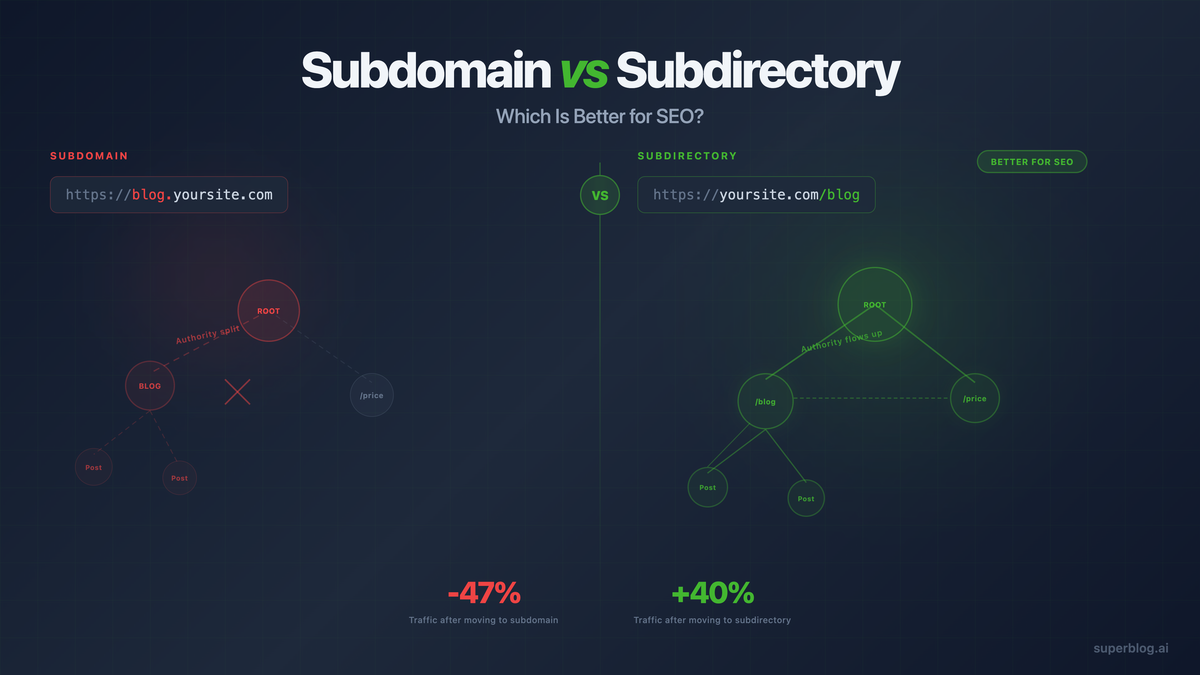
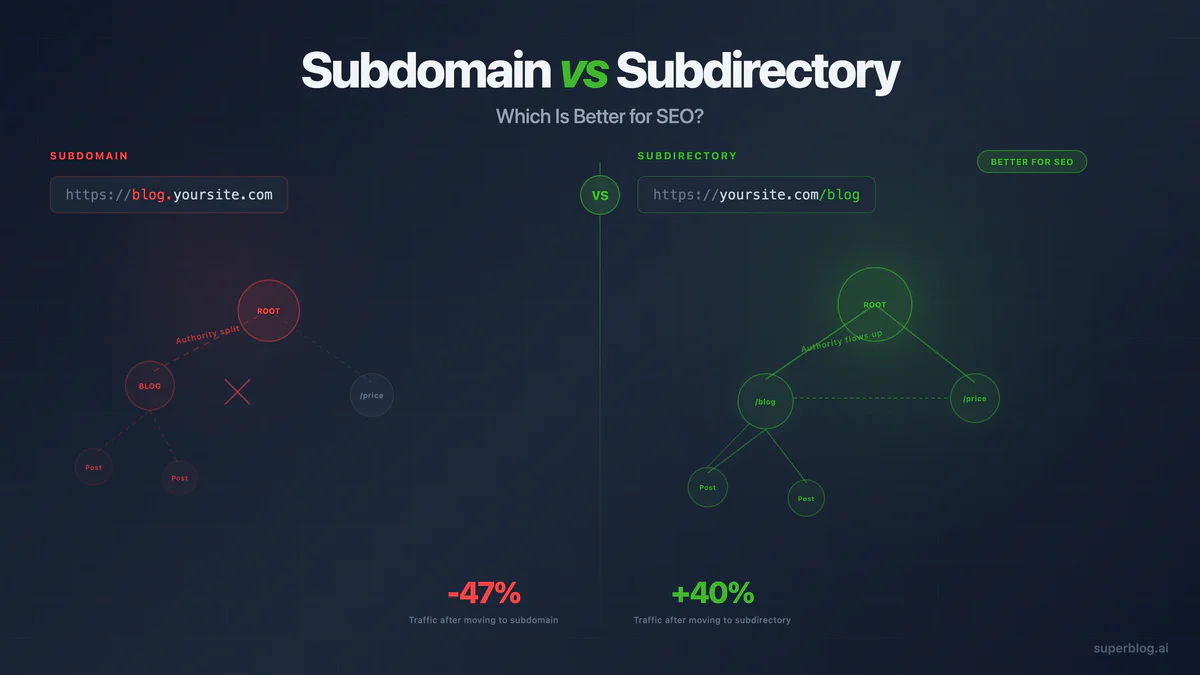
For a business blog whose job is SEO, choose the subdirectory when you can. That means yoursite.com/blog instead of blog.yoursite.com.
This is not a guess and it is not a hard Google rule either. Google's own guidance says subdomains and subdirectories are treated roughly the same. But the subdomain vs subdirectory decision is bigger than what a crawler can technically index. It is an architecture decision, and for a blog whose entire purpose is to grow organic traffic into a business, the architecture that consolidates authority, keeps internal links inside one site, and shares analytics cleanly is the one that compounds faster.
This guide gives you the honest version of both sides: what Google's search team says, what practitioners consistently report after migrations, and exactly when a subdomain is still the right call. Then a decision table, a how-to for routing a blog to a subdirectory on every major stack, and a migration checklist if you need to move.
If you have not added a blog to your site yet, start with how to add a blog to an existing website before deciding where it should live.
What is a subdomain?
A subdomain sits in front of your root domain, separated by a dot.
Examples:
blog.yoursite.comdocs.yoursite.comsupport.yoursite.comshop.yoursite.com
Technically, a subdomain can run on entirely different infrastructure, a different tech stack, even a different hosting provider, with no routing work on your main site. That is exactly why so many blogging tools default to it: point one DNS CNAME record at the vendor and you are live in minutes.
Search engines generally treat a subdomain as its own host. It can rank, it can accumulate its own backlinks, but it does not automatically inherit the authority, trust, or internal link equity your root domain has built up.
What is a subdirectory?
A subdirectory (also called a subfolder) sits after your root domain as a URL path.
Examples:
yoursite.com/blogyoursite.com/resourcesyoursite.com/guidesyoursite.com/case-studies
To a reader, a subdirectory blog is indistinguishable from the rest of your site. To Google, it is the same host. To your analytics, it is one property. To your content team, it is one set of URLs, one crawl budget, one sitemap, one link graph.
That consolidation is the whole argument for subdirectories in content marketing. If the blog exists to make the main domain rank for more queries and convert more of the traffic it earns, keeping it inside the main domain's URL structure is the more direct path to that outcome. For the fuller case on why a blog helps the main site rank at all, see blog for SEO. For the broader framework on structuring URLs once the blog lives there, see our blog URL structure guide.
Google's official position vs what practitioners see
This is the part most articles on this topic get wrong in one direction or the other, so here is the honest version of both sides.
Google's official position: subdomains and subdirectories are essentially equivalent for search. John Mueller, who has fielded this exact question from webmasters for years, has said it plainly: "In general, we see these the same." Google is not secretly penalizing subdomains, and there is no algorithmic tax for choosing one URL structure over the other. If you go looking for an official Google statement that subdirectories rank better, you will not find one, because Google does not make that claim.
What practitioners consistently report: teams that consolidate a blog from a subdomain onto a subdirectory of an established domain frequently see ranking and traffic improvements in the months that follow. This shows up often enough in migration write-ups and SEO case studies that it is treated as conventional wisdom across the industry, even though it contradicts Google's stated equivalence.
Why both things can be true. Google's statement is about crawling and indexing mechanics. It is not a statement about internal linking, crawl budget allocation, historical authority signals, or how cleanly a single domain's link graph reinforces itself over time. When a blog moves from blog.yoursite.com to yoursite.com/blog, several things change at once that have nothing to do with the URL format itself: internal links from the main site to the blog (and back) become same-domain links instead of cross-domain links, the blog inherits whatever trust and backlink history the root domain has already earned, and the whole thing becomes one crawl surface instead of two. Those are real ranking inputs. The subdirectory does not have magic SEO powers. It removes friction from signals Google already uses.
The honest synthesis: if your blog's job is organic growth for a business, put it in a subdirectory, because internal link equity and crawl-context consolidation are real and they compound. If your blog is a genuinely separate product, a different audience, or lives on a stack that cannot be routed to a path, a subdomain is a legitimate and Google-sanctioned choice. Mueller's own nuance backs this up: he has said he tries to keep related content together on one site and reserves subdomains for content that is meaningfully different from the main site. That is the same conclusion, from Google's side of the table. For more on how internal links carry that equity, see our internal linking guide.
Decision table
How subdirectory hosting actually works
The reason so many blogs end up on subdomains is not that subdomains are better. It is that subdirectory routing takes one extra piece of infrastructure: a reverse proxy that forwards requests for /blog/* to wherever the blog is actually hosted, while everything else on your domain keeps working exactly as it does today.
Here is what that looks like on the platforms teams actually use:
Next.js: use rewrites() in next.config.js to forward /blog/:path* to the blog platform's origin. This runs at the framework level, so no separate proxy service is needed. Superblog's setup guide walks through the exact rewrite rule for a Next.js site.
Vercel: if your main site is hosted on Vercel, the same Next.js rewrite works, or you can use a vercel.json rewrite rule for non-Next.js Vercel projects to route /blog requests to the blog platform's edge.
Cloudflare Workers: a lightweight Worker script intercepts requests to /blog/* and proxies them to the blog host, while requests to every other path pass through untouched. This works regardless of what your main site is built with, since Cloudflare sits in front of the request before it reaches your origin.
Nginx: a location /blog { proxy_pass ... } block in your server config forwards matching requests to the blog platform's IP or hostname while the rest of the server block continues serving your existing site.
Webflow, Framer, Shopify, WordPress, and other hosted platforms: these typically cannot run custom server code themselves, so the proxy layer sits in front of them, usually via Cloudflare or a similar edge network the platform supports.
Superblog handles the blog platform side of this (CMS, editor, hosting, CDN, SSL, schemas, sitemaps) and works with any of the routing options above. Subdirectory hosting is included on every plan, works with any tech stack, and does not require a specific vendor like Cloudflare to be in front of your site. In the rare case where your host has no proxy option at all, Superblog also supports subdomain hosting on blog.yoursite.com as a fallback, so you are not blocked either way.
If your main site runs on Next.js, our dedicated guide covers the exact rewrite setup: add a blog to a Next.js site. For the SEO checklist behind any CMS choice, including subdirectory support, see SEO friendly CMS.
Migration checklist: subdomain to subdirectory
If your blog already lives at blog.yoursite.com and you want to move it, do it in this order.
1. Map every current URL. Export every indexed post, category, tag, and author page. Include image URLs and any RSS feed paths still receiving traffic.
2. Build the new subdirectory version first. Do not touch the old blog until the new one is live and verified. Check templates, canonical tags, sitemap generation, and every internal link on the new URLs before switching anything over.
3. Set one-to-one 301 redirects. Every old URL should redirect to its exact new counterpart. Redirecting everything to the blog homepage instead of the matching post is the single most common mistake in this migration, and it throws away the relevance signal Google had already built for that specific URL.
4. Fix canonical tags. Confirm the new subdirectory pages self-canonicalize correctly, and that nothing on the old subdomain is still claiming to be canonical after the cutover.
5. Add the new property in Google Search Console. If you were verified on blog.yoursite.com as a separate property, add yoursite.com (or confirm your existing domain property covers /blog) and submit the updated sitemap.
6. Update every internal link. Search your main site's navigation, footer, old blog posts, and any marketing emails for hardcoded blog.yoursite.com links, and repoint them to the new /blog paths.
7. Watch it for 4 to 8 weeks. Expect a temporary dip in some queries while Google reprocesses the URL changes. Track indexed page count, redirect errors, and top landing pages in Search Console rather than checking rankings daily. Our blog indexing guide covers how to read that report and speed up recrawls if pages stall.
FAQ
Does Google prefer subdomain or subdirectory?
Google does not prefer either one as a ranking factor. John Mueller has said Google's search quality team sees them as essentially the same. What changes between the two options is not Google's treatment of the URL format, it's how cleanly internal links, crawl paths, and accumulated domain authority carry over, and subdirectories make that consolidation easier by default.
Is a subdomain bad for SEO?
No, a subdomain is not bad for SEO on its own, and Google does not penalize it. A subdomain blog can rank well. The practical downside is that it starts as a separate host in Google's eyes, so it does not automatically inherit your root domain's backlink history or internal link equity the way a subdirectory does. For a genuinely separate product or audience, that separation can be the right call.
How do I serve a blog at /blog on Next.js?
Add a rewrite rule in next.config.js that forwards /blog/:path* to your blog platform's hosting origin. The rewrite happens at the framework level, so visitors see yoursite.com/blog in the address bar while the actual content is served from the blog platform behind the scenes. Superblog's Next.js setup guide covers the exact configuration.
Can I run a subdirectory blog if my main site is on Webflow, Framer, or Shopify?
Yes. These platforms don't support custom server-side routing directly, so the proxy step usually runs at the edge, most commonly through Cloudflare in front of your existing site. Superblog's setup guides cover the specific configuration for each platform.
Will moving from a subdomain to a subdirectory hurt my rankings?
Not if the migration is planned. The main risks are redirect mistakes (redirecting everything to the homepage instead of matching URLs) and a temporary reprocessing window while Google recrawls the moved pages. A one-to-one 301 redirect map and a few weeks of monitoring in Search Console cover both risks.
What about a multilingual blog? Subdomain or subdirectory?
Subdirectory, with a locale path per language: yoursite.com/blog/, yoursite.com/es/blog/, yoursite.com/de/blog/, and so on. This is Google's own recommended structure for international content, and it needs hreflang tags, translated metadata, and per-language canonical URLs to work correctly. Superblog generates all of this automatically for subdirectory-hosted multilingual blogs.
Does Superblog require Cloudflare for subdirectory hosting?
No. Subdirectory hosting is included on every Superblog plan and works with any tech stack, Next.js, React, Vue, Webflow, Shopify, WordPress, or a custom server, through whichever reverse proxy option fits your stack. Cloudflare is one option, not a requirement.
Final recommendation
If your blog's job is organic growth, put it on a subdirectory. Google will index it exactly the same either way, but internal links, crawl context, and accumulated domain authority all move faster inside one site than across two. Reserve the subdomain for the cases where the content is genuinely a different product, audience, or technical environment, and even then, know that it's a deliberate trade-off, not a technical requirement.
The URL structure will not do the ranking work by itself. You still need internal links, fast pages, and clean metadata pointing readers from the blog into the rest of the business. But a subdirectory gives that work a shorter path to the domain you're actually trying to grow. If you are still comparing platforms for that blog, see our breakdown of the best blogging platform for business use.
Frequently Asked Questions
Does Google really treat subdomains differently from subdirectories?
How long does it take to see results after migrating from a subdomain to a subdirectory?
Can I use a subdirectory if my main site is on WordPress/Shopify/Webflow?
What if my blog is on the same platform as my main site?
Is a subdomain ever better than a subdirectory for SEO?
Your blog, without the maintenance
Fast pages, automatic SEO, no plugins to patch. Runs on yoursite.com/blog.
Sai Krishna is the Founder and CEO of Superblog. Having built multiple products that scaled to tens of millions of users with only SEO and ASO, Sai Krishna is now building a blogging platform to help others grow organically.
superblog
Superblog is a blazing fast blogging platform for beautiful reading and writing experiences. Superblog takes care of SEO audits and site optimizations automatically.