
Ghost vs WordPress vs Superblog: Which is Best for SEO? (2026)
Comparing three popular blogging platforms on performance, SEO, maintenance, and features. Find out which one is best for your business blog...

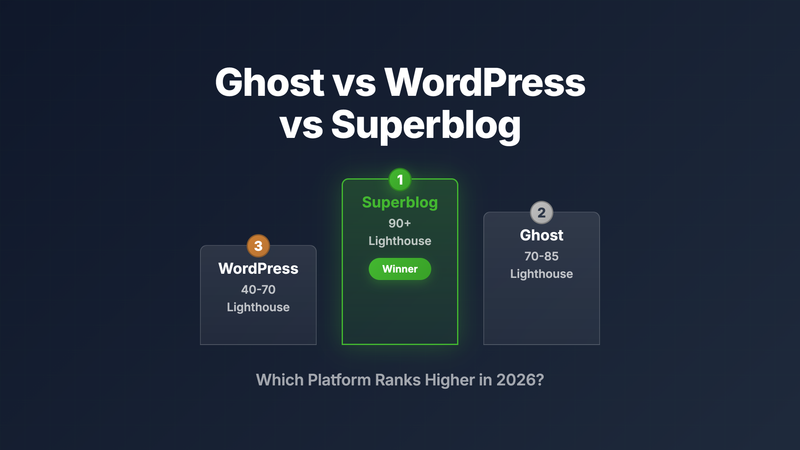
Ghost vs WordPress is one of the most searched comparisons for people starting a blog. But there's a third option that many businesses are switching to: Superblog.
Here's the quick summary:
- WordPress: Maximum flexibility, maximum maintenance
- Ghost: Beautiful publishing, built for paid memberships
- Superblog: Auto SEO and performance, built for business blogs
Quick Comparison Table
| Feature | WordPress | Ghost | Superblog |
|---|---|---|---|
| Lighthouse Score | 40-70 (varies) | 70-85 | 90+ (guaranteed) |
| Setup Time | Hours to days | Minutes to hours | 2 minutes |
| Maintenance | Constant | Moderate | Zero |
| Subdirectory Hosting | Complex | $199/mo | All plans |
| Auto SEO (schemas, sitemaps) | Plugins required | Plugins required | Built-in |
| IndexNow | Plugin | No | Built-in |
| LLMs.txt (AI visibility) | No | No | Built-in |
| Lead Gen Forms | Plugin | Limited | Built-in |
| AI Content Helper | Plugin | No | Built-in |
| REST API | Built-in | Built-in | Built-in (Super plan) |
| MCP Integration | No | No | Built-in (Super plan) |
| Paid Memberships | Plugin | Built-in | No |
| Best For | Complex sites | Publishers | Business blogs |
What's Changed in 2026
The blogging platform landscape evolved significantly this year. Here's what's new:
AI Search Visibility
AI tools like ChatGPT, Claude, and Perplexity now drive significant traffic. Superblog introduced LLMs.txt support, generating a machine-readable file automatically for AI systems. WordPress and Ghost don't offer this natively.
Performance as a Ranking Factor
Google's ranking algorithm puts more weight on Core Web Vitals than ever before. Sites scoring below 75 on Lighthouse Performance are seeing traffic declines. Superblog maintains 90+ scores automatically. WordPress and Ghost require ongoing optimization to stay competitive.
MCP Protocol for AI Agents
The Model Context Protocol lets AI agents interact with your blog directly. Superblog supports MCP on the Super plan, enabling AI-powered workflows. WordPress and Ghost don't support this protocol yet.
IndexNow Adoption
Bing and other search engines expanded IndexNow support. Superblog sends instant notifications when you publish. WordPress requires a plugin. Ghost doesn't support it.
1. Performance
WordPress
WordPress performance depends entirely on your theme, plugins, and hosting. Most WordPress blogs score 40-70 on Lighthouse. Getting to 90+ requires significant optimization work: caching plugins, image optimization, CDN setup, and careful plugin selection.
The more plugins you add, the slower your site gets. It's a constant tradeoff between functionality and speed.
Ghost
Ghost is faster than WordPress out of the box. Typical scores land between 70-85 on Lighthouse. Self-hosted Ghost requires server optimization as traffic grows. Ghost Cloud handles scaling, but you're still responsible for theme performance.
Superblog
Superblog scores 90+ on Lighthouse automatically. Every page, every time. The JAMStack architecture serves pre-built static pages from 200+ CDN edge locations. Traffic spikes don't affect performance. No optimization required.
Speed is a direct ranking factor. Superblog wins this category decisively.
2. SEO
WordPress
WordPress can be optimized for SEO, but it requires work. You need plugins like Yoast or RankMath, a theme that doesn't bloat your HTML, and ongoing monitoring. Getting schemas, sitemaps, and meta tags right requires configuration.
Subdirectory hosting (yoursite.com/blog) is technically possible but complex to set up.
Ghost
Ghost handles basic SEO well. You'll need integrations for advanced features like JSON-LD schemas. The platform doesn't have IndexNow or LLMs.txt support.
Subdirectory hosting costs $199/mo on Ghost Cloud. Self-hosted subdirectory setup is extremely difficult.
Superblog
Superblog automates SEO entirely:
- JSON-LD schemas: Article, FAQ, Organization (auto-generated)
- XML sitemaps: Updated on every publish
- IndexNow: Notifies search engines instantly when you publish
- LLMs.txt: Machine-readable file generated automatically at a standard URL
- Meta tags: Auto-generated with manual override options
- Internal link suggestions: AI-powered recommendations to improve site structure
- Multilingual SEO: 41 languages with auto-translation and hreflang tags
Subdirectory hosting is included on all plans, starting at $29/mo.
3. Target Audience
WordPress
WordPress is a general-purpose CMS. It powers e-commerce sites, portfolios, forums, and yes, blogs. This flexibility comes with complexity. If you just need a blog, WordPress is overkill.
Ghost
Ghost targets publishers who monetize through paid subscriptions and newsletters. The entire product is built around membership paywalls. If you want readers to pay for content, Ghost is purpose-built for that.
Superblog
Superblog targets businesses using content for organic growth. Everything is optimized for SEO, lead generation, and converting readers into customers. No membership features because the goal is different: traffic and leads, not subscription revenue.
4. Features Comparison
Superblog Features (2026)
- 90+ Lighthouse scores (automatic)
- Auto JSON-LD schemas and sitemaps
- IndexNow instant indexing
- LLMs.txt for AI search visibility
- AI content helper (outlines, improvements)
- Internal link suggestions
- Multilingual SEO with auto-translation (41 languages)
- Lead generation forms
- Team collaboration (up to 10 members)
- Import from WordPress, Ghost, Medium, Blogger, Webflow, Wix, and Shopify
- Custom CSS and code injection
- Privacy-friendly analytics
- Zapier and API integrations
- MCP protocol support for AI agents
Ghost Features
- Beautiful editor experience
- Membership and subscription billing
- Newsletter functionality (Mailgun)
- Theme customization
- Open source option
WordPress Features
- Unlimited customization via plugins
- Massive theme ecosystem
- E-commerce capabilities (WooCommerce)
- Community and documentation
- Self-hosted control
5. Ease of Use
WordPress
Steep learning curve. The dashboard is complex, plugin conflicts are common, and getting everything working together takes time. Expect to spend hours or days on initial setup.
Ghost
Moderate learning curve. The editor is clean and intuitive. Self-hosted setup requires technical knowledge. Ghost Cloud simplifies this but limits customization.
Superblog
Minimal learning curve. Create a blog in 2 minutes. Connect your domain. Start writing. The platform handles everything else. No technical knowledge required.
6. Setup and Maintenance
WordPress
WordPress requires constant maintenance:
- Core updates (security patches)
- Plugin updates (compatibility issues)
- Theme updates
- Database optimization
- Security monitoring
- Backup management
Managed WordPress hosting reduces some burden but costs more and still requires plugin management.
Ghost
Self-hosted Ghost needs server management, SSL setup, database backups, and security patches. Ghost Cloud handles infrastructure but you still manage themes, integrations, and performance optimization.
Superblog
Zero maintenance. No updates to install. No plugins to manage. No security patches. No performance optimization. Superblog handles everything. You focus on writing.
7. Migration: How Easy Is It to Switch?
Migrating to Superblog
Migration to Superblog takes 10-15 minutes. The platform pulls content directly from your existing blog.
From WordPress:
- Log in to Superblog
- Go to Dashboard → Data
- Enter your WordPress URL
- Click Import
All posts, images, categories, tags, and publish dates transfer automatically. URL slugs remain identical, preserving your rankings. Imported posts are attributed to the account that ran the import, so multi-author archives need their bylines reassigned afterward.
From Ghost:
- Export content from Ghost (Settings → Labs → Export)
- Upload JSON file to Superblog
- Import completes automatically
What's preserved:
- All content and formatting
- Featured images and inline images
- Categories and tags
- Publish dates
- URL structure (critical for SEO)
Migrating from Superblog
Superblog provides export in WordPress WXR format. Import this file into WordPress or Ghost using their standard import tools.
Migrating from Ghost to WordPress
Ghost provides JSON export. WordPress requires conversion tools or manual migration. Expect several hours of work.
Migrating from WordPress to Ghost
WordPress exports to WXR format. Ghost accepts JSON. You'll need conversion tools and manual cleanup. Budget at least a few hours.
8. AI Features Comparison
WordPress
WordPress doesn't include AI features natively. You'll need third-party plugins:
- Yoast AI: SEO optimization suggestions (paid add-on)
- Jetpack AI: Content generation ($10/mo)
- AI Engine: Custom AI integrations (complex setup)
Each plugin adds weight to your site, slowing performance. No centralized AI experience.
Ghost
Ghost doesn't offer AI features. The platform focuses on publishing and memberships. You'd need to build custom integrations.
Superblog
Superblog includes AI Helper on the Super plan:
Content Outlines: Enter a keyword, get an SEO-optimized title plus structured outline with H2/H3 headings and guidance for each section. Uses your site context for relevant suggestions.
Internal Link Suggestions: AI analyzes your content, finds related posts by category/tags/keywords, and suggests anchor text phrases from your existing content. One-click insertion.
LLMs.txt Generation: Superblog generates a machine-readable llms.txt file automatically at /llms.txt on every deploy.
Usage Limits:
- 15 runs during free trial
- Monthly limits on paid plans
The AI features integrate directly into the editor. No performance impact because processing happens server-side.
9. API & Integrations
WordPress
WordPress REST API is built-in and mature. Every installation exposes endpoints for posts, pages, categories, tags, media, and users.
Integrations:
- Zapier: Thousands of apps
- Native plugins: WooCommerce, Mailchimp, Google Analytics
- Developer ecosystem: Massive
Limitations:
- API performance depends on your hosting
- Complex authentication setup
- No standardized integration management
Ghost
Ghost provides a comprehensive Content API and Admin API. Well-documented and developer-friendly.
Integrations:
- Zapier: Available
- Mailgun: Native email
- Stripe: Native payments
- Limited plugin ecosystem compared to WordPress
Limitations:
- Requires API keys and authentication setup
- No MCP protocol support
- Fewer pre-built integrations
Superblog
Superblog offers a full REST API on the Super plan plus unique integration options.
REST API (Super plan):
- Posts, categories, tags, media, leads
- Bulk operations (publish, assign, redate)
- Import endpoints (WordPress, Ghost, Medium)
- Deployment triggers
- Full CRUD operations
MCP Integration (Super plan): Model Context Protocol support lets AI agents interact with your blog. AI tools can:
- Read your posts and metadata
- Create and update content
- Manage categories and tags
- Trigger deployments
Zapier (Super plan): Connect to 5,000+ apps. Pre-built workflows for:
- New post notifications
- Lead capture to CRM
- Social media auto-posting
Webhooks (Super plan): Real-time HTTP POST notifications for new leads. Send lead data directly to your CRM, email service, or custom endpoint.
Key Difference: Superblog's API is server-first. Static page generation means 90+ Lighthouse scores even with API usage. WordPress and Ghost APIs return data that requires client-side rendering, impacting performance.
10. Pricing
| Platform | Starting Price | Subdirectory Hosting |
|---|---|---|
| WordPress | Free (+ hosting ~$10-30/mo) | Complex setup |
| Ghost Cloud | $9/mo | $199/mo |
| Superblog | $29/mo | Included |
WordPress appears cheapest but factor in premium themes ($50-200), plugins ($100-300/year), and time spent on maintenance.
Ghost's $9/mo starter plan works for subdomains. Subdirectory hosting jumps to $199/mo.
Superblog includes subdirectory hosting, all SEO features, and zero maintenance at $29/mo.
Superblog Plans (2026)
Basic ($29/mo):
- Up to 300 posts
- 1 team member
- 100,000 pageviews/mo
- Auto SEO (schemas, sitemaps, IndexNow, LLMs.txt)
- Subdirectory hosting
- Lead generation forms
Pro ($49/mo, Most Popular):
- Up to 1,000 posts
- 5 team members
- 100,000 pageviews/mo
- Everything in Basic
- Scheduled posts
- Privacy-friendly analytics
- Collaborative review
Super ($99/mo):
- Unlimited posts
- 10 team members
- 100,000 pageviews/mo
- Everything in Pro
- AI Helper
- REST API access
- MCP integration
- Zapier
- Webhooks
- Multilingual SEO
All plans include a 7-day free trial with no credit card required, plus a 30-day money-back guarantee.
FAQ
Which platform is fastest?
Superblog scores 90+ on Lighthouse Performance automatically. Ghost scores 70-85. WordPress typically scores 40-70. Speed directly impacts rankings and conversions.
Which platform is best for SEO?
Superblog automates SEO entirely: JSON-LD schemas, XML sitemaps, IndexNow, LLMs.txt, internal link suggestions, and multilingual support. WordPress requires plugins. Ghost requires manual setup.
Can I use my own domain?
Yes, all three platforms support custom domains. Superblog includes subdirectory hosting (yoursite.com/blog) on all plans. Ghost charges $199/mo for subdirectory hosting. WordPress subdirectory setup is technically complex.
Which platform is easiest to use?
Superblog has the shortest learning curve. Create a blog in 2 minutes, zero maintenance required. Ghost is moderately easy but requires theme management. WordPress has a steep learning curve.
Can I migrate from WordPress to Superblog?
Yes. Migration takes 10-15 minutes. Enter your WordPress URL in Superblog's import tool. All posts, images, categories, tags, and publish dates transfer automatically, and URL slugs remain identical. Imported posts are attributed to the account that ran the import, so multi-author archives need their bylines reassigned afterward.
Do I need technical knowledge?
Superblog requires no technical knowledge. Ghost requires moderate technical knowledge for self-hosting. WordPress requires significant technical knowledge for optimization and maintenance.
Which platform has the best editor?
Ghost's editor is clean and minimal. Superblog uses TipTap v3 with markdown support, slash commands, and keyboard shortcuts. WordPress uses Gutenberg blocks, which many find clunky.
Can I monetize my blog?
Ghost is built for paid memberships and subscriptions. WordPress supports monetization through plugins (WooCommerce, membership plugins). Superblog focuses on lead generation and organic traffic, not paid subscriptions.
Which platform is most secure?
Superblog uses JAMStack architecture (static pages, minimal attack surface). WordPress has the largest attack surface due to plugins and PHP. Ghost is more secure than WordPress but requires security maintenance.
Do these platforms support team collaboration?
Yes. Superblog supports up to 10 team members (Super plan) with role-based permissions. Ghost supports team members on higher plans. WordPress supports unlimited users but requires careful permission management.
Which platform handles traffic spikes best?
Superblog serves static pages from 200+ CDN locations. Traffic spikes don't impact performance. WordPress and Ghost require server scaling during traffic spikes.
Can I use AI to help write content?
Superblog includes AI Helper on the Super plan (outlines, internal link suggestions). WordPress requires third-party plugins. Ghost doesn't offer AI features.
Which platform is best for business blogs?
Superblog is purpose-built for business blogs focused on organic growth. WordPress works for complex sites needing custom functionality. Ghost works for publishers monetizing through subscriptions.
Conclusion: Which Should You Choose?
Choose WordPress if:
- You need maximum customization
- You're building more than just a blog
- You have technical resources for maintenance
- You need specific plugins that don't exist elsewhere
Choose Ghost if:
- You want to monetize through paid subscriptions
- Newsletter revenue is your business model
- You prefer Ghost's editor experience
- You don't need subdirectory hosting
Choose Superblog if:
- You run a business blog focused on organic traffic
- You want SEO automation (schemas, sitemaps, IndexNow, LLMs.txt)
- You need subdirectory hosting without the $199/mo price tag
- You want guaranteed 90+ Lighthouse scores
- You prefer zero maintenance
- You want AI features for content creation and optimization
- You need MCP or API access for AI agent integration
For business blogs focused on ranking and lead generation, Superblog delivers the best combination of performance, SEO automation, and ease of use.
Start your 7-day free trial at superblog.ai and see the difference.
Your blog, without the maintenance
Fast pages, automatic SEO, no plugins to patch. Runs on yoursite.com/blog.
Sai Krishna is the Founder and CEO of Superblog. Having built multiple products that scaled to tens of millions of users with only SEO and ASO, Sai Krishna is now building a blogging platform to help others grow organically.
superblog
Superblog is a blazing fast blogging platform for beautiful reading and writing experiences. Superblog takes care of SEO audits and site optimizations automatically.