
Best WordPress Alternatives for Blog in 2026: 10 Platforms That Won't Slow You Down

WordPress powers 43% of the web. It's also responsible for countless hours lost to plugin conflicts, security patches, and performance optimization that never quite works.
If you're running a business blog for organic growth, you need a platform that ranks, not one that requires a developer on retainer. This guide covers the best WordPress alternatives for blogging in 2026, with honest assessments of what each platform does well and where it falls short. For the broader how-to on running a blog without WordPress at all, see our blog without WordPress guide.
Why Businesses Are Leaving WordPress
The WordPress tax is real. What starts as a "free" platform quickly becomes:
25+ plugins just to match basic SEO and performance standards
Weekly updates that break themes, conflict with plugins, or expose security holes
40-60 Lighthouse scores out of the box (Google wants 90+)
Constant security patches because WordPress is the #1 target for hackers
Hosting costs that scale unpredictably with traffic
For businesses serious about content marketing, the question isn't whether WordPress can do what you need. It's whether you want to spend your time configuring it instead of writing.
The 10 Best WordPress Alternatives for Business Blogs
1. Superblog
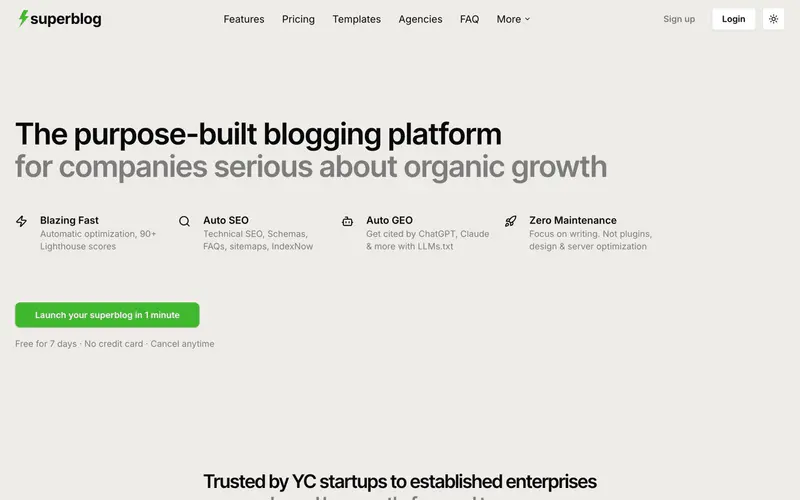
Best for: Businesses that want SEO and performance handled automatically
Superblog is a purpose-built blogging platform for companies serious about organic growth. Unlike WordPress (which requires plugins for everything) or website builders (which treat blogs as an afterthought), Superblog delivers the full stack: CMS, frontend, hosting, SEO engine, and performance optimization.
What sets it apart:
90+ Lighthouse score on every page. No optimization needed. JAMStack architecture means pages are pre-built and served from a global CDN.
Auto SEO. JSON-LD schemas (Article, FAQ, and Organization), XML sitemaps, IndexNow protocol, and LLMs.txt for AI search visibility. All automatic.
Subdirectory hosting. Run your blog at yoursite.com/blog (the SEO-optimal approach) without reverse proxy headaches.
Zero maintenance. No plugins to update, no security patches, no servers to manage.
Internal link suggestions. The editor analyzes your content and suggests related posts to link, with anchor text recommendations.
Pricing: $29/mo (Basic), $49/mo (Pro), $99/mo (Super with AI features)
Limitations: Not a full website builder. Designed specifically for blogs, not landing pages or e-commerce.
Best for: SaaS companies, startups, agencies, and any business using content marketing for organic acquisition.
If you want a deeper side-by-side against other platforms in this space, see our roundup of the best Superblog alternatives.
2. Ghost

Best for: Publishers focused on memberships and newsletters
Ghost started as a WordPress alternative for bloggers who wanted a cleaner writing experience. It's evolved into a powerful platform for creators monetizing through paid memberships.
Strengths:
Clean, distraction-free editor
Built-in membership and subscription billing
Strong newsletter integration
Good performance out of the box
Self-hosting option available
Limitations:
Subdirectory hosting costs $199/mo on Ghost(Pro). Most businesses end up on a subdomain (blog.yoursite.com), which dilutes SEO authority.
No built-in lead generation forms (you'll need third-party tools)
Self-hosting requires DevOps expertise
No LLMs.txt or IndexNow support
Pricing: $16-$199/mo (Ghost Pro) or free self-hosted
Best for: Independent creators and publishers monetizing through subscriptions, not businesses driving leads through SEO.
3. Webflow

Best for: Design-focused teams who need a complete website, not just a blog
Webflow is a visual website builder that produces clean, professional sites. Its blog functionality exists, but it's clearly secondary to the page-building tools.
Strengths:
Stunning visual design capabilities
No-code flexibility for landing pages
Decent SEO controls
Good performance when optimized
Limitations:
SEO ceiling below purpose-built blog platforms. No automatic schema markup, no IndexNow protocol, and performance work is manual.
The blog editor is clunky compared to purpose-built platforms
Designed for landing pages first, content second
Requires Webflow expertise to maintain
Pricing: $14-$212/mo depending on plan and CMS needs
Best for: Teams that need both a marketing site and a blog, and have design resources to maintain it.
4. Squarespace

Best for: Small businesses wanting an all-in-one solution with minimal setup
Squarespace offers polished templates and an integrated blogging experience. It's the "it just works" option for businesses that don't want to think about their website.
Strengths:
Beautiful, consistent templates
Simple setup process
Reliable hosting included
Decent mobile experience
Limitations:
Limited SEO customization compared to purpose-built blog platforms
No subdirectory hosting (blog lives on subdomain or separate pages)
Template constraints limit flexibility
Performance varies by template and content
Pricing: $16-$52/mo
Best for: Local businesses, consultants, and portfolios where the blog is secondary to the main site.
5. Wix

Best for: Budget-conscious businesses that need a simple web presence
Wix is the most accessible website builder on the market. Drag, drop, publish. The blog functionality is basic but functional.
Strengths:
Extremely easy to use
Large template library
Affordable pricing
App market for added functionality
Limitations:
SEO limitations are well-documented (though improved in recent years)
Performance can suffer with heavy content
Limited export options if you want to migrate later
Blog features are basic compared to dedicated platforms
Pricing: $17-$159/mo
Best for: Small businesses testing content marketing before investing in a dedicated solution.
6. HubSpot CMS

Best for: Companies already deep in the HubSpot ecosystem
HubSpot's CMS integrates directly with their marketing, sales, and CRM tools. If you're already paying for HubSpot Marketing Hub, the CMS makes sense.
Strengths:
Tight integration with HubSpot's marketing tools
Built-in analytics and lead tracking
Smart content personalization
Strong enterprise support
Limitations:
Expensive. CMS Hub starts at $25/mo but scales to $400+/mo for meaningful features.
Locked into HubSpot's ecosystem
Overkill if you just need a blog
Requires HubSpot expertise to use effectively
Pricing: $25-$1,200/mo
Best for: Mid-market and enterprise companies standardized on HubSpot.
7. Contentful (Headless CMS)

Best for: Developer teams building custom blog frontends
Contentful is a headless CMS: it stores and delivers your content via API, but you build your own frontend. Total flexibility, total responsibility.
Strengths:
Complete control over frontend design and performance
Excellent content modeling
Strong API
Scales well for large content operations
Limitations:
Requires developers. No blog exists until someone builds it.
No built-in SEO optimization
No hosting, CDN, or SSL included
Expensive at scale ($300+/mo for team features)
Pricing: Free tier available, $300+/mo for teams
Best for: Companies with dedicated development resources who need a custom content architecture.
8. Medium

Best for: Writers who want reach over ownership
Medium provides instant access to a large, engaged audience. You can start writing today with zero setup.
Strengths:
Built-in audience and distribution
Clean reading experience
Zero technical setup
Free to publish
Limitations:
You don't own your audience. Medium actively converts YOUR readers into THEIR paying members.
No subdirectory or custom domain hosting (only Medium subdomain)
No lead generation forms
Limited SEO control
Content can be paywalled without your consent
Pricing: Free to publish, $5/mo for a Medium subscription
Best for: Individual thought leaders building personal brands, not businesses driving leads.
9. Notion + Super.so

Best for: Teams already using Notion who want a quick blog solution
Super.so turns Notion pages into websites. It's a clever hack that works surprisingly well for simple blogs.
Strengths:
Use Notion as your CMS (familiar interface)
Quick setup
Good performance through their CDN
Affordable
Limitations:
Limited SEO customization
Dependent on third-party service (Super.so)
No advanced blogging features (scheduling, analytics, lead gen)
Design options are limited
Pricing: $16/mo (Super.so) + Notion subscription
Best for: Notion-native teams who want a simple blog without learning a new tool.
10. Jekyll / Hugo (Static Site Generators)
Best for: Developers who want maximum control and minimal cost
Jekyll and Hugo are open-source static site generators. You write in Markdown, run a build command, and deploy HTML files.
Strengths:
Blazing fast (static HTML)
Free and open source
Complete control over everything
Can be hosted for free (GitHub Pages, Netlify, Vercel)
Limitations:
Developer required. No GUI, no visual editor.
No built-in CMS for non-technical team members
SEO optimization is manual
Maintenance falls on your team
Pricing: Free (hosting may cost extra)
Best for: Developer blogs, documentation sites, and technical teams comfortable with Git workflows.
WordPress Alternatives Comparison Table
How to Choose the Right WordPress Alternative
Choose Superblog if: You're a business using content marketing for organic growth and want SEO, performance, and hosting handled automatically. No plugins, no maintenance, no compromises.
Choose Ghost if: You're building a membership-based publication and don't mind managing your own infrastructure or paying premium prices for subdirectory hosting.
Choose Webflow if: You need a full marketing website with design flexibility and have the resources to build and maintain it.
Choose Squarespace if: You want a simple, beautiful website where the blog is one component among many.
Choose a headless CMS if: You have developers who want complete control and are willing to build the frontend themselves.
Stay on WordPress if: You have a dedicated WordPress developer, need specific plugins that don't exist elsewhere, or have a complex existing setup that would be painful to migrate.
Migrating from WordPress
Most platforms on this list support WordPress imports. Superblog imports posts, pages, images, categories, and tags directly from your WordPress export file. The process takes minutes, not hours.
Before migrating:
Export your WordPress content (Tools > Export in WordPress admin)
Set up redirects from old URLs to new ones
Update any hardcoded internal links
Verify your sitemap is submitted to Google Search Console
The Bottom Line
WordPress is powerful, but that power comes with complexity most businesses don't need. If you're spending more time managing your blog platform than writing content, it's time to switch.
For businesses serious about organic growth, Superblog delivers what WordPress promises but rarely achieves: fast pages, automatic SEO, and zero maintenance. Your content ranks. You focus on writing.
Ready to stop managing WordPress?Start your free Superblog trial and migrate your content in minutes.
Your blog, without the maintenance
Fast pages, automatic SEO, no plugins to patch. Runs on yoursite.com/blog.
Sai Krishna is the Founder and CEO of Superblog. Having built multiple products that scaled to tens of millions of users with only SEO and ASO, Sai Krishna is now building a blogging platform to help others grow organically.
superblog
Superblog is a blazing fast blogging platform for beautiful reading and writing experiences. Superblog takes care of SEO audits and site optimizations automatically.