
Subdomain vs Subdirectory for SEO: Where Should Your Blog Live in 2026?
Compare subdomains and subdirectories for blog SEO, authority, analytics, migration risk, and setup. Learn when to use yoursite.com/blog...

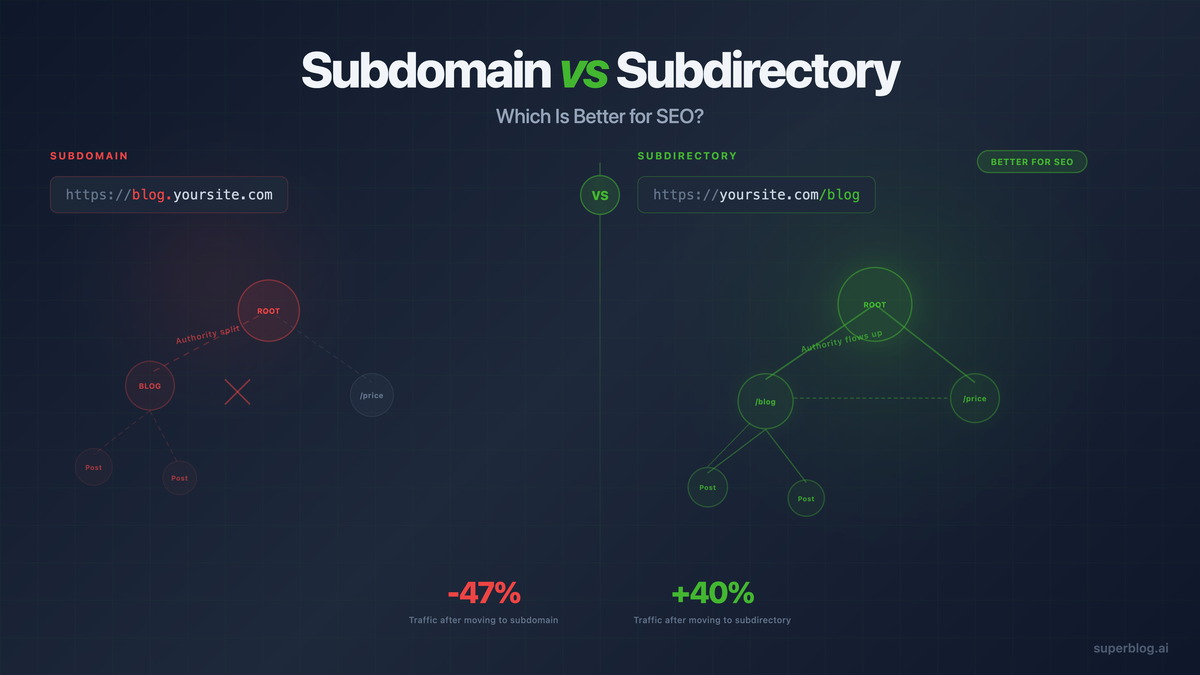
For a business blog, use a subdirectory (yoursite.com/blog), because it keeps every post, link and report on the same site as the pages you want to rank and sell.
A subdomain (blog.yoursite.com) is still the right call when the blog is meant to stand on its own: a separate product, a different audience, or a site that cannot route a path to another service. Google says its web search "is fine with using either subdomains or subdirectories", so a subdomain is not penalized. It keeps the blog apart from the main site, which only helps when that separation is what you want.
Below: what Google has said, what the choice changes for a blog, what the setup costs, a decision table and a migration checklist. If you have not added a blog to your site yet, start with how to add a blog to an existing website.
What is a subdomain?
A subdomain sits in front of your root domain, separated by a dot.
Examples:
blog.yoursite.comdocs.yoursite.comsupport.yoursite.comshop.yoursite.com
A subdomain can run on different infrastructure, a different tech stack, even a different hosting provider, with no routing work on your main site. That is why so many blogging tools default to it: point one DNS CNAME record at the vendor and you are live in minutes.
Google treats a subdomain as a separate host to crawl. In its own video on the question, Google says it has to "learn how to crawl them separately," which it calls "a formality for the first few days" (Google Search Central, 2017). A subdomain can rank and earn its own backlinks. Links between it and your main site cross from one host to another.
What is a subdirectory?
A subdirectory (also called a subfolder) sits after your root domain as a URL path.
Examples:
yoursite.com/blogyoursite.com/resourcesyoursite.com/guidesyoursite.com/case-studies
To a reader, a subdirectory blog is part of the rest of your site. To Google, it is the same host. To your analytics, it is one property. To your content team, it is one set of URLs, one sitemap index and one link graph.
That consolidation is the whole argument for subdirectories in content marketing. If the blog exists to make the main domain rank for more queries and convert more of the traffic it earns, keeping it inside the main domain's URL structure is the more direct path to that outcome. For the fuller case on why a blog helps the main site rank at all, see blog for SEO. For the broader framework on structuring URLs once the blog lives there, see our blog URL structure guide.
Google's official position vs what practitioners see
Here is what Google has said on the record, and where practitioners differ.
Google's official position: either structure works. In the 2017 SEO Snippets video on this exact question, John Mueller says "Google web search is fine with using either subdomains or subdirectories." He adds that keeping sections in subdirectories "helps us with crawling since we understand that everything's on the same server," and that a URL structure change "tends to take a bit of time to settle down," so pick a setup you can keep. Google has not said that either structure ranks better.
Mueller's later nuance: in a November 2022 post, Mueller framed the choice around intent: "Is it content that's meant to be tightly connected to the main site? then put it on the main site. If you want the content to stand on its own, then a subdomain is a good match." Later in the same thread, answering a question about where to put new content, he added: "I think it will affect rankings of the new content", and that the results differ depending on whether you want the content separated out or seen as part of the main site.
What practitioners report: many SEOs disagree with the neutral reading. When the video came out, Rand Fishkin replied that the answer "should be 'subfolders are almost always better for rankings'" (Search Engine Roundtable, which also carries the full video transcript). Teams that move a blog from a subdomain into a subdirectory often report ranking gains afterward, even though Google describes both structures as acceptable.
Why both can be true. Google's statement is about whether it can crawl and index either structure. It is not a statement that the two setups produce the same link graph. When a blog moves from blog.yoursite.com to yoursite.com/blog, several things change at once: links between the blog and the product pages become links within one site, the blog moves onto the host that already holds the domain's backlinks, and Google crawls one host instead of two. The subdirectory does not have special SEO powers. It removes friction from signals Google already uses.
The synthesis: if your blog's job is organic growth for a business, the blog is content "tightly connected to the main site," so put it in a subdirectory. If the blog is a separate product, a different audience, or lives on a stack that cannot route a path, a subdomain is a legitimate choice that Google supports.
How the choice affects a blog's rankings, links and authority
A business blog has one job beyond ranking its own posts: send readers and link value to product, pricing and signup pages. That is where the structure matters most.
Rankings of new posts. A new post in /blog launches on a host Google already crawls and already has backlinks. A new post on a fresh subdomain launches on a host Google still has to learn. Mueller's own view, quoted above, is that where you put new content will affect how it ranks.
Internal links. Google says it "uses links as a signal when determining the relevancy of pages and to find new pages to crawl", and that "every page you care about should have a link from at least one other page on your site." In a subdirectory, every link from a post to a feature page, and from the homepage to a post, is a link inside one site. On a subdomain, the same links cross from one host to another, and the blog and the product pages build separate link graphs. Our internal linking guide covers how to plan those links.
Authority. Backlinks to a post in /blog point at the same domain as your pricing page. Backlinks to blog.yoursite.com point at a host that Google crawls separately. Over dozens or hundreds of posts, that difference compounds.
Reporting and crawl files. A Search Console Domain property "aggregates data for all subdomains, protocols, and subpaths", so you can report on either setup in one place. robots.txt is different: Google says "a robots.txt on a subdomain is only valid for that subdomain", and the file must sit at the root of the host. A subdomain blog needs its own robots.txt. A subdirectory blog lives under your main site's robots.txt, so add the blog's sitemap there (Google allows a sitemap URL on another host).
What a subdirectory blog costs to set up
A subdirectory blog needs one routing rule on your main domain: requests for /blog and /blog/* go to wherever the blog is hosted, and the address bar keeps showing your domain. That rule is a reverse proxy. A subdomain needs one DNS record instead.
The exact rule for each stack, including the prefix stripping, Host header and trailing slash details, is in our subdirectory blog hosting guide. If your main site runs on Next.js, see also add a blog to a Next.js site.
Decision table
How to serve your blog at /blog
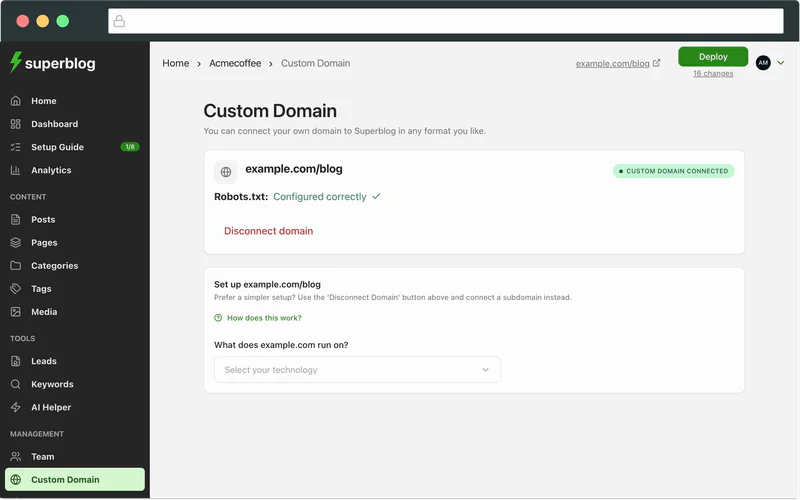
Many blogs end up on subdomains because the blog tool only offers a CNAME, not because a subdomain is better. To get /blog, you need a blog platform that can be served behind your domain, plus the routing rule above.
Superblog fits growing businesses that want the blog at yoursite.com/blog without running a CMS themselves. It hosts the blog and the editor, runs the SEO setup (schemas, sitemaps, IndexNow, canonical URLs) and serves every page with SSL over a CDN. Your site serves it at yoursite.com/blog through a standard reverse proxy on any stack: a Cloudflare Worker, an nginx or Caddy rule, or your platform's rewrites in Next.js, Vercel or Netlify. Subdirectory hosting is included on every paid plan, starting with Pro at $49 a month.
Migration checklist: subdomain to subdirectory
If your blog already lives at blog.yoursite.com and you want to move it, do it in this order. Google's site move guide covers each step in more depth.
1. Map every current URL. Export every indexed post, category, tag, and author page. Include image URLs and any RSS feed paths still receiving traffic. Google says "it's important to map your old site's URLs to the URLs for the new site."
2. Build the new subdirectory version first. Do not touch the old blog until the new one is live and verified. Check templates, canonical tags, sitemap generation, and every internal link on the new URLs before switching anything over.
3. Set one-to-one permanent redirects. Every old URL should 301 to its exact new counterpart. Google recommends "server side permanent redirects if technically possible" and warns: "Don't redirect many old URLs to one irrelevant single URL destination, such as the home page of the new site." It may treat those as soft 404s, which throws away the relevance each post had earned.
4. Fix canonical tags. Confirm the new subdirectory pages self-canonicalize, and that nothing on the old subdomain still claims to be canonical after the cutover.
5. Check Search Console. A Domain property for yoursite.com already covers both blog.yoursite.com and /blog. If you only had a URL-prefix property for the subdomain, add one for the main site. Google says to "verify all variants of both the old and new sites" and to "submit the new sitemap in Search Console."
6. Update every internal link. Search your main site's navigation, footer, old blog posts, and any marketing emails for hardcoded blog.yoursite.com links, and repoint them to the new /blog paths.
7. Watch it for several weeks. Google says to "expect temporary fluctuation in site ranking during the move," and that "a small to medium-sized website can take a few weeks for most pages to move." Track indexed page count, redirect errors, and top landing pages in Search Console rather than checking rankings daily. Our blog indexing guide covers how to read that report and what to do if pages stall.
FAQ
Does Google prefer subdomain or subdirectory?
No. Google says its web search is fine with either. Mueller's advice is to put content that is tightly connected to the main site on the main site, and to use a subdomain for content that should stand on its own. A business blog is tightly connected to the main site, so a subdirectory fits it.
Is a subdomain bad for SEO?
No, and Google does not penalize it. A subdomain blog can rank well. The practical downside is that Google crawls it as a separate host, and every link between the blog and your product pages crosses from one host to another. For a separate product or audience, that separation can be the right call.
How do I serve a blog at /blog on Next.js?
Add a rewrite rule in next.config.js that forwards /blog/:path* to your blog platform's origin. The rewrite happens at the framework level, so visitors see yoursite.com/blog in the address bar while the content is served from the blog platform. The subdirectory blog hosting guide has the exact configuration.
Can I run a subdirectory blog if my main site is on Webflow, Framer, or Shopify?
Usually, yes. These platforms do not let you write your own proxy rules, so the proxy runs in front of the site, often through a Cloudflare Worker. Cloudflare documents proxying Webflow and Shopify domains through your own Cloudflare zone, with Workers supported (on Shopify, not on the /checkout path). On Framer, the docs require Pro with the Advanced Hosting add-on ($200 per month on top of Pro) or an Enterprise plan for reverse proxying, per Framer's help article on proxying with Cloudflare and pricing page (checked November 23, 2026).
Will moving from a subdomain to a subdirectory hurt my rankings?
Not if the migration is planned. Google expects temporary ranking fluctuation during any URL move. The main risks are redirect mistakes (sending every old URL to the homepage instead of its matching page) and the reprocessing window while Google recrawls the moved pages. A one-to-one 301 redirect map and a few weeks of monitoring in Search Console cover both.
What about a multilingual blog? Subdomain or subdirectory?
Use a subdirectory with a locale path per language: yoursite.com/blog/, yoursite.com/es/blog/, yoursite.com/de/blog/, and so on. Google lists subdirectories as a supported structure for multilingual sites and notes they are low maintenance because everything stays on one host. Each language version still needs hreflang tags, translated metadata, and its own canonical URL.
Do I need Cloudflare to run a blog at /blog?
No. Any reverse proxy works: a rewrite in Next.js, Vercel or Netlify, an nginx or Caddy rule on your own server, or a Cloudflare Worker. Cloudflare is one option, not a requirement.
Final recommendation
If your blog's job is organic growth, put it on a subdirectory. Google will crawl and index either structure, but internal links, crawling, and backlinks all work in one place inside one site instead of being split across two. Use a subdomain when the content is a different product, audience, or technical environment, and treat it as a deliberate trade-off.
The URL structure will not do the ranking work by itself. You still need internal links, fast pages, and clean metadata pointing readers from the blog into the rest of the business. A subdirectory gives that work a shorter path to the domain you are trying to grow. If you are still choosing a platform for that blog, see our blogging platform comparison for business use.
Frequently Asked Questions
Does Google really treat subdomains differently from subdirectories?
How long does it take to see results after migrating from a subdomain to a subdirectory?
Can I use a subdirectory if my main site is on WordPress/Shopify/Webflow?
What if my blog is on the same platform as my main site?
Is a subdomain ever better than a subdirectory for SEO?
Your blog, without the maintenance
Fast pages, automatic SEO, no plugins to patch. Runs on yoursite.com/blog.
Sai Krishna is the Founder and CEO of Superblog. Having built multiple products that scaled to tens of millions of users with only SEO and ASO, Sai Krishna is now building a blogging platform to help others grow organically.
superblog
Superblog is a blazing fast blogging platform for beautiful reading and writing experiences. Superblog takes care of SEO audits and site optimizations automatically.