Dashboard > Settings

Settings control how your whole blog looks and behaves. They are split into tabs. Type in Find a setting at the top to jump to any setting by name.

Changes are saved as you make them, and go live on your next deploy.
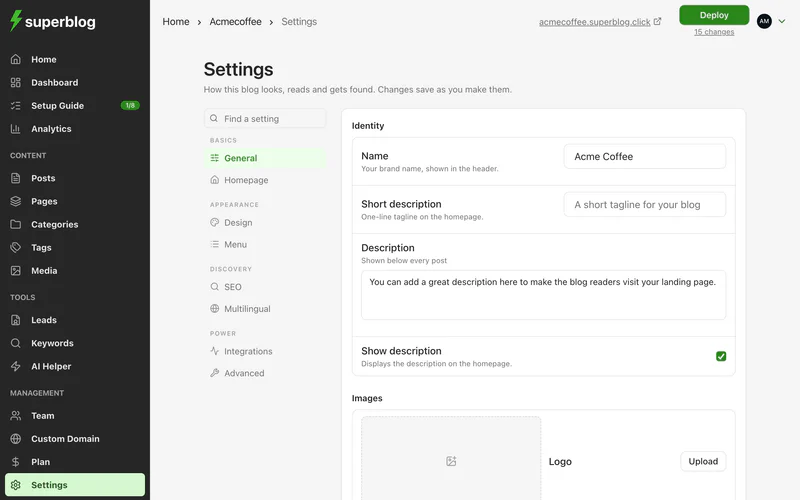
The Settings page on the General tab, with the list of tabs on the left

General

  1. Name: your brand name, shown in the header.
  2. Short description: a one-line tagline on the homepage, also shown in the browser tab.
  3. Description: shown below every post. Tick Show description to also show it on the homepage.
  4. Logo, favicon and footer logo. See Colours, fonts and logo.
  5. Blog interface language: the language of the labels readers see, such as search, reading time and dates.
  6. Setup guide: click Reopen to go through the setup guide again.

Design

Your template, style, colours and fonts, and the reading progress bar on posts. See Choose a template and Colours, fonts and logo.

Homepage

The header section at the top of the homepage, which categories stay off it, the search bar and the number of posts per page. See Homepage.

Your header and footer links, menu alignment, a fixed menu, a search bar in the header, and your own header or footer HTML. See Menu, Footer and Custom header and footer HTML.

SEO

SettingWhat it does
Meta title and meta descriptionWhat search engines show for your homepage.
OG imageThe image shown when your homepage is shared on social media, 1200 × 630 pixels.
Hide trailing slashWrites your URLs without a slash at the end in canonical tags and the sitemap.
Do not index pagination, category, tag or author pagesKeeps those pages out of search results.
Custom robots.txtYour own robots.txt. It applies once a custom domain is connected.
Generate llms.txtPublishes your posts as markdown for AI tools.
Block ChatGPT crawlingAdds a robots.txt rule that blocks OpenAI's crawler.

See SEO settings.

Multilingual

Publish your blog in more than one language. See Multilingual blogs.

Integrations

Google Analytics, AdSense, Disqus, reader comments, MCP, and your own scripts and CSS. See Integrations and Add custom CSS.

Advanced

SettingWhat it does
Show breadcrumbsShows a breadcrumb trail on posts, pages and archive pages. Breadcrumb data for search engines is added either way.
Show table of contentsAdds a table of contents to every post. Tick Include H3 subheadings to list those too.
Hide author namesHides authors on every post.
Hide post datesHides dates on every post.
Hide sharing iconsHides sharing icons on every post. Each post can override this.
Enable text-to-speech playerAdds a "Listen to this article" player to every post. On the BUSINESS plan. See text-to-speech.
Privacy policy URLLinked from the cookie consent popup.
Logo target URLWhere readers go when they click your logo.
Send email on deployEmails you when a deploy finishes. Only for deploys that take longer than 15 seconds.
Superblog addressYour blog's superblog.click address. Hidden once a custom domain is connected.
RedirectsSend old URLs to new ones. See Redirects.
Custom homepageServe your own static site as the homepage. See Custom homepage.

If a setting has no effect

If your blog uses a custom template, some settings show a note that the template decides that part itself. The setting is kept, but the template does not use it.