Colours, fonts and logo
Colours
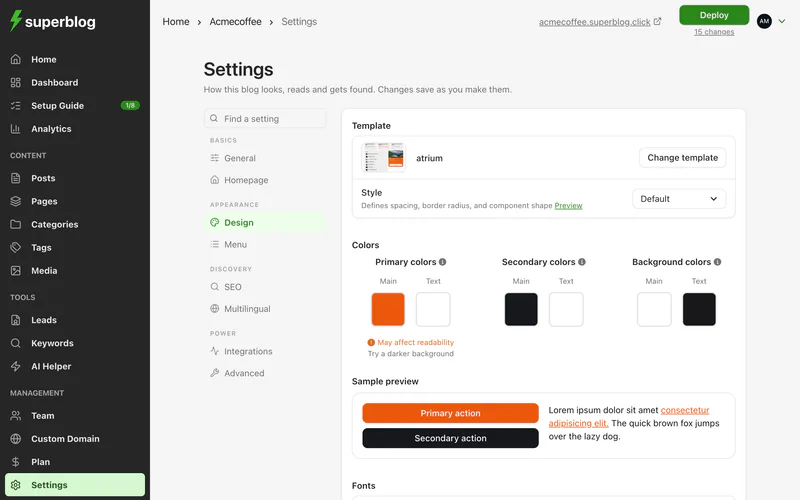
Dashboard > Settings > Design > Customize colors
Your blog uses three pairs of colours. Each pair is a main colour and the text colour shown on top of it.
The sample preview updates as you pick. If a pair is hard to read, Superblog warns you and suggests a lighter or darker shade. Readable text needs a contrast ratio of at least 4.5:1.
Click Reset colors to go back to your template's colours.
Fonts
Dashboard > Settings > Design
Pick each from the Google Fonts list. Font size sets Small, Medium (the default) or Large across the whole blog. For proven pairings, click View examples under Font pairings.
To use a font that is not on Google Fonts, load it with custom CSS.
Style
Style sets spacing, corner rounding and the shape of components: Default, Soft, Rounded or Sharp. Click Preview to compare them.
Logo, favicon and sharing image
The logo, favicon and footer logo are in Settings > General. The OG image is in Settings > SEO, under Social preview.
If your logo or OG image is a different shape, a cropper opens so you can choose which part to use.
Remove the Superblog branding
Blogs on the current PRO, SUPER and BUSINESS plans show no Superblog branding. Some older FREE and BASIC plans, which are no longer sold, show a small Powered by superblog line in the footer. It is not a setting: to remove it, change to a current plan.