Use your own homepage
Dashboard > Settings > Advanced > Custom homepage
A custom homepage lets one Superblog serve your whole website. You upload your own static site, and it becomes your homepage. Your blog, with its posts, pages, categories and tags, moves to a path you choose, such as /blog.
Use it when you want a marketing site and a blog on the same domain, without hosting the site somewhere else.
Upload your site
- Build your site as static files, with an
index.htmlat the top level. - Put the files in a
.zipfile, up to 50 MB. - Go to Settings > Advanced and tick Use a custom homepage.
- Drag the zip onto the upload area, or click it to browse.
- Enter the Blog path, for example
blog, and save. - Deploy.
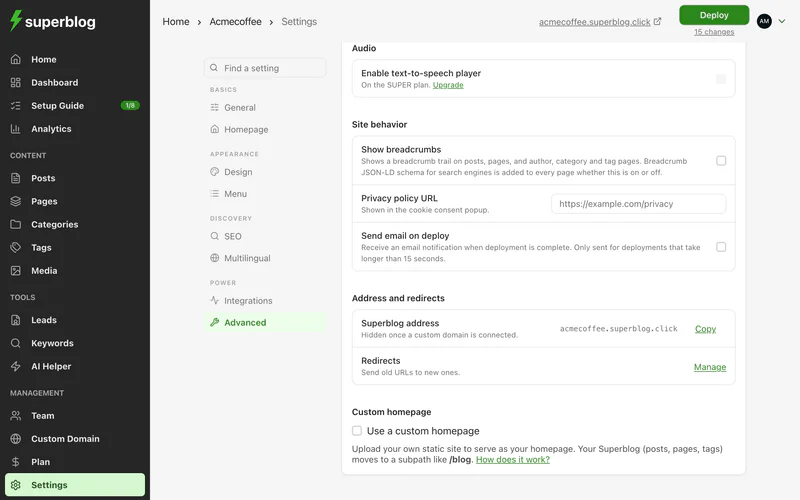
After the deploy:
- Your
index.htmlis your domain's homepage. - Every other file in the zip is served at its own path, for example
pricing.htmlorcontact/index.html. - Your whole blog is served at the blog path, for example
yourdomain.com/blog.
You can include your own sitemap.xml in the zip. Superblog's sitemap and robots.txt are handled for you.
Update your site
Upload a new zip. It replaces the current one on your next deploy.
Go back to an earlier version
Your last 10 uploads are kept.
- Click History.
- Click Restore next to the version you want.
- Deploy.
Change the blog path
Click Change path, enter the new path, and deploy. This changes the address of every blog page, including every post, which can affect your search rankings. Add redirects from the old addresses if other sites link to them.
Turn it off
Click Turn off custom homepage and deploy. Your uploaded zip is deleted, and your blog moves from its path back to your domain's root. Every blog URL changes, which can affect your search rankings.