Add custom CSS and scripts
Dashboard > Settings > Integrations > Custom code
The Custom code section has three fields. Each is checked when you click Validate & Save, and goes live on your next deploy.
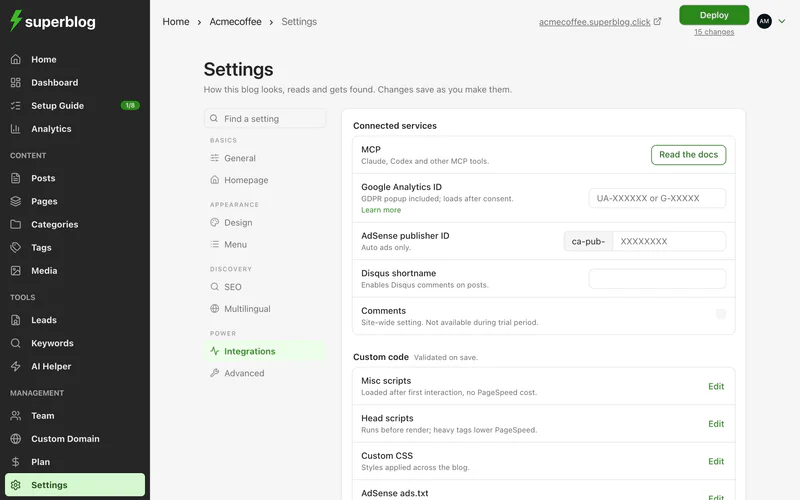
Custom CSS
Styles applied across your whole blog. Use it to adjust anything the design settings do not cover.
For example, to centre post titles:
.post-title {
  text-align: center;
}
To find the class of an element, right-click it on your blog and choose Inspect.
If your blog uses a custom template with its own CSS, put your styles in the template instead.
Misc scripts
For analytics and marketing tags such as Google Tag Manager, Meta Pixel, Microsoft Clarity, HubSpot and chat widgets.
These scripts load after the reader's first interaction with the page, such as a scroll or a tap. That keeps them from lowering your PageSpeed scores. Use this field for almost every script.
Head scripts
Scripts that must run before the page appears, placed in the page's <head>. Use it only for cookie consent or anti-flicker snippets.
Heavy scripts here lower your PageSpeed scores. Use Misc scripts instead whenever you can.
Google Analytics
You do not need a script for Google Analytics. Enter your ID in the Google Analytics ID field on the same tab. See Google Analytics.
Scripts for one post
To run a script on a single post only, use Custom JS in the post's settings. See Change a post's settings.