Preview before you deploy
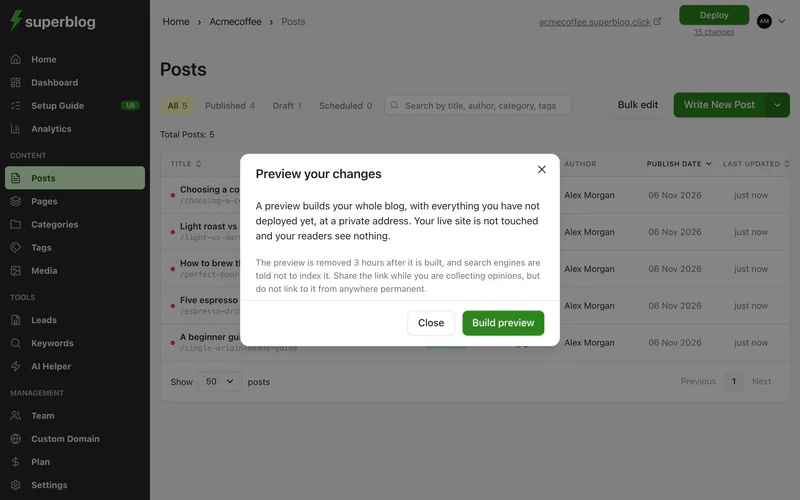
A preview builds your whole blog, including every change you have not deployed yet, at a private address. Your live blog does not change, and your readers see nothing.
Use a preview to check a change on the real blog before it goes live, for example a new template, a batch of posts, or a menu change.
Build a preview
- Click the line under the Deploy button at the top right of the dashboard.
- Click Preview.
- Click Build preview.
The build takes about as long as a deploy. While it runs, Superblog shows how long it usually takes for your blog. When it is ready, click Open preview, or Copy link to share it.
Come back to the same preview
The link is kept for you. You can close the window, move around the dashboard, refresh, or switch devices. When you open Preview again, it shows the same link and when it was built.
After you make more changes, click Rebuild so the preview includes them.
The preview link is private and temporary
- It is private. The address contains a long random string made for that build, so nobody can guess it. Search engines are told not to index it.
- It is removed 3 hours after it is built. Share it with your team while you collect opinions, but do not link to it from anywhere permanent.
If the link has expired, build a new one. A preview is always built from your current content, so nothing is lost.
Previews do not use up your deploys
Previews are counted separately from deploys, so previewing never stops you from publishing. If you build a lot of previews in one day, you may be asked to wait before building another.
Deploy when you are happy
A preview never publishes anything. When it looks right, deploy to make the same changes live.
From the command line
With the Superblog CLI, run superblog preview to build a preview of your blog, or superblog template preview to preview a template you are building. Both print the preview link.