Finish setting up your blog
A new blog is live as soon as you create it, but parts of it still show Superblog's sample content. The setup guide walks you through replacing each part with your own.
Open the setup guide
- Open your blog's dashboard.
- Click Setup guide in the sidebar.
The guide also opens on its own when you click Finish setting up right after creating a blog.
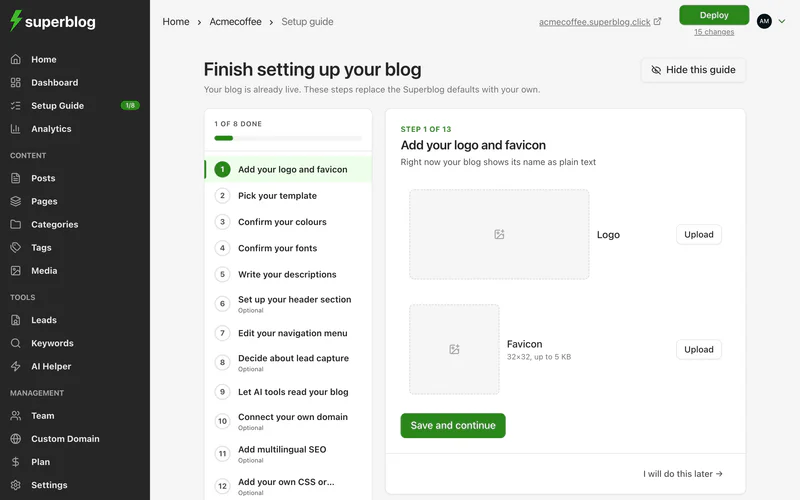
Work through the steps
The steps are listed on the left, with how many you have done. Each step shows a preview of where the change appears on your blog. Click View example to see it on a sample homepage and post.
For each step, make your changes and click Save and continue. If a step already looks right, click Looks good. To skip an optional step, click I will do this later.
Publish your changes
Your changes are saved as you go, but readers do not see them until you deploy. The last step points to the Deploy button at the top of the dashboard. See Deploy.
Hide the guide
When you are done, or if you would rather set things up yourself, click Hide this guide. It disappears from your dashboard and sidebar. You can still open it later from its address, write.superblog.ai/sites/<your-supername>/setup, and click Show again.