Create your Superblog
Creating a blog takes about two minutes. It goes live on a temporary Superblog address straight away, and you can connect your own domain later.
Step 1: Start a new blog
- Sign in at write.superblog.ai.
- On the My Superblogs page, click Create New Superblog.
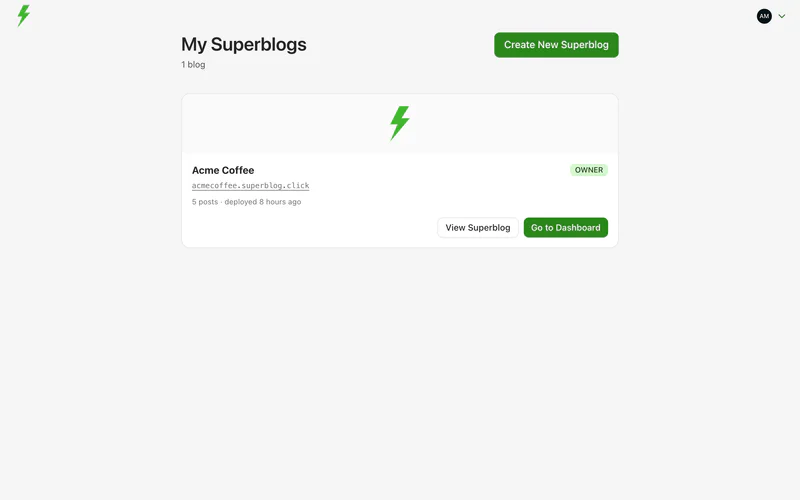
Step 2: Choose where to start
Superblog asks Where should we start from? Pick one:
- I have a website, I need a blog. Enter your website address and click Look up. Superblog reads your logo, brand colour and fonts from your public homepage, the same way a search engine does. Check what it found, then click Continue with these details.
- Start fresh. Pick a template and colours yourself.
If Superblog cannot read your website, it says so. You can then set everything up yourself.

Step 3: Fill in the details
- Name: your company or brand name. It cannot contain the word "superblog".
- Superblog address: the temporary address of your blog, such as
yourbrand.superblog.click. It must be unique. The form tells you if it is taken. - How did you find out about Superblog?: shown only if you did not answer it after your first sign-in.
- Template: the layout of your blog. Click Change template to pick another, Customize colors to change the colours, or Preview to see it with sample content. See Choose a template.
- Advanced options (optional): the style of buttons and surfaces, where the menu sits, whether posts show a table of contents, whether lead capture is on, and the blog's language.
Click Create My Superblog.

Step 4: Finish setting up
When your blog is ready, Superblog shows Your Superblog is ready with its address. Click Finish setting up to open the setup guide, which replaces the sample content on your new blog with your own.
Everything you chose here can be changed later in Settings.
Manage more than one blog
You can manage every blog you own, and every blog you are a team member of, from the same My Superblogs page. There is no need for a second account.