Connect a subdirectory
A subdirectory such as example.com/blog puts your blog on the same domain as your main website. Search engines treat it as part of your site, which is the best option for SEO.
Your main website keeps serving every page except the blog. Requests to /blog are forwarded to Superblog by a reverse proxy: a small rule on your website, or a free Cloudflare Worker in front of it.
Connect it
- In Custom Domain, enter the address, for example
example.com/blog, and click Connect Domain. - Under What does example.com run on?, pick your website's platform.
- Follow the steps shown for it. They include the exact code or rules to add, with your own domain and path already filled in.
- Deploy your blog, so it is built for its new address. This step is required.
- Open
example.com/blogto check it loads. Allow a few minutes.
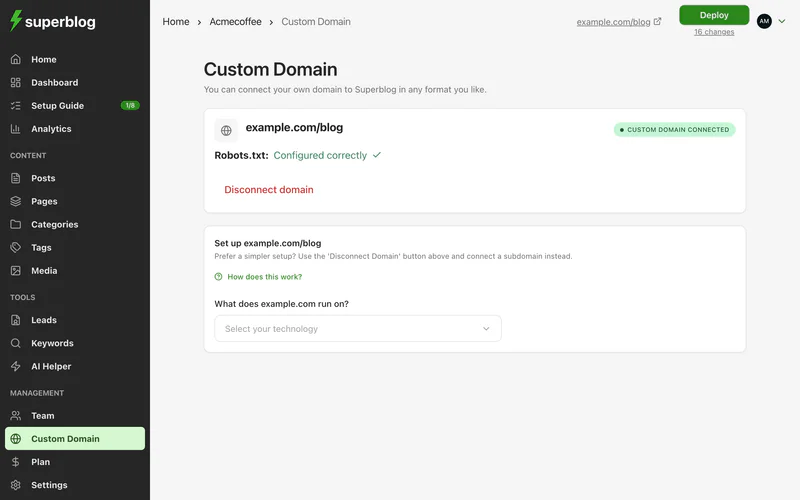
The setup takes about 10 minutes. To get help from an AI assistant, use the copy option, which copies the steps with your values filled in.
If your website's URLs end with a slash, enter the address with one, for example example.com/blog/. Superblog then writes your blog's URLs the same way.
Supported platforms
The dashboard has instructions for:
For WordPress, the easiest option is the Superblog Proxy plugin: download it from the dashboard, upload it under Plugins > Add New > Upload Plugin, and activate it.
Website builders such as Webflow, Framer, Wix and Shopify do not let you add proxy rules. For these, the instructions put your domain on Cloudflare's free plan and use a Cloudflare Worker to send /blog to Superblog. Your site keeps working during the switch.
If your platform is not listed, pick Not listed / not sure to see the Cloudflare route, or email hello@superblog.ai with the technology your website uses.
Point search engines to your blog
Your main website's robots.txt should list your blog's sitemap. The Custom Domain page checks this. If it says Needs attention, click View details for the exact line to add.
Still seeing your main website at /blog
- Check the rule is above any catch-all rule on your website.
- Clear your website's or Cloudflare's cache for
/blog. - Reload with a hard refresh.
Each platform's instructions end with notes for its own caching. If you would rather avoid the setup, disconnect the domain and connect a subdomain instead.