
WordPress.com vs WordPress.org for a Business Blog: The Real Trade-Off (2026)

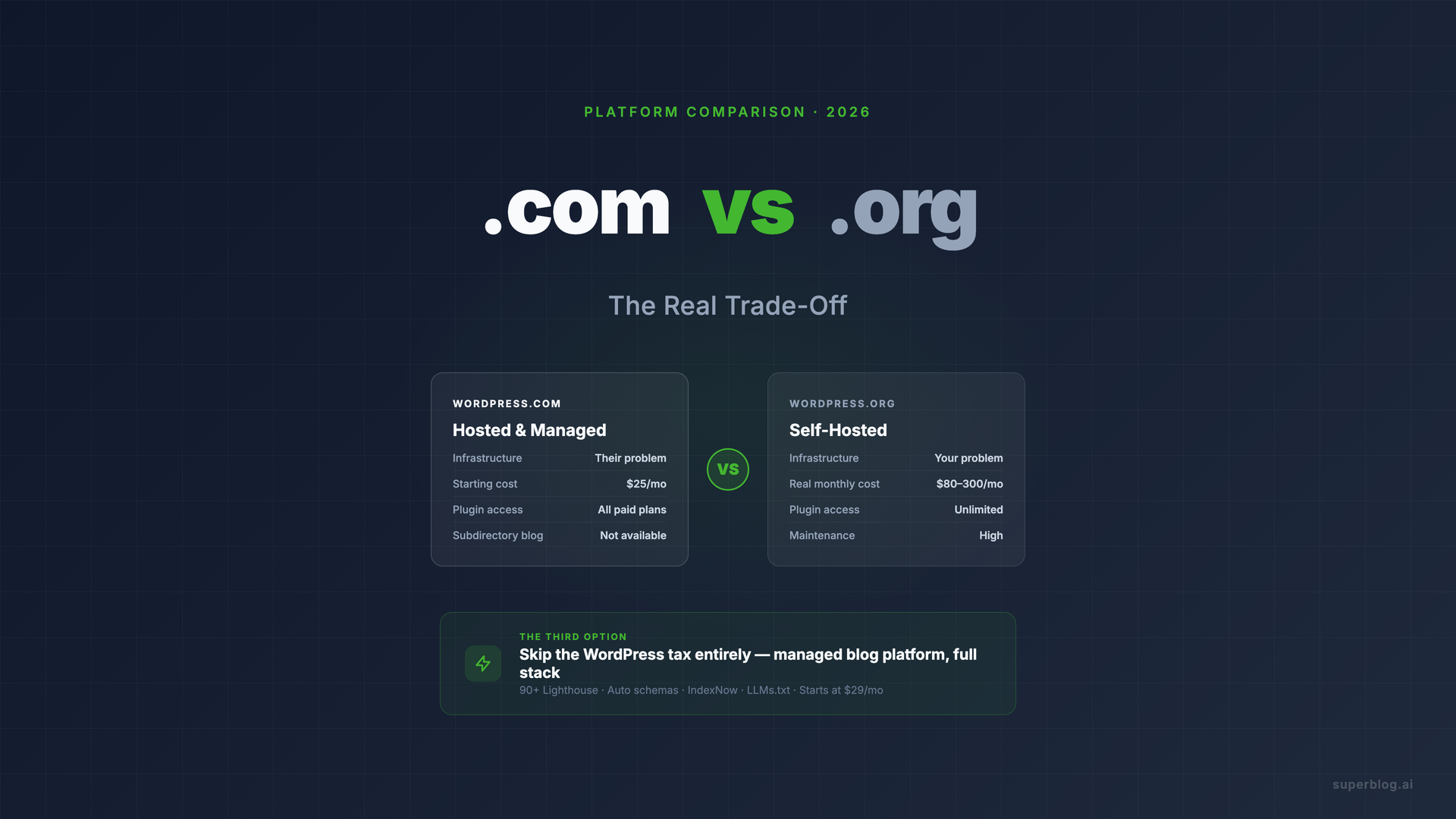
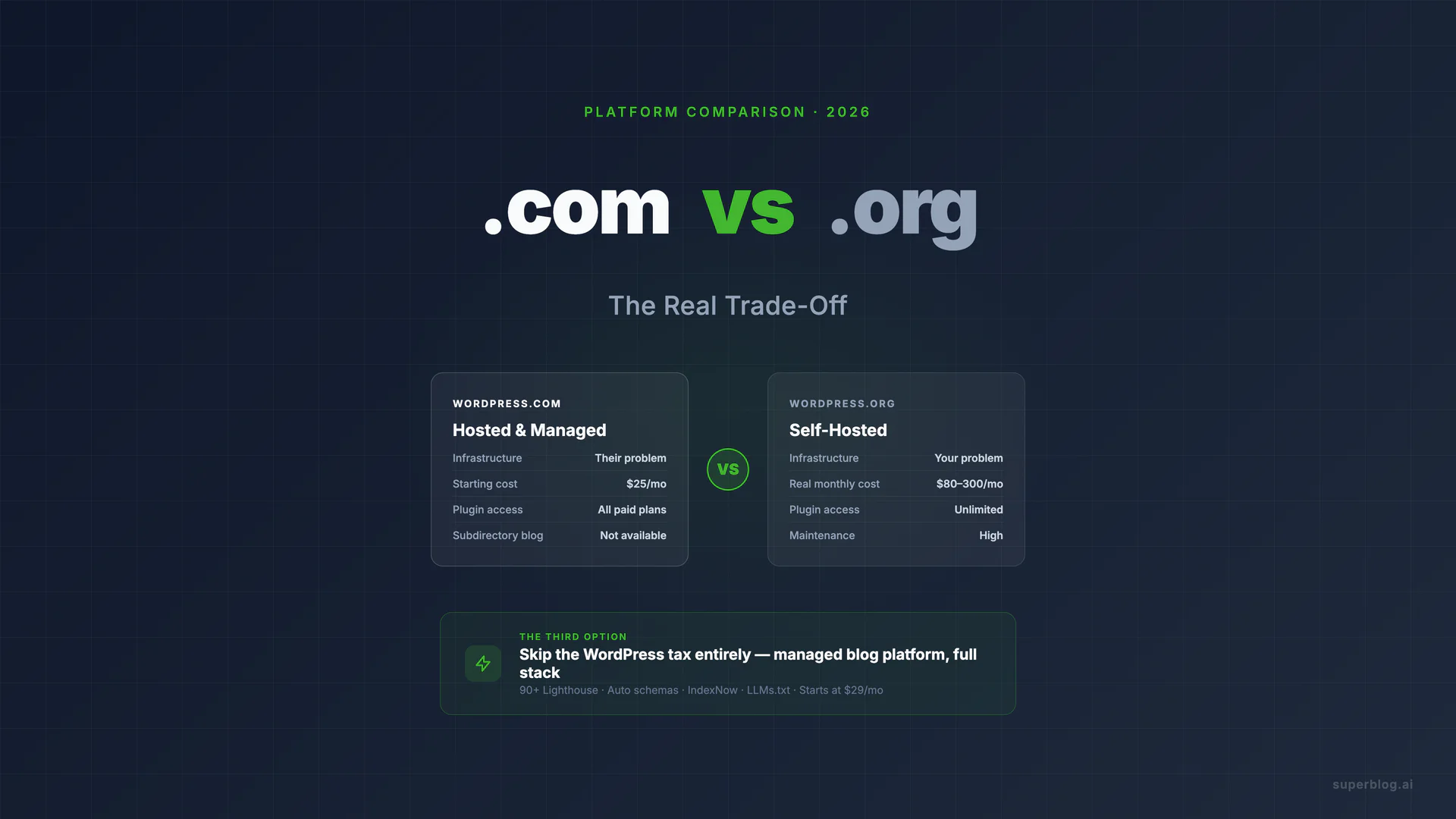
WordPress.com vs WordPress.org is not a question about two different software products. It is one question about who carries the technical burden of running a WordPress site: them or you.
WordPress.com hosts your site and manages the infrastructure. WordPress.org gives you the software to install on hosting you control. Both run the same core code. The difference is who owns the maintenance, the plugins, the security patches, and the server bills.
For a business blog, that distinction matters more than most comparison posts admit. Here is the actual trade-off. For the broader question of why businesses are moving off WordPress entirely, regardless of which flavor they started on, see our switching from WordPress analysis.
The Real Difference Between WordPress.com and WordPress.org
WordPress.com is a hosted platform. You sign up, choose a plan, and WordPress.com handles the server, updates, backups, and SSL. You write content. They run the infrastructure.
WordPress.org is software you download and install on a web host you pay separately. GoDaddy, WP Engine, Kinsta, and SiteGround are common choices. Once installed, you control everything: which plugins you install, how the site looks, what code runs, and how performance is managed. You also own every problem that comes up.
The short version: WordPress.com = hosted with guardrails. WordPress.org = self-hosted with full responsibility.
Neither version is maintenance-free for a business blog that needs to rank and perform. That distinction is where most comparisons stop short.
Decision Table: WordPress.com vs WordPress.org
WordPress.com shows annual-billing prices by default; monthly billing costs more. All figures above are labeled accordingly.
Who Should Pick WordPress.com
WordPress.com works for businesses that want a blog without thinking about servers. If the primary use case is publishing content and the team has no developer resources, the Business plan ($40/mo billed monthly, $25/mo billed annually) removes most of the infrastructure friction.
The April 2026 plugin update changed the calculus here. WordPress.com now allows plugin installation on all paid plans, which closes the most common objection. You can install Yoast, set up basic schema, and get to a functional blog without touching a server.
Pick WordPress.com if:
- You need a blog live in a day without touching hosting
- You have no developer on the team and do not want one
- Your blog is standalone (not at yoursite.com/blog)
- You do not need deep SEO customization beyond what Yoast covers
- Predictable monthly costs matter more than flexibility
The Business plan at $25/mo billed annually ($40/mo billed monthly) includes plugin access, a custom domain, and managed infrastructure. For a low-volume company blog, that is a defensible starting point. For more context on what WordPress.com specifically offers for blogging, our WordPress.com blog guide covers the platform in depth.
What WordPress.com cannot do: run your blog at yoursite.com/blog (subdirectory hosting). Your blog lives at yourcompany.wordpress.com or a connected custom domain. For businesses where the blog needs to share domain authority with the main site, this is a disqualifying limitation.
Who Should Pick WordPress.org
WordPress.org is the right call when your business needs maximum control or has a developer who will maintain the site. The trade-off is explicit: you get full flexibility, and you own all the maintenance.
Pick WordPress.org if:
- You have a developer (in-house or agency) managing the site
- You need custom functionality that requires specific plugins or code
- You want to monetize with any ad network (AdSense, Mediavine, Ezoic)
- You need specific integrations that require plugin-level access
- You are running a content operation that needs full technical control
The real cost of WordPress.org for a business blog is higher than the software's free price tag suggests. Add managed hosting ($30-100/mo for performance-grade providers like WP Engine or Kinsta), premium plugin licenses ($200-1,000/year for Gravity Forms, WP Rocket, Yoast Premium, and similar tools), and a developer or maintenance service ($50-200/mo). The true monthly cost for a well-run WordPress.org business blog lands between $80 and $300, depending on how much support you need.
The security reality is worth naming directly. Over 90% of WordPress vulnerabilities are found in plugins and themes, not the core software. A business blog on WordPress.org needs someone whose job it is to apply updates, run security scans, and respond when something breaks. If that person does not exist on your team, either budget for a maintenance plan or consider whether self-hosting is the right call. For more on this, see our breakdown of WordPress maintenance costs.
The Third Option Most Comparisons Skip
Here is what the WordPress.com vs WordPress.org debate leaves out: both paths require you to manage WordPress. One manages the server for you. Neither manages the SEO engine, the performance optimization, or the ongoing technical maintenance of the blog itself.
A business that picks WordPress.com still needs to configure Yoast, manually set up schema markup, optimize images, and monitor Core Web Vitals. A business that picks WordPress.org owns all of that plus the server.
For companies that want organic traffic from a blog, without the WordPress tax, there is a third path: a purpose-built managed blog platform that handles the full stack.
Superblog is built for exactly this. It is not a CMS you install. It is the complete stack: CMS, frontend, hosting, SEO engine, and performance infrastructure, all in one product. The result is a blog that:
- Scores 90+ on Lighthouse automatically, on every page
- Generates JSON-LD schemas (Article, FAQ, Organization) without plugin setup
- Submits new posts to search engines via IndexNow the moment you publish
- Creates LLMs.txt
- Runs on your existing domain at yoursite.com/blog via subdirectory hosting, preserving domain authority
Pricing starts at $29/mo. There are no plugins to update, no security patches to apply, and no hosting bills to manage separately. You publish content. The platform handles everything else.
Amal Kiran, CEO of Daffodil Health, put it directly: "Getting a blog up and running has never been easier. I just can't go back to WordPress after this."
For companies already on WordPress who want to move, Superblog imports everything, including posts, images, categories, and metadata, in under 10 minutes. URL slugs are preserved, so rankings are not disrupted. The full migration process is covered in our WordPress migration guide.
If you are evaluating blog platforms more broadly, the complete blog platform guide covers how to think about the decision for business use.
Can You Switch Between WordPress.com and WordPress.org?
Yes. WordPress.com includes an export tool that generates a WordPress XML file. You can import that file into a self-hosted WordPress.org installation.
The reverse also works: WordPress.org sites can be exported and imported into WordPress.com, though some plugins and custom code will not transfer.
The main friction point is custom design and plugins. If you built a custom theme or rely on plugins unavailable on WordPress.com, migrating from .org to .com requires redesign work. If you are moving from .com to .org, you will need to configure hosting, security, and plugin setup from scratch.
Neither migration path is automatic. Plan for a few hours of technical work, or hire a developer if you need it done cleanly.
Migration: From WordPress to Something Else
If you reach a point where neither WordPress.com nor WordPress.org is serving your business well, the migration path to a dedicated blog platform is well-trodden.
Superblog supports direct import from both WordPress.com and WordPress.org via the WordPress REST API. No file exports needed. The import pulls posts, images, categories, and tags in one step. Most blogs complete migration in under 10 minutes.
For businesses that have built significant content libraries on WordPress, this is worth knowing before the migration feels like a bigger project than it is. More detail in our migrate from WordPress guide.
FAQ
What is the difference between WordPress.com and WordPress.org?
WordPress.com is a hosted platform where WordPress manages the server, updates, and infrastructure. You pay a subscription. WordPress.org is open-source software you install on your own hosting. It is free to download, but you pay for hosting, plugins, and maintenance separately. The core software is the same; the operational model is completely different.
Which is better for a business blog, WordPress.com or WordPress.org?
It depends on whether you have developer resources. WordPress.org gives you more control and full plugin access, which is valuable for businesses with technical teams. WordPress.com removes infrastructure management and works well for teams that want to publish without touching servers. Neither handles SEO and performance automatically. For businesses that want a complete platform without the WordPress tax, a purpose-built platform like Superblog is worth evaluating.
Is WordPress.com really free?
There is a free tier, but it includes WordPress.com branding, no custom domain, and limited design options. For a business blog, the free plan is not a viable option. The Business plan at $25/mo billed annually ($40/mo billed monthly) is the first tier with meaningful plugin access and professional features. That is a better baseline for comparing WordPress.com to alternatives.
Can I switch from WordPress.com to WordPress.org?
Yes. WordPress.com provides an XML export that can be imported into a self-hosted WordPress.org site. You will need to set up hosting, install WordPress, and configure plugins separately. Expect a few hours of setup, plus any redesign work if your current theme is not portable.
Do I need plugins on WordPress.com?
As of April 2026, all paid WordPress.com plans support plugin installation from the WordPress plugin directory. The Business plan at $25/mo billed annually ($40/mo billed monthly) is the first tier with full plugin access and custom code editing. Lower paid tiers have plugin access but fewer developer tools. Previously, plugins were restricted to Business plan and above, so some older comparison posts may still reflect those restrictions.
Do I actually need WordPress at all for a business blog?
Not necessarily. WordPress built its dominance when it was the main way to run a self-hosted blog. The options available in 2026 are different. Purpose-built blog platforms like Superblog handle hosting, SEO, performance, and CMS in one product, starting at $29/mo. For businesses that want organic traffic without maintaining WordPress infrastructure, WordPress alternatives built for blogs are worth a serious look. The comparison between managed blog platforms and self-hosted WordPress is also covered in our blog platform overview.
What is the WordPress.com vs WordPress.org answer for SEO?
Both can support good SEO, but neither automates it. WordPress.org gives you full access to SEO plugins and allows more technical configuration. WordPress.com supports Yoast on Business plans. In both cases, you configure schema markup, monitor Core Web Vitals, and manage sitemaps manually or through plugins. Platforms like Superblog generate JSON-LD schemas, XML sitemaps, and submit to IndexNow automatically, which removes that configuration layer entirely.
The Bottom Line
The WordPress.com vs WordPress.org decision comes down to one question: how much technical ownership do you want?
WordPress.com handles the server. WordPress.org handles nothing for you. Both still require ongoing attention to SEO, performance, and maintenance.
For businesses where the blog is a core channel for organic growth, and where the team does not want to become WordPress administrators, a managed platform purpose-built for business blogging removes the trade-off entirely. The infrastructure is handled, the SEO is automated, and the performance targets are built in.
If you are starting fresh or already frustrated with WordPress maintenance, Superblog's 7-day free trial is worth testing against your current stack. No credit card required.
Your blog, without the maintenance
Fast pages, automatic SEO, no plugins to patch. Runs on yoursite.com/blog.
Sai Krishna is the Founder and CEO of Superblog. Having built multiple products that scaled to tens of millions of users with only SEO and ASO, Sai Krishna is now building a blogging platform to help others grow organically.
superblog
Superblog is a blazing fast blogging platform for beautiful reading and writing experiences. Superblog takes care of SEO audits and site optimizations automatically.