
Wix vs Squarespace 2026: Which Is Better for a Business Blog?

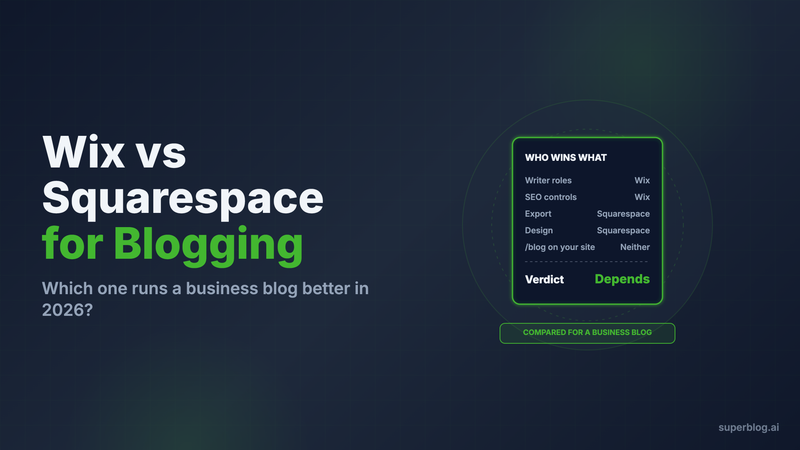
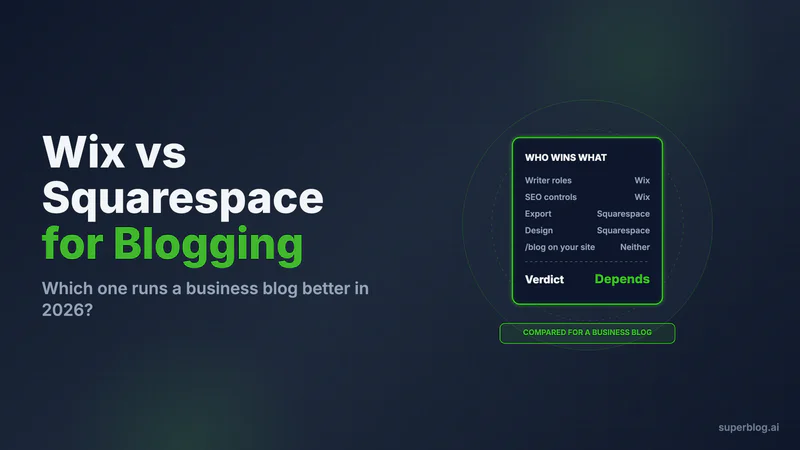
In Wix vs Squarespace for a business blog, Wix wins on writing workflow and SEO controls, and Squarespace wins on getting your posts out again. Wix gives you real blog roles with an approval step, an editable robots.txt and an llms.txt it maintains for you. Squarespace gives you an export file, and Wix gives you none.
So the choice comes down to which risk you would rather carry: a thinner toolset today, or a harder exit later. Every claim below is checked against Wix's and Squarespace's own help centers and pricing pages as of November 2026.
The verdict, before the detail
Choose neither for the blog if the blog is an acquisition channel with a publishing calendar. Keep the site on the builder you like and run yoursite.com/blog on a platform built for publishing, such as Superblog (covered in the last section). Otherwise:
Choose Wix if several people write for the blog, you want a review step before posts go live, and you care about crawl and AI-search controls.
Choose Squarespace if one person writes, design matters more than workflow, and you want a documented way to take the archive with you.
Wix vs Squarespace for blogging, side by side
Editor and writing workflow

Wix wins. Its blog has three roles, and they map onto how a company blog actually runs. Wix's documentation on adding writers and editors defines them:
- A Blog Editor writes posts and manages the blog, including other writers' posts. Editors cannot open the site editor, so they cannot break a page.
- A Blog Writer writes and publishes their own posts only.
- A Guest Writer writes posts but cannot publish them. Each post needs approval first.
That third role is the review step most marketing teams want for freelancers and subject experts.
Squarespace has less here. Its permissions article gives the Website editor role the right to add and edit blog posts. The role that cannot publish, Draft editor, sits under the Enterprise plan. On standard plans, everyone who writes can also push a post live.
Squarespace also states in its lost content article that it has no auto-save and no revision history when editing. A closed tab costs you the unsaved draft. Each post also takes one author, chosen from a list.
SEO controls
Wix wins, clearly. Wix gives you levers. Squarespace gives you checkboxes.
On Wix:
- You can edit robots.txt in the SEO & GEO dashboard (Wix docs).
- IndexNow runs automatically on Premium plans, notifying Bing, Yandex, Naver and other engines when your pages change (Wix docs).
- Wix generates and maintains an llms.txt file on upgraded sites with a custom domain. If you edit it, it stops updating automatically until you reset it (Wix docs).
- A toggle turns on AI-generated structured data, which adds Article, BlogPosting, FAQPage or Recipe markup depending on the post (Wix docs).
One quirk to plan for: every Wix post URL contains a post prefix. Wix lets you rename it but not remove it.
On Squarespace:
- The sitemap is generated and cannot be edited.
- robots.txt is the same file on every Squarespace site, and you cannot edit it. The control you get is a checkbox that asks AI models to exclude your site, and it is unchecked by default.
- llms.txt is a text field you fill in yourself. It is disabled by default and only available on version 7.1 sites. You write and maintain its contents yourself.
Both cover titles, meta descriptions and slugs per post. The full Squarespace picture is in is Squarespace good for blogging, and the Wix one is in our Wix blog review.
Speed
A tie, and neither one is yours to tune. Both are hosted builders. You do not control the template's JavaScript, the render order or how fonts load. What you control is what you add: image weight, embeds, apps and custom code. A lean blog on either platform can be fast. A busy one gets slower, and the fix is removing things rather than optimizing them.
Neither vendor guarantees a page speed score, so do not pick between them on speed. Pick on the factors above and keep the pages light.
Blog features

Roughly even. Both schedule posts, both have categories and tags, and both support comments (Squarespace blogging docs). Wix adds the role structure and approval flow described above. Squarespace's pull is its templates, which many teams pick it for.
On Squarespace, each post credits one author. Wix's writer documentation does not mention co-authors.
Pricing
Squarespace has no free plan. Wix does, but the blog SEO features that matter sit on paid plans.
Squarespace's US prices, from squarespace.com/pricing:
Every Squarespace site starts with a 14-day free trial.
Wix's plans page lists a free plan and four paid plans: Light, Core, Business and Business Elite. Site collaborators are 2, 5, 10 and 100. Displayed prices are for yearly billing, and Wix states that prices and currency vary by location, so check the figure for your country at checkout. Paid plans carry a 14-day money-back guarantee.
For a blog, the plan line that matters is writers. Basic on Squarespace and Light on Wix both stop at two people. The cost breakdowns, with the upgrades a blog pushes you into, are in Wix blog pricing and Squarespace pricing for blogs.
Migration out
Squarespace wins. It is the only one of the two with an exit.
Wix states on its own help center that it is not possible to export blog posts to other platforms. The page is filed as a feature request collecting votes. Getting posts out means a destination that reads them through Wix's API, the RSS feed, or copy and paste.
Squarespace exports your site as a WordPress-format XML file. Two limits apply:
- Only one blog page exports. If you run two blogs, pick one.
- You cannot import that file into another Squarespace site.
A partial file is still more than Wix gives you. If you expect the blog to outgrow the builder, weigh this factor heavily.
Choose Wix if
- More than one person writes, and you want writers who cannot publish without approval.
- You want to edit robots.txt and have llms.txt and IndexNow handled for you.
- You want a free plan to start on.
- You accept that leaving later means an API pull or manual work, not an export file.
Choose Squarespace if
- One or two people write and the site's design is the priority.
- You want a documented export for the blog.
- You do not need crawl controls beyond the defaults.
- You can live with no auto-save and no draft-only role on standard plans.
Where Superblog fits: keep the site, move the blog

Most teams comparing Wix and Squarespace for a blog are choosing a website builder and hoping the blog module keeps up. You can split the two jobs. Keep the site on Wix or Squarespace and serve yoursite.com/blog from Superblog, a platform built only for publishing. Readers and search engines see one domain, and the blog builds authority on the domain you already have.
Neither builder has a setting to send a path to another host, so the routing sits in front of your domain. Your domain moves to Cloudflare's free plan, and a Cloudflare Worker sends /blog to Superblog while every other page keeps loading from Wix or Squarespace. See blog for Wix and blog for Squarespace for each builder. Subdirectory hosting is on every paid plan. Trial sites cannot connect /blog, so choose a plan before you set up the routing.
What changes at /blog, measured against the factors above:
- Workflow. Admin, Editor and Writer roles, co-authors on a post, and collaborative review and scheduled posts on Pro and above.
- SEO. JSON-LD for Article, WebPage, Organization and ImageObject on every post, plus FAQ schema on posts with an FAQ block. Sitemaps rebuild on every deploy, and IndexNow fires when a post goes live. llms.txt regenerates on every deploy, and each post is also served as plain markdown at its own URL. Canonical URLs and Open Graph tags are set per post.
- Speed. 90+ Lighthouse on every page, with images converted to WebP automatically and pages served from a 200+ location CDN.
- Migration in. The Wix import takes an API token and your site ID and moves up to 500 posts per run. It brings titles, body, slugs, first publish dates, tags and cover images. Meta titles, meta descriptions, alt text and categories do not come across, so rebuild those after the import. Set 301 redirects from
/post/{slug}to/blog/{slug}. There is no direct Squarespace importer. Plan for a JSON or spreadsheet file import (up to 300 posts per import, spreadsheet import on Super) or paste posts in, and map your slugs so the URLs match.
Pro is $49/month with up to 1,000 posts and 5 team members. Super is $99/month with up to 10,000 posts, multilingual SEO and API access. There is a 7-day free trial, no credit card required.
FAQ
Is Wix or Squarespace better for blogging?
Wix, for a team blog with SEO goals; Squarespace, for a solo blog where design and export matter most.
Is Squarespace or Wix better for SEO?
Wix: editable robots.txt, automatic IndexNow on Premium plans and a maintained llms.txt.
Can you export a Wix blog?
No. Wix lists blog export as a feature request.
Can you export a Squarespace blog?
Yes, one blog page per site, as a WordPress-format XML file.
How many writers do the entry plans allow?
Two on both: Wix Light and Squarespace Basic.
Can I keep my Wix or Squarespace site and run the blog elsewhere?
Yes. Route yoursite.com/blog to a blog platform and keep every other page on the builder.
Your blog, without the maintenance
Fast pages, automatic SEO, no plugins to patch. Runs on yoursite.com/blog.
Sai Krishna is the Founder and CEO of Superblog. Having built multiple products that scaled to tens of millions of users with only SEO and ASO, Sai Krishna is now building a blogging platform to help others grow organically.
superblog
Superblog is a blazing fast blogging platform for beautiful reading and writing experiences. Superblog takes care of SEO audits and site optimizations automatically.