
Weebly Blog: Where It Stands in 2026 (and Your Upgrade Paths)

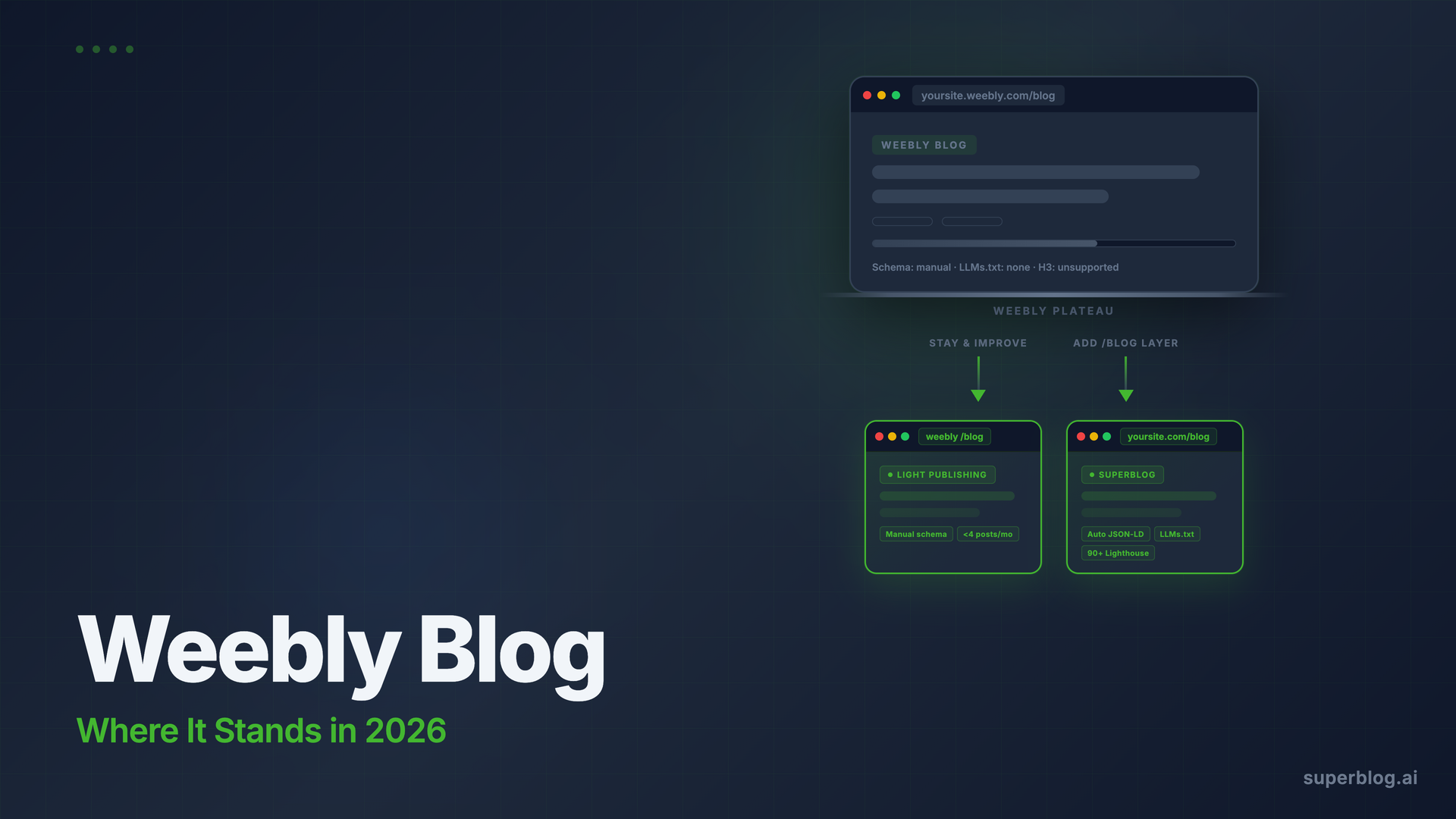
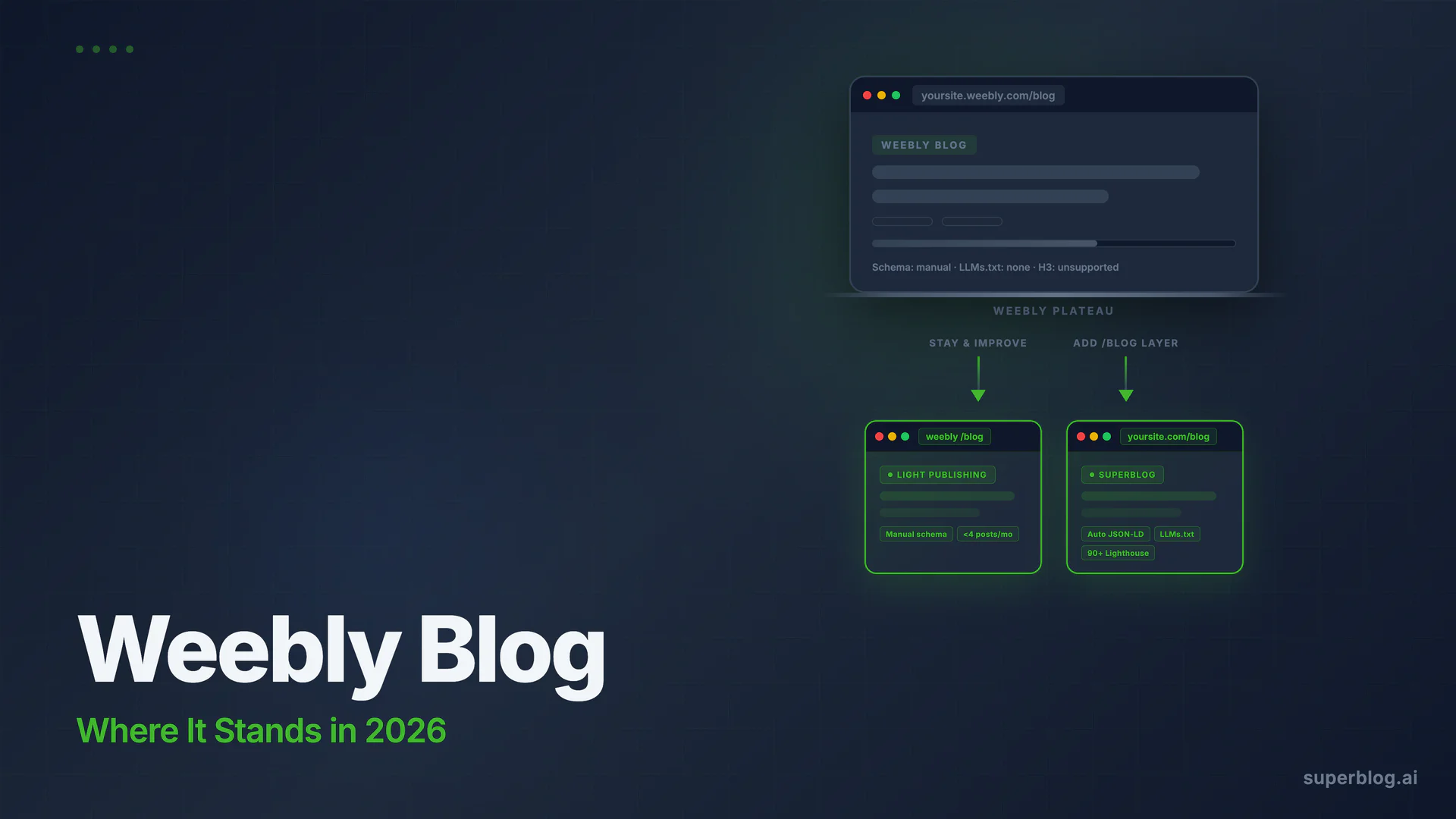
The Weebly blog still works. Posts publish, categories organize content, and basic meta fields let you set title tags and descriptions per post. If you have a Weebly site and publish occasionally, the built-in blog will get the job done.
But the platform context matters a lot in 2026. Square acquired Weebly in 2018, and since then active development has effectively stopped. The mobile app has been removed from app stores, no new features have shipped in years, and new signups are steered toward Square Online instead. Third-party analysts now classify Weebly as maintenance mode, not active development.
This guide covers what the Weebly blog still does adequately, where it stops for growth-focused teams, and two realistic paths forward if you want more from content marketing.
What Is Weebly Blog?
Weebly Blog is the native blogging module built into every Weebly site. You do not install it separately. It adds a blog section to your existing site through the Weebly drag-and-drop editor, and you manage posts from the same dashboard as your pages.
The blog is included with every Weebly plan, including free. No second account, no API integration, no redirect setup required. For businesses already on Weebly, that frictionlessness is real value.
What the Weebly Blog Still Does Adequately
Basic content publishing
Weebly Blog handles standard post creation: text, images, video embeds, and scheduled publishing. You can set per-post title tags, meta descriptions, and custom URL slugs. The editor is a drag-and-drop interface rather than a dedicated content editor, which is more limiting than purpose-built blog editors but workable for teams publishing a few posts per month.
Scheduled posts, social sharing to Facebook and Twitter, and RSS feeds are all supported. For a business that wants a blog without complex tooling, the basics are covered.
Category and tag organization
You can create categories and tags to organize posts. Sidebar customization lets you add category lists, recent post widgets, and a search bar to individual post pages. Navigation integration with your main Weebly site is automatic, which keeps the experience cohesive.
Comment management
Weebly Blog includes comment moderation with approval workflows, Disqus integration, and Facebook commenting as alternatives to the native system. For businesses that want reader engagement, these options exist.
Minimal SEO controls
Each post gets a title field, meta description field, and URL slug control. Weebly generates a sitemap automatically. Google Search Console connection is available through settings. These are the minimum viable on-page SEO controls, and for a blog that publishes infrequently, they may be enough.
Where the Weebly Blog Stops for Growth Teams
Here is where the picture changes for businesses using content marketing as a core acquisition channel.
No structured data automation
Weebly does not automatically generate JSON-LD schema for blog posts. Article schema, FAQ schema, Organization schema, and Breadcrumb schema do not appear on your pages by default. The platform does allow custom HTML injection in the header and footer, so it is technically possible to add schema markup manually. But that means writing or generating JSON-LD code for every post and pasting it into a custom header block.
That process does not scale. At five posts per month it is tedious. At twenty posts per month it becomes a real bottleneck, and the risk of errors or outdated markup compounds as your archive grows.
Rich snippets in Google Search (star ratings, FAQ dropdowns, breadcrumb trails) require valid structured data to render. Without automated schema generation, those rich results are not available unless you invest significant ongoing manual effort.
Weebly also does not generate an LLMs.txt file. This is a growing standard: a machine-readable index built for AI tools like ChatGPT and Perplexity. Platforms that include it automatically are ahead of the ones that require manual setup or skip it entirely.
Heading hierarchy is limited
Weebly's editor does not support H3 heading tags natively. You work with H2s and standard paragraph text. That is a real constraint for long-form posts where topic hierarchy matters, and it limits how well you can signal content structure to search engines through heading nesting.
Performance is not guaranteed
Weebly has improved its infrastructure over the years, and basic sites can score reasonably on Lighthouse. But performance is not a guarantee the way it is on purpose-built, JAMStack-architected platforms. Heavier Weebly sites with multiple apps, large image uploads, and third-party scripts can show meaningful variance across pages. If you do not control your image sizes before upload and are not careful about the apps you add, Lighthouse scores can degrade.
A blog that depends on search rankings needs consistent performance, not performance that holds when conditions are ideal.
No internal link automation
Internal linking is one of the highest-leverage on-page SEO actions. Weebly Blog does not offer any tooling to surface related posts, suggest anchor text, or identify gaps in your internal link structure. Every internal link is manual, which is fine at small scale and does not work when you are publishing regularly across dozens of posts covering related topics.
The platform's trajectory
This is the most significant constraint, and it is not a feature gap. It is platform risk.
Weebly is in maintenance mode. Square's product focus is Square Online (its e-commerce platform) and its payments ecosystem. Weebly's mobile apps have been pulled. No new features have shipped in years. Third-party analysts estimate that support may wind down entirely, though no official date has been announced.
Publishing your business blog on a platform with no active development roadmap is a risk. The blog will work today. Whether it will receive security updates, infrastructure improvements, or any response to platform-level issues over the next two years is less certain.
Two Paths Forward for Weebly Users
Your situation determines which path makes sense. These are the two realistic options.
Path 1: Work within Weebly Blog (for light publishing)
If you publish fewer than four posts per month and blog traffic is a secondary priority rather than a core growth channel, the Weebly blog is workable. Tips that help:
- Add Article schema manually per post. Use a JSON-LD generator like Google's Structured Data Markup Helper, generate an Article block for each post, and paste it into a custom header block. Check the output with Google's Rich Results Test after each post.
- Keep images below 200KB before uploading. Do not rely on Weebly's CDN to correct large original files. Upload at appropriate dimensions to maintain consistent page performance.
- Use Google Search Console URL Inspection after every publish. Request indexing manually. Weebly's IndexNow support is not documented as a current feature, so do not assume new posts are discovered automatically.
- Install Google Analytics or a privacy-friendly alternative. Weebly's native analytics are minimal. You need external tracking to understand which posts drive traffic and how readers engage.
These steps work at low volume. They do not scale to a team publishing consistently for organic growth.
Path 2: Route yoursite.com/blog to a managed blog platform
If content marketing is a real growth channel, the stronger move is keeping your Weebly site for your homepage and product pages while routing yoursite.com/blog to a purpose-built blog platform that handles SEO infrastructure automatically. Your Weebly pages at all other URLs continue working unchanged.
This is what adding a blog to your existing website covers in full. The short version: you set up subdirectory routing through your domain's DNS, point /blog to a dedicated platform, and your main Weebly site never changes. Readers and Google see a seamless experience at one domain.
For why the subdirectory path matters for SEO, subdomain vs subdirectory covers the tradeoffs in detail. The core argument: blog.yoursite.com creates a separate subdomain that does not share domain authority with your main site. yoursite.com/blog keeps all link equity on one domain. For a business building content marketing, that distinction compounds over time.
Platforms like Superblog are designed specifically for this setup. You route yoursite.com/blog to Superblog, and your Weebly site remains at every other URL. The Weebly-to-Superblog complement works without migration, without touching your existing pages, and without any Weebly configuration beyond the DNS change.
Weebly Blog vs. Purpose-Built Blog Platforms: A Comparison
The table separates what matters for a blog that ranks from what matters for a blog that exists. Weebly Blog covers the "exists" column. Purpose-built platforms cover the "ranks" column.
Where Superblog Fits for Weebly Users
Superblog is not a Weebly replacement for your main site. It is a blog layer that attaches at yoursite.com/blog while your Weebly homepage, product pages, and marketing pages continue running unchanged.
What changes is the infrastructure behind your blog content. Every post gets Article JSON-LD schema automatically, no manual HTML injection required. Organization schema applies across the blog without any per-post work. LLMs.txt updates on every deploy. Every page scores 90+ on Lighthouse without tuning images or removing apps. IndexNow fires on every publish, notifying Bing and other supporting search engines within hours rather than waiting for crawl cycles.
The first month of Superblog pricing starts at $29/mo for up to 300 posts. The Pro plan at $49/mo handles up to 1,000 posts with scheduled publishing, privacy-friendly analytics, and collaborative review. All plans include auto SEO, free SSL and CDN, and subdirectory hosting. A 7-day free trial requires no credit card.
For the broader context on running a dedicated blog alongside an existing website builder, best blog platform covers the full landscape. And if you are on a similar platform evaluating the same question, Wix Blog runs through the identical analysis for Wix users.
FAQ
Does Weebly have a blog?
Yes. Weebly includes a built-in blog module with every plan, including the free tier. It supports post scheduling, categories, tags, comment moderation, meta fields per post, and social sharing. Setup requires no installation; you add it from the Weebly editor. The blogging module is functional but has not received significant updates since Square's 2018 acquisition.
Is Weebly still supported in 2026?
Weebly is accessible and existing sites continue to function, but the platform is widely described as being in maintenance mode. Square, which acquired Weebly in 2018, has removed the Weebly mobile app from app stores, halted new feature development, and directs new signups toward Square Online. No official shutdown date has been announced, but active development has effectively stopped. Businesses relying on Weebly long-term face platform risk that growing on an actively developed platform would not carry.
Is Weebly Blog good for SEO?
Weebly Blog covers basic on-page SEO controls: title tags, meta descriptions, URL slugs, and a sitemap. For a blog publishing infrequently with modest organic goals, those controls are workable. For growth-stage content marketing, the gaps are significant: no automated structured data (Article, FAQ, Organization, Breadcrumb schema), limited heading hierarchy (H2 only, no H3), no internal link automation, no LLMs.txt for AI discoverability, and no IndexNow integration documented as a current feature. These gaps mean meaningful manual work for every post that publishes.
Can I add an external blog to my Weebly site?
Yes. You can route yoursite.com/blog to a separate blogging platform through DNS configuration without touching your Weebly site. Pages on your Weebly site outside /blog continue working normally. This approach keeps your main site intact while giving the blog a dedicated platform built for organic search performance. Adding a blog to your website covers the full subdirectory setup process. Platforms like Superblog are designed specifically for this routing pattern.
Your blog, without the maintenance
Fast pages, automatic SEO, no plugins to patch. Runs on yoursite.com/blog.
Sai Krishna is the Founder and CEO of Superblog. Having built multiple products that scaled to tens of millions of users with only SEO and ASO, Sai Krishna is now building a blogging platform to help others grow organically.
superblog
Superblog is a blazing fast blogging platform for beautiful reading and writing experiences. Superblog takes care of SEO audits and site optimizations automatically.