
Webflow Pricing 2026: Plans From $15 a Month, and What a CMS Blog Really Costs

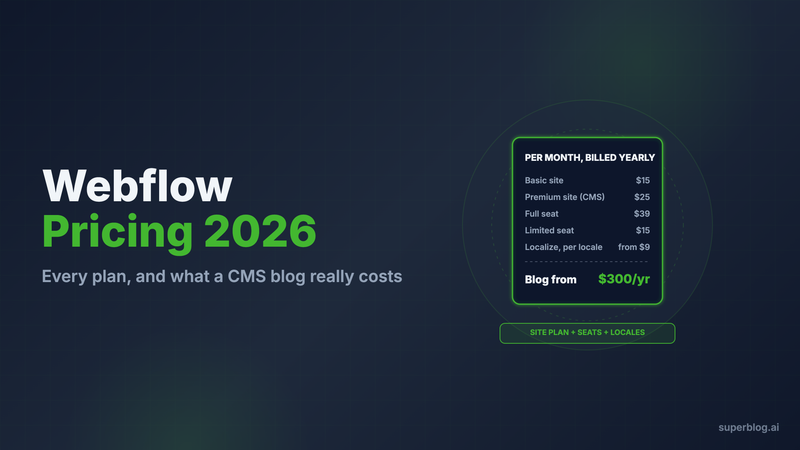
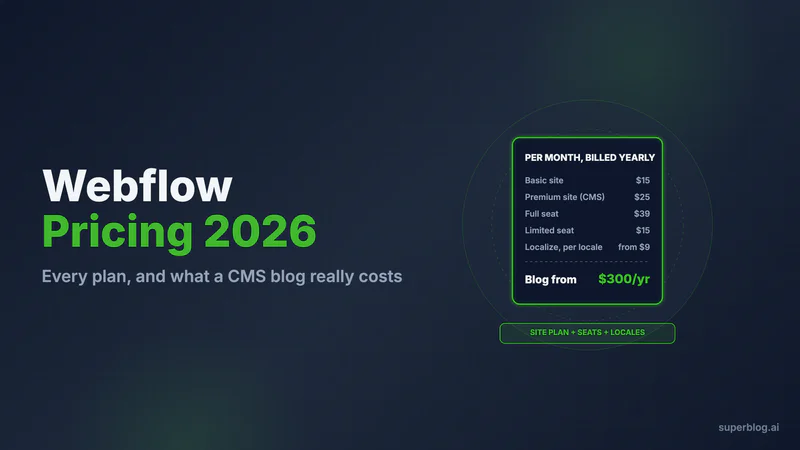
Webflow pricing starts at $15 a month for the Basic Site plan and $25 a month for Premium, billed yearly, or $25 and $39 billed monthly. Basic has no CMS, so a company blog on Webflow needs Premium at $300 a year. Seats, languages and bandwidth push a working content team to $1,000 to $5,000 a year billed yearly.
Every Webflow price below was checked on webflow.com on November 13, 2026.
Webflow pricing at a glance
A Site plan pays for hosting and features on one site. A Workspace plan pays for staging, collaboration and admin tools across every site you build. Most businesses need a paid Site plan. Many never need a paid Workspace plan.
Site plans
Notes on the table:
- Prices are per site, in USD, before tax. Webflow's toggle says yearly billing saves "up to 40%", which is the Basic gap ($15 against $25).
- Starter publishes only to a webflow.io subdomain. A custom domain needs Basic or higher.
- Team bundles a site, a Workspace, 5 full seats, 5 limited seats, 2 Localize locales and 100,000 AI credits a year.
Workspace plans
Freelancer ($16 billed yearly, $24 monthly) and Agency ($35 and $42) are versions of the same plans for client work.
Any Workspace tier, free ones included, can hold an unlimited number of paid Site plans. The Workspace tier only changes how many unpublished staging sites you keep, how you manage people, and which code tools you get.
What changed in May 2026
Webflow rebuilt its lineup on May 13, 2026. The changes that matter for a blog:
- CMS and Business became Premium. One plan at $25 a month billed yearly or $39 monthly, with 20,000 CMS items and 40 Collections included. CMS item add-ons are gone.
- Business sites lost bandwidth. Included bandwidth on former Business plans dropped from 100 GB to 50 GB.
- Basic went up. $15 billed yearly and $25 monthly, with the static page limit doubled from 150 to 300.
- Team arrived. A $2,500 a month annual contract for teams between self-serve and Enterprise.
- AI moved to credits. Every Workspace now has an AI credit pool, reset monthly on self-serve plans.
New purchases have paid the new prices since May 13, 2026. Most existing sites switched at their first renewal or billable change on or after June 29, 2026. Sites in Freelancer or Agency Workspaces, and sites on legacy pricing, switch at their first renewal or billable change on or after November 16, 2026.
Is Webflow free?
Yes, for building. The Starter Site plan costs nothing and keeps 2 static pages, 50 CMS items, 1 GB of bandwidth and 50 form submissions on a webflow.io address.
It is not free for a business. A custom domain needs a paid Site plan, and a blog needs the CMS, which starts at Premium. The realistic floor for a company blog on Webflow is $300 a year.
If your site stays on Webflow and only the blog moves, Superblog runs the blog at yoursite.com/blog from $49/month (Pro), with up to 5 team members included. The comparison is further down.
What the Webflow CMS costs
Which plan a blog needs
Premium. Webflow describes Basic as a plan for sites "that don't need a CMS", so it cannot hold blog posts as Collection items. Premium also brings the blog features: scheduled publishing, per-item publishing, RSS feeds, site search and CMS item indexing control.
CMS item limits
Premium includes 20,000 CMS items across 40 Collections. Every post, author, category and tag is an item. At three posts a week, 20,000 items is far more than a decade of publishing. Our Webflow CMS limits guide covers the limits that do bite.
Bandwidth
Premium includes 50 GB a month. Above that you buy add-ons:
Webflow's surge protection covers short spikes, but two consecutive months over the limit trigger an automatic plan upgrade.
Seats
The Workspace owner's full seat is included. Everyone else who edits is paid:
A writer who edits posts fits a Limited seat. A designer who changes templates needs a Full seat.
Localization
Webflow Localize is an add-on priced per locale:
Both include CMS localization, locale subdirectories and a localized sitemap with hreflang. Only Advanced adds localized URL slugs and automatic visitor routing. Our Webflow localization pricing breakdown works through 2, 5 and 10 languages.
Other add-ons
Analyze (site analytics) starts at $9 a month billed yearly. Optimize (A/B testing) starts at $299. Extra AI credits are $20 a month for 2,000 credits. A blog can skip all three.
Three Webflow blog budgets, summed
Team sizes are our assumptions, so swap in your own.
Scenario 1: A founder-run blog
The founder owns the Workspace and writes every post. One language, traffic under 50 GB.
- Premium: $300 ($25 x 12) or $468 billed monthly ($39 x 12)
Total: $300 a year billed yearly, or $468 billed monthly.
Scenario 2: A marketing team in three languages
The founder keeps the included full seat and maintains the site. Three writers publish on Limited seats. The blog runs in English plus two locales on Localize Essential.
- Premium: $300 or $468
- Three Limited seats: $540 ($15 x 3 x 12) or $684 ($19 x 3 x 12)
- Two Essential locales: $216 ($9 x 2 x 12) or $288 ($12 x 2 x 12)
Billed yearly: $300 + $540 + $216 = $1,056.
Billed monthly: $468 + $684 + $288 = $1,440.
The Site plan is 28% of the yearly bill ($300 / $1,056).
Scenario 3: A content program at scale
Two designers on Full seats, five writers on Limited seats, five languages (four added locales, over Essential's limit of 3, so Localize Advanced), 200 GB of monthly traffic, and the Growth Workspace for publishing permissions.
- Premium: $300 or $468
- Bandwidth to 200 GB: $720 ($60 x 12) or $1,080 ($90 x 12)
- Two Full seats: $936 ($39 x 2 x 12) or $1,080 ($45 x 2 x 12)
- Five Limited seats: $900 ($15 x 5 x 12) or $1,140 ($19 x 5 x 12)
- Four Advanced locales: $1,392 ($29 x 4 x 12) or $1,680 ($35 x 4 x 12)
- Growth Workspace: $588 ($49 x 12) or $720 ($60 x 12)
Billed yearly: $300 + $720 + $936 + $900 + $1,392 + $588 = $4,836.
Billed monthly: $468 + $1,080 + $1,080 + $1,140 + $1,680 + $720 = $6,168.
That is still far below Team, which costs $30,000 a year on contract. Team makes sense only when you need its governance features, such as page branching and publishing workflows.
Where Webflow pricing frustrates teams
- You pay twice. A Site plan and a Workspace plan are separate bills, and seats sit on top of both.
- Monthly billing costs more. Premium is $39 billed monthly against $25 billed yearly, 56% more.
- Cancelling does not refund the term. Asked whether you can cancel any time, Webflow's FAQ answers: "Yes, but you'll still pay the remainder of the term for the plan you signed up for."
When Webflow is worth the money
Webflow is a strong platform for the marketing site itself. It fits when:
- Design is the product. Webflow's visual Designer and GSAP-powered interactions give designers control that few builders match.
- The whole site already lives on Webflow. The blog sits at yoursite.com/blog with no routing work.
- One or two people publish. Scenario 1 costs $300 a year, and that includes hosting the marketing site on Cloudflare's CDN.
Paid plans also cover SEO basics: metadata, canonical tags, sitemaps, schema markup support, 301 redirects, and robots.txt and llms.txt controls.
When the blog should live somewhere else
Signals that the blog belongs somewhere else:
- Writers and languages pile up. Each Limited seat and each locale is another monthly charge.
- Writers have to work inside Webflow. Limited seats work in the same tool your designers use.
- Structured data is your job. Webflow supports schema markup on Site plans, but you add it yourself.
For a full move off Webflow, see our list of Webflow alternatives. Comparing WordPress? See Webflow vs WordPress for blogging. Most teams do not need to leave Webflow. They need to move the blog.
Keep the Webflow site, move the blog: Superblog
Superblog is a fully managed blogging platform for company blogs. Hosting, CDN, SSL and the SEO engine come in one price: automatic JSON-LD schema, XML sitemaps, IndexNow and llms.txt. Pages are pre-built static files on a global CDN and score 90+ on Lighthouse. Subdirectory hosting is included on every paid plan.
Your marketing pages stay on Webflow. The blog runs on Superblog at yoursite.com/blog through a free Cloudflare Worker: the domain's DNS records are set to Proxied, and a Worker on the /blog route sends /blog to Superblog while every other path goes to Webflow as before. Webflow itself has no setting for this, and the Superblog dashboard generates the Worker code for you. A subdomain such as blog.yoursite.com works too. Our Webflow blog setup page has the steps.
Here is the blog-side cost of Scenarios 2 and 3 set against Superblog:
Scenario 3 is the clear case. The blog-side Webflow lines are the five Limited seats and four Advanced locales: $900 + $1,392 = $2,292 a year. Superblog Super is $1,070 a year for up to 10 team members and multilingual SEO with no charge per language, so the blog costs $1,222 less. On Superblog's Super plan your team supplies the translations, while Webflow's Localize price includes AI translation (Localize Advanced includes 50,000 AI-translated words per locale per month). AI translation on Superblog is a Business-plan feature. The designers' Full seats and the Premium plan stay on Webflow for the marketing site. This assumes the marketing pages stay in English.
Scenario 2 is close. The blog-side Webflow cost is $540 + $216 = $756 a year against $1,070 for Superblog Super, so Webflow is $314 cheaper on paper. If the site no longer needs a CMS once the blog moves, it can drop from Premium to Basic and save $120 a year ($300 - $180), as long as the marketing site fits Basic's 10 GB of bandwidth (Premium includes 50 GB). The rest of the difference buys what Webflow leaves to you or charges extra for: automatic JSON-LD schema, IndexNow, an llms.txt file plus a markdown copy of each post, privacy-friendly analytics included (on Webflow, Analyze is a paid add-on from $9/month billed yearly), and writers who no longer work inside the Webflow Designer.
Scenario 1 stays on Webflow. A founder publishing alone in one language pays $300 a year, and Superblog would add to that bill.
Moving posts out of Webflow uses Superblog's Webflow importer: you enter an API token, the Collection ID and the name of the post body field. Slugs are kept and drafts stay drafts. Tags, SEO titles and meta descriptions do not come across. Categories can arrive as Webflow item IDs, archived items are not filtered out, and the publish date is taken from Webflow's last-published date. Plan a short pass to fix categories and re-add tags and meta fields. Our Webflow migration guide walks through the move end to end.
There is a 7-day free trial, no credit card required, and a 30-day money-back guarantee. Subdirectory hosting turns on once you are on a paid plan.
Bottom line
Webflow costs $180 a year for Basic and $300 a year for Premium, billed yearly. A blog needs Premium, and seats and locales take a growing team to $1,000 to $5,000 a year billed yearly. If one person publishes in one language, Webflow CMS is good value. Once writers and languages pile up, keep the Webflow site and put the blog on Superblog at yoursite.com/blog: $49/month (Pro) for up to 5 team members, or $99/month (Super) for 10 members and multilingual SEO with no charge per language. For the same breakdown on another builder, see Framer pricing.
FAQ
How much does Webflow cost?
Basic is $15/month and Premium is $25/month billed yearly, or $25 and $39 billed monthly.
Which Webflow plan do I need for a blog?
Premium, because Basic has no CMS.
How much does the Webflow CMS cost?
It comes with Premium at $25/month billed yearly, including 20,000 CMS items.
How much is a Webflow seat?
$39/month for a Full seat and $15/month for a Limited seat, billed yearly.
What is the difference between Webflow Site and Workspace plans?
Site plans pay for hosting one site; Workspace plans pay for staging and collaboration across sites.
Can I keep my Webflow site and run the blog on Superblog?
Yes, at yoursite.com/blog through a free Cloudflare Worker, or on blog.yoursite.com.
Your blog, without the maintenance
Fast pages, automatic SEO, no plugins to patch. Runs on yoursite.com/blog.
Sai Krishna is the Founder and CEO of Superblog. Having built multiple products that scaled to tens of millions of users with only SEO and ASO, Sai Krishna is now building a blogging platform to help others grow organically.
superblog
Superblog is a blazing fast blogging platform for beautiful reading and writing experiences. Superblog takes care of SEO audits and site optimizations automatically.