
Notion Blog: Three Routes, and What Each One Serves at the URL

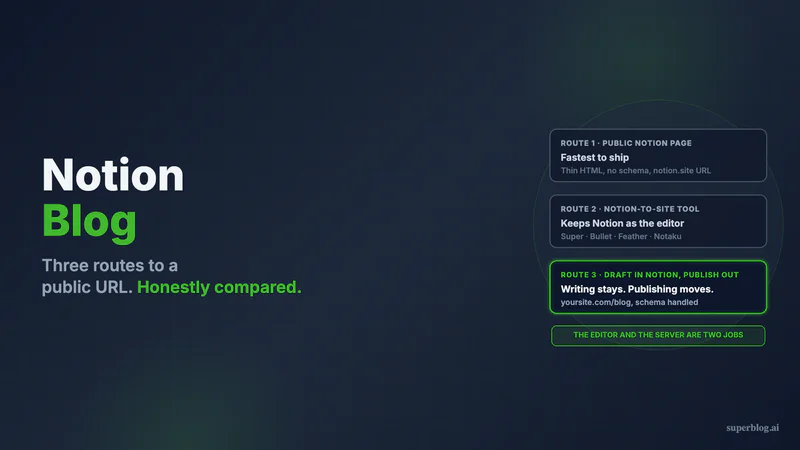
A Notion blog can be built three ways, and they differ in how much of the publishing job you hand off. Publish the Notion page itself. Point a Notion-to-site tool at your database. Or keep Notion for drafting and let a publishing platform serve the pages.
Notion is one of the better places to write a blog post. Databases give you an editorial calendar for free, comments handle review, and nobody needs training. Nothing below argues you should stop drafting there.
The argument is about the second half of the job. A post has to become an HTML document at a stable address that a crawler can read on the first pass. Notion was built as a workspace, not a web server, and that gap is why an entire category of products exists to close it.
Prices, capability checks, and what came back in the served HTML are below for all three, all pulled on August 10, 2026.
Disclosure before you read further: route three is where our product lives. Superblog is ours. That is why this post spends more words crediting the tools in route two than attacking them, and why the section on us names what we do not do, starting with the fact that we have no Notion importer at all.
Why a Notion page makes a great draft and a weak URL
Fetch a Notion page without running JavaScript and see what comes back. I did this twice on August 10, 2026, against a notion.site address and a public notion.so page. Both returned a large HTML shell whose readable text ran to 95 characters, and every one of them was this: JavaScript must be enabled in order to use Notion. Please enable JavaScript to continue.
No article text. No headings. Zero application/ld+json blocks on either page.
Google renders JavaScript, so this is not a wall. It is a queue, run on a second pass with its own budget. Which is presumably why Notion's own help center carries this note: "Notion Sites can take up to four weeks to be indexed and appear in search results" (notion.com/help/public-pages-and-web-publishing). That is Notion setting an honest expectation, and a long time to wait to learn whether a post works.
The quieter consequence matters more in 2026. Anything that requests your URL without running a browser engine gets those 95 characters: crawlers that skip rendering, link previewers, and the fetch step behind an AI assistant. A machine can only repeat your argument back to someone if the argument was in the response body when the request completed. On a raw Notion page, it was not.
Route 1: Notion's own public sharing
Free, instant, and genuinely fine for some purposes. You publish pages to the web, claim one notion.site domain, and switch on the Search engine indexing setting with the Discoverable on the web toggle. A paid Notion plan adds editable link titles and descriptions for search, themes, and Google Analytics.
Custom domains are an add-on rather than an inclusion. As of August 2026, Notion lists the Sites custom domain add-on at $10 per month, or $8 per month on annual billing, for workspace owners on paid plans, purchased separately per domain up to 25 domains (notion.com/help/notion-sites-availability-and-pricing).
That buys a hostname pointing at a Site, a title, a description, and a page. It does not buy the machinery underneath a blog that competes: no Article or Breadcrumb structured data in the served markup, no publish-time indexing ping, and the rendering behavior above on every post.
Where this is the right answer: a changelog, a public roadmap, an internal handbook, a personal page you want online this afternoon. All real uses. None of them are organic acquisition.
Route 2: A Notion-to-site tool
This category owns the search results for this topic, and it deserves better treatment than it usually gets from vendors with something to sell. Super, Bullet, Feather, Notaku and Potion all solve a real problem: they read your Notion database and serve pre-rendered pages on your domain, so the shell above stops being your problem. If your team refuses to leave Notion, one of these is very likely your answer.
They are not interchangeable, and the differences run deeper than the prices suggest. Below are the four whose live pages I could read on August 10, 2026.
Super
As of August 2026, Super lists a free tier on a super.site domain carrying a Made with Super badge, Personal at $16 per month ($144 per year) for your own domain, custom code, custom fonts and RSS/ATOM feeds, and Pro at $28 per month for manual publishing controls, advanced search, file uploads, redirects and multi-language sites. Teams bill at $5 per member monthly or $50 annually, and analytics is a separate tiered charge from $10 per month up to 10,000 views (super.so/pricing).
Sub-path hosting, meaning /docs or /blog on your existing domain, sits under Custom solutions, priced from $50 plus fees for modifications and routed through a conversation with the founders rather than a signup flow.
Super's SEO documentation covers sitemaps generated from the pages you add, title tags from the Notion page title, meta descriptions, Open Graph images from the page cover, indexing controls, per-page overrides, and canonical and author values set through Notion database properties. A solid on-page floor, properly documented.
I fetched three Super-published sites on August 10, 2026. All three served the page text in the HTML, which is the whole point of the product. All three carried a meta description. All three had zero JSON-LD blocks.
Bullet
Bullet's pricing page renders its plan table client-side, so I could not read a full tier breakdown from the served HTML. What is in that HTML is Bullet's own FAQ answer, stating that plans start at just $9/month and that $19/mo adds features such as membership and multi-lingual sites, with expert services from $499 (bullet.so/pricing, verified August 10, 2026). Treat those as entry points rather than the full picture.
On a Bullet-published site from their showcase, the page text was in the served HTML, with a canonical tag and a meta description present and no JSON-LD.
Feather
Feather is built for blogs rather than for Notion sites generally, and it shows in the output. As of August 2026, Feather prices on pageviews: $39 per month up to 10K, $79 up to 100K, $149 up to 200K, $299 up to 500K, custom above 1M, with two months free annually. Every tier includes unlimited blog sites, unlimited custom domains, analytics, SSL, comments, localization and programmatic SEO (feather.so/pricing).
Their help center carries a Sub-folders tag whose articles include a guide for routing example.com/blog to a Feather blog with a Cloudflare Worker. Subdirectory hosting is documented and supported, with the edge config on your side.
Then the part that should change how you read the rest of this post. I pulled two Feather-published blogs from their showcase on August 10, 2026, both running at a /blog path on the customer's own domain. The post HTML was server-rendered. Each post carried a self-referencing canonical on the customer's domain, plus one JSON-LD block containing Article, BreadcrumbList, Organization, Person, WebSite and ImageObject types. One served a sitemap index at /blog/sitemap.xml.
That is a real SEO stack, and any blanket claim that Notion tools are bad for search dies on contact with it. The gaps were narrow: neither blog served an llms.txt, at the blog path or the domain root, and I found no IndexNow support documented.
Notaku
As of August 2026, Notaku lists Free at $0 for 20 Notion pages on a notaku.site subdomain, Basic at $17 per month for 50 pages and one seat with a custom domain, Business at $37 for 150 pages and five seats adding custom JavaScript and CSS, password protection and full-text search, and Business Plus at $97 for 2,000 pages with unlimited seats, versions, auto sync and subdirectory hosting. VAT excluded, with a refund offered within 30 days of purchase (notaku.so).
Notaku's feature copy is refreshingly direct about the mechanism: subdomain or subdirectory hosting works using a reverse proxy such as Cloudflare or Next.js. The $97 tier unlocks it, and you still run the routing.
What the category is actually short on
Enumerated, because the blanket version would be false:
- Structured data. Feather emits Article, BreadcrumbList and Organization JSON-LD. The Super and Bullet sites I checked had none.
- Publish-time indexing. No IndexNow support documented by any of the four.
llms.txt. Not served by the Feather blogs I checked, at either path.- Subdirectory hosting. Present across the category, but as a custom engagement on Super, a $97 tier on Notaku, and a Worker you configure on Feather.
- Your writing surface is still Notion. No publishing queue independent of the sync, no SERP preview, no internal-link suggestions mined from your archive.
None of that is disqualifying. It is a specific list, the only kind worth arguing with.
Route 3: Draft in Notion, publish on a blogging platform
Routes one and two both assume the tool you write in should also serve the page. That is a preference, not a requirement. Plenty of teams keep the Notion database as the editorial calendar and drafting surface, then move finished copy into a platform whose entire job is publishing. You lose the automatic sync, which for a team shipping twice a month is a paste that takes ninety seconds.
On Superblog, three schema types are derived per post without setup: Article, FAQ, Organization. XML sitemaps rebuild on each deploy. An IndexNow ping fires at publish, so Bing, Yandex and the other participating engines hear about a post in minutes instead of waiting for a crawl. An llms.txt index is written and rewritten every deploy. Lighthouse clears 90 on every page, guaranteed, because the pages are static and images convert to WebP on upload.
Hosting at yoursite.com/blog is on every plan rather than behind a tier, and the dashboard generates the routing config for your stack. The mechanics, including the prefix strip and the trailing-slash trap, are in subdirectory blog hosting.
Two plans, both on our pricing page. Pro at $49 monthly carries 1,000 posts and 5 team members. Super at $99 raises that to 10 and adds the AI Helper, REST API, MCP, Zapier, and hreflang plus per-language sitemaps for 41 languages. Roles run Owner, Admin, Editor, Writer, Billing. The trial is 7 days without a card, and there is a 30-day money-back guarantee.
The parts of this that are annoying, stated plainly
There is no Notion importer. Superblog imports from WordPress, Ghost, Webflow, Wix, Shopify, Drupal, Blogger, Docusaurus, Framer, Jekyll, Hugo and Medium, plus generic markdown ZIP, JSON and spreadsheet files. Notion is not on that list and I will not pretend otherwise.
Two paths exist, both manual:
- The markdown ZIP import. Notion exports markdown as a
.zip, and our ZIP importer reads YAML front matter when it finds it, takingtitle,slug,date,tags,metaTitleandmetaDescription. Absent a field, it falls back to the filename. Notion names each exported file after the page title with a 32-character page ID appended, so unless you strip those IDs or write front matter first, that hex string lands in your titles and your slugs. Two hard gates: this importer requires an active paid subscription and refuses to run on a trial, and it caps at 300 posts per import. - Single-file import in the post editor. Drop in a Markdown, HTML or Word file and it creates one draft. The title comes from the file name and the slug is generated from that title. Content travels, nothing else does. Useful for moving a handful of drafts. Not a URL-preserving migration.
Two more limits belong next to the tools above. Our plans are sized for blogs under 100,000 monthly pageviews, so Feather's $299 and custom tiers cover traffic bands we do not sell into. And Pro at $49 costs three times Super Personal or Notaku Basic. If your blog is four posts a year, take the cheaper tool.
Three routes, side by side
| Notion public pages | Notion-to-site tool | Draft in Notion, publish elsewhere | |
|---|---|---|---|
| Article text in the served HTML | No, JS-required shell | Yes, on all four I checked | Yes, static pre-built pages |
| JSON-LD structured data | None found | Feather yes; none on the Super and Bullet sites checked | Article, FAQ, Organization, per post |
yoursite.com/blog | Not part of the Sites flow | Super custom engagement, Notaku $97 tier, Feather via your Cloudflare Worker | Every plan, config generated for your stack |
| IndexNow | None found | None found | Fires on publish |
llms.txt | None found | Not served by the Feather blogs checked | Generated, rewritten every deploy |
| Sync from Notion | It is Notion | Automatic | Manual, no importer |
| Entry price, Aug 2026 | Free, plus $10/mo for a custom domain | $16 Super, $17 Notaku, $9 Bullet, $39 Feather | $49 Pro |
Picking by what the blog has to do
The blog is documentation, a changelog, or a handbook. Stay on Notion's public sharing, or take Notaku for a docs site with search. Paying for an SEO stack you will not use is waste.
Nobody on the team will leave Notion, and the blog matters. Feather. It was the only one I checked already emitting Article and Breadcrumb JSON-LD on a customer domain at a /blog path, and it prices on traffic rather than on features you have to guess at.
You want the cheapest thing that puts Notion content on your own domain. Super Personal at $16 or Notaku Basic at $17. Honest products at honest prices, neither pretending to be a growth engine.
Organic search is a channel you are funding, and Notion is a writing habit rather than a requirement. Split the two. Keep the database as the calendar and the draft surface, and put the publishing layer where the search result gets built. Still deciding between platform types generally? Blog platform comparison runs seven of them against each other, and SEO friendly CMS is the checklist to test any of them against.
Resist the assumption that one product has to do both jobs. Draft wherever your team drafts. Whether the blog compounds is decided by what comes back when a machine requests the page, and that is answered by whatever serves the URL, not by whatever you typed it in.
Our 7-day trial takes no card. Paste one post in, connect yoursite.com/blog, and read the source of the page it produces.
Notion blog FAQ
Is Notion good for a blog?
For writing one, yes. For serving one, no. A public Notion page returns a JavaScript-required shell to anything that does not run a browser engine, and Notion's help center budgets up to four weeks for a Site to be indexed. If the blog exists to be found, put a publishing layer in front of the writing layer.
How do I create a blog with Notion?
Three ways, ascending in effort and capability. Publish the Notion pages directly, adding the $10 per month custom domain add-on for your own hostname. Connect a Notion-to-site tool such as Super, Feather, Bullet or Notaku, which reads your database and serves pre-rendered pages. Or draft in Notion and publish through a blogging platform, dropping the automatic sync in exchange for schema, sitemaps, indexing pings and subdirectory hosting.
Can I host a Notion blog at mysite.com/blog?
Not through Notion's own Sites flow. Among the Notion-to-site tools it exists, gated differently in each as of August 2026: Super sells sub-path hosting under Custom solutions from $50 plus fees, Notaku includes it on Business Plus at $97 per month, and Feather documents it as a Cloudflare Worker you configure yourself. Platforms built around subdirectory hosting include it on every plan and generate the routing rule for your stack.
Is Super.so or Feather better for a Notion blog?
Different jobs. Super builds Notion sites of any kind, prices from $16 per month, bills analytics separately, and treats sub-path hosting as a custom engagement. Feather is blog-specific, prices on pageviews from $39, and on the two customer blogs I checked in August 2026 was already serving Article and BreadcrumbList JSON-LD with correct canonicals at a /blog path. For a marketing blog, that output gap decides it.
Will Google index my Notion blog?
Yes, if you switch on the Discoverable on the web setting, and slowly. Google renders JavaScript, so the content is reachable on a second pass, which is why Notion states indexing can take up to four weeks. Pre-rendered pages skip that queue because the article is in the response body the first time a crawler asks.
Can I move my Notion blog to Superblog?
Manually, and I would rather say so than sell you a migration that does not exist. There is no Notion importer. Export your pages as a markdown ZIP and use the generic ZIP import, which reads YAML front matter and otherwise falls back to the filename, so strip Notion's 32-character page IDs or write front matter before uploading. That path needs an active paid subscription and takes 300 posts per import. For a few posts, the editor's single-file import creates one draft each, titled from the file name.
Your blog, without the maintenance
Fast pages, automatic SEO, no plugins to patch. Runs on yoursite.com/blog.
Sai Krishna is the Founder and CEO of Superblog. Having built multiple products that scaled to tens of millions of users with only SEO and ASO, Sai Krishna is now building a blogging platform to help others grow organically.
superblog
Superblog is a blazing fast blogging platform for beautiful reading and writing experiences. Superblog takes care of SEO audits and site optimizations automatically.