
Migrating From WordPress to a Managed Blog Platform: What Actually Happens

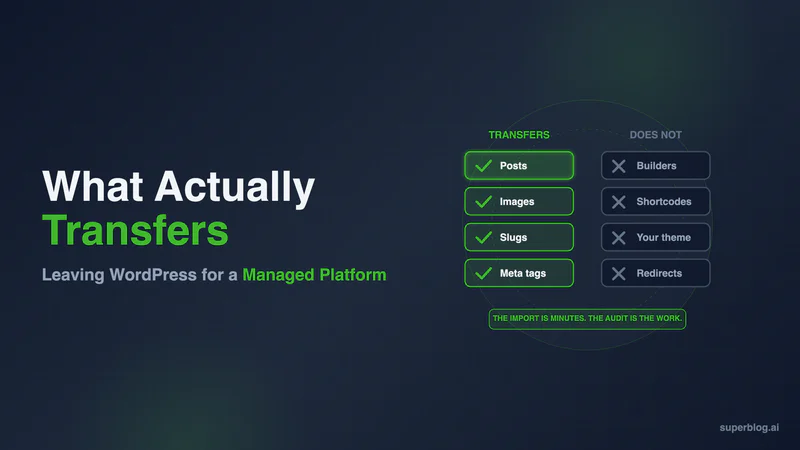
When you migrate from WordPress to a managed blog platform, what moves is your content: posts, images, categories, tags, publish dates, and metadata. What does not move is everything WordPress was doing around that content, including plugin behavior, custom fields, and your theme's layout. The import itself takes minutes. The real work sits on either side of it, in the audit before and the redirect discipline after.
The first thing to get straight is that this is a different move than the one most search results describe. Search anything close to this question and you get managed WordPress hosting: Kinsta, WP Engine, GoDaddy. Good products, different question. This guide is for someone who has decided to stop running WordPress, not to keep running it somewhere nicer.
Managed hosting and a managed platform are two different migrations
Both categories carry the word "managed," and both will tell you the technical burden stops being yours. The migrations they describe have almost nothing in common.
Managed WordPress hosting is a copy operation. Your files and database move to better infrastructure. The site looks identical afterward because it is identical. Your theme is still your theme, your plugin list is unchanged, and the update notifications still arrive every week. Uptime, caching, staging, and support quality improve. Who owns the application does not change. You do.
Moving to a managed blog platform is a conversion. Your content comes across and the machinery around it never gets rebuilt, because on the other side it is unnecessary. No plugin list to reassemble, no caching layer to configure, no schema plugin to reconcile against your SEO plugin. The CMS, the frontend, and the SEO automation all belong to the vendor. For the full definition, what a managed blog platform is lays out which layers a vendor takes over, and hosted vs self-hosted frames the ownership question behind it.
| Move to managed WP hosting | Move to a managed platform | |
|---|---|---|
| What travels | Files, database, plugins, theme | Content and its metadata |
| What you run afterward | WordPress | Nothing |
| What can break | Plugin and PHP compatibility | Anything a plugin used to do |
| Recurring work after | Same as before | None |
| Why you would do it | The servers were the problem | The stack was the problem |
One question settles which migration you are contemplating. Afterward, are you still updating plugins? If the honest answer is yes, you booked a hosting migration. Everything below assumes the answer is no.
What actually transfers
| Transfers | Does not transfer |
|---|---|
| Posts with formatting | Page-builder layouts (Elementor, Divi, WPBakery, Beaver Builder) |
| Inline and featured images | Live shortcode behavior (arrives frozen or as bracket text) |
| Categories (one per post) and tags | Custom field values and the templates that rendered them |
| Publish dates | Your theme |
| Meta titles and descriptions | Form submissions and comment threads |
| Slugs, post and taxonomy | Your accumulated redirect table |
Imports come in two shapes. Some platforms ask you to produce a WXR export file and upload it. Others read your live site through the WordPress REST API. The API path matters more than it sounds, because an export file captures a moment while an API read captures the site as it stands, images included.
- Posts, with formatting intact. Headings, lists, links, and embeds arrive as structured content. Spot-check your longest and most formatted post, not your shortest.
- Images, re-hosted rather than referenced. A good import downloads your featured and inline images and serves them from its own CDN. A lazy one points back at your old media library, so your images die the day you cancel hosting. Inspect an image URL on a migrated post and confirm the domain changed.
- Categories and tags, as real taxonomy rather than flat labels. One asymmetry to plan for: tags import as a set, categories do not. A post filed in three WordPress categories arrives with one, so posts that lean on multi-category filing need those extra categories re-added as tags.
- Publish dates. Original dates feed your sitemap and how engines read freshness, so chronology surviving matters.
- Metadata. Meta titles and descriptions carry over. Verify these hardest, because on WordPress they were never core fields.
On Superblog a typical blog finishes in five to ten minutes, large archives inside thirty. It is short precisely because nothing about plugins is being reconstructed.
What does not transfer, and what to do about each
This section decides whether your move feels clean or feels like a demolition. None of it is a flaw in any particular platform, only a consequence of leaving an ecosystem where functionality came from third-party code running on your server.
Page-builder layouts. If posts were built in Elementor, Divi, WPBakery, or Beaver Builder, this is your largest risk. Those builders do not store a post as portable HTML. They keep layout instructions in their own data structures and render them at request time with their own CSS and JavaScript. Take the builder away and what remains ranges from clean content to almost nothing. Trial-import ten builder-heavy posts before you plan a timeline.
Shortcode behavior. A shortcode's rendered output often does come across as static HTML, because WordPress runs it through the content filter before the API returns it. What does not come across is the thing behind it. A pricing-table shortcode arrives as a snapshot, frozen at import and no longer updating. One from a deactivated plugin arrives as literal bracket text. Search your archive for [ before migrating.
Custom fields. Advanced Custom Fields values sit outside post content, and the templates that displayed them are code you are leaving behind. If posts render review scores, spec tables, or event details from custom fields, that layer gets rebuilt as ordinary content or dropped.
Your theme. The design does not travel. You pick a template on the new platform and customize within it, which for most business blogs is a relief. If your brand is built around a bespoke design system, count it as a real cost.
Forms, submissions, and comment threads. A form on WordPress is a plugin, and both the submissions behind it and your comment threads are separate data stores that no post import touches. Export what matters before you shut anything down. Managed platforms typically ship native lead-capture forms, so the form itself is replaced rather than moved.
Your accumulated redirect table. A redirect plugin used for years holds 301s pointing from URLs you retired long ago. That table is link equity sitting in a database row, invisible to any content export, and losing it is permanent. Export it as CSV first, before anything else in the decommissioning sequence gets touched.
Anything gated. Memberships, courses, drip content, and opt-in downloads are application logic, not content.
How to migrate from WordPress to managed platforms without losing rankings
This is the anxiety underneath the project, and it deserves precision rather than reassurance. Your rankings are attached to URLs. Google does not know that WordPress was assembling the page behind a given URL. It knows the URL returned a page, the page satisfied a query, and other pages link to it. Preserve the URL and serve equivalent content at it, and the thing rankings attach to is intact. So the real question is not whether you will lose rankings, but which of your URLs are about to change shape.
The slug is rarely the problem. Any serious platform keeps how-to-do-thing as how-to-do-thing. What changes underneath people is the path wrapped around it, and there are four common causes.
Dated permalinks. Plenty of installs still run the /2019/03/post-name/ structure inherited from a default years ago. Cleaning that up is an improvement, and it also rewrites every URL you have, turning a redirect-optional migration into a redirect-mandatory one.
A new path prefix. If your blog sat at the domain root and lands at /blog/, or the reverse, every URL changed even though every slug is identical.
Taxonomy bases. WordPress serves archives at /category/name/ and /tag/name/, and platforms differ here. Archives earn real impressions on mature blogs, so pull them from Search Console rather than assuming they do not matter.
The URLs nobody inventories. Paginated archives at /page/2/, author archives, attachment pages, and feed endpoints. Each needs a decision, because something is linking to some of them right now.
Then work in this order: export twelve months of ranking URLs from the Search Console Pages report, map each to its destination, and write a 301 for every row that changed. Use 301 rather than 302, and verify a sample with curl -I instead of a browser, since redirect caching will show you a result that is no longer true. The step-by-step migration guide covers import, DNS, and domain configuration in full.
After cutover, resubmit your sitemap and leave it alone. The one signal worth acting on immediately is a cluster of new "Not found" URLs in the Page Indexing report in the first few days, which means a redirect gap. Judge clicks and impressions at day 30, not day three. The full monitoring cadence is in the exit checklist.
Superblog as a reference implementation, limits included
Superblog is a managed blog platform, so it shows what the destination side of this move looks like in practice.
Its WordPress import reads your live site over the REST API, so no export file enters the picture. Posts, inline and featured images, categories, tags, publish dates, and metadata come across in one pass, with images pulled down and re-served from Superblog's CDN rather than pointed back at your old media library. One caveat worth knowing before you run the test above: image re-hosting runs on paid sites. A trial import brings your posts across with images still pointing at your WordPress media library, and they are pulled onto Superblog's CDN once the plan is active.
Meta titles and descriptions import from Yoast or SEOPress. Rank Math stores them differently, so check a sample of posts and expect to re-enter meta on that path. If you run Yoast, the import also carries its JSON-LD schema across, which is the piece most migrations quietly drop. Slugs stay identical across posts, categories, and tags, which keeps most redirect work off your plate. Afterward, schemas, XML sitemaps, canonical tags, and IndexNow submissions generate on publish. Pro is $49 a month and Super is $99, with a 7-day trial that does not ask for a card.
Now the limits, because a fit judgment made without them is not a fit judgment. It is blog-only: no store, no membership or paid-subscription layer, and no newsletter sending engine, so if email drives your growth you keep an email provider beside it. It is not a general website builder, so a full marketing site still lives elsewhere. Arbitrary plugins cannot be installed, which is the point and also a genuine constraint if you were leaning on one. Imported posts are all attributed to the account that ran the import, so multi-author archives need bylines reassigned afterward. Plans meter under 100,000 pageviews a month, seats cap at 5 on Pro and 10 on Super, and post caps are 1,000 on Pro and 10,000 on Super, which is the limit an old WordPress archive is most likely to meet. Refunds are pro-rata on yearly billing with none on monthly, so do your evaluating inside the trial. The point-by-point comparison against WordPress sits on our WordPress blog alternative page.
Who should not make this move
A meaningful minority of WordPress blogs should stay put, and one test sorts them quickly. Is your blog a separable layer, or is it wired into your product? If your posts are posts, they separate cleanly. If they are load-bearing parts of a larger WordPress application, you are contemplating a rebuild rather than a migration. Two profiles fail the test outright.
You run WooCommerce. If posts reference products through WooCommerce shortcodes or blocks, the blog is not separable from the store.
You run memberships, courses, or an LMS. Gated content, drip schedules, and student progress are application logic. MemberPress, LearnDash, and their peers do things no blog platform ships.
Beyond those two, the case turns on how much of WordPress's flexibility you actually use and whether engineers on your team want their hands on the CMS. Why businesses are switching works through that judgment with numbers attached.
One middle path resolves many of these cases: blog and product do not have to share a platform. Subdirectory hosting runs content at yoursite.com/blog while your store or member area keeps running on WordPress elsewhere on the domain, so authority stays consolidated and you split by layer rather than forcing one tool to do both jobs. If you are still choosing a destination, the five paths off WordPress compares the options with costs attached.
What the move costs in time and money
Time. The import is minutes. The project is not. For a blog of a few hundred posts, budget a day of focused work spread over a week: two to four hours auditing content and mapping URLs, minutes for the import, two to four hours on redirects and domain routing, an hour or two verifying, then thirty days of monitoring at ten minutes a week. Page-builder archives and dated permalinks push the audit end higher.
Money. Run both stacks in parallel for one billing cycle. That overlap month is the honest price of a safe cutover. Against it, subtract what leaves: hosting, premium plugin and theme renewals, backup and CDN subscriptions, and the maintenance hours themselves. Our WordPress maintenance checklist puts a well-run business blog at four to eight hours of attention a month. Price those hours at what your team costs and the comparison usually stops being close.
Frequently asked questions
What is the difference between managed WordPress hosting and a managed blog platform?
Managed WordPress hosting takes over the servers underneath your install. WordPress itself remains yours to operate, along with every theme update, plugin version, and conflict that comes with it. A managed blog platform takes over the layers above the servers as well, so the CMS, the reader-facing frontend, and the SEO automation are all vendor software. The difference shows up in your calendar: one leaves you a recurring maintenance queue, the other leaves you nothing to maintain.
Will I lose my rankings if I move off WordPress?
Rankings attach to URLs, not to the software that produced them. If the URL is unchanged and the content at it is equivalent, there is nothing for rankings to fall off. Trouble comes from URLs that quietly changed shape during the move, usually dated permalinks being cleaned up, a new path prefix, or category archives landing somewhere new. Inventory your ranking URLs from Search Console first, 301 anything that changed, and judge the outcome at day 30.
How long does migrating to a managed blog platform take?
The content import is minutes, and on Superblog most blogs finish in five to ten. The project around it runs about a day of focused work spread over a week: audit, redirect mapping, domain routing, and verification, then thirty days of light monitoring. Page-builder archives take longer, because that content has to be reviewed and often reworked.
What happens to my WordPress plugins?
Most stop being needed. Caching, image compression, sitemap generation, schema markup, and security scanning are handled natively, so they leave your stack outright. The ones needing a decision are plugins doing something a blog platform does not do at all: memberships, e-commerce, LMS functionality, and custom application logic. Inventory plugins by the job they do rather than by name, then mark each job replaced, relocated, or dropped.
Do I need a developer to do this?
For a subdomain, no: a CNAME record at your registrar is the whole job. Subdirectory hosting at yoursite.com/blog, the stronger choice because it keeps authority on one domain, needs a routing rule added to your main site's configuration. That is a small task for whoever already deploys that site, and the content migration itself requires no code.
Should I keep my WordPress site running after I migrate?
Leave it up until the new blog has handled live traffic cleanly for a week, then archive it before deleting. During that window the old install is still publishing a full copy of your content at a second address, so lock it behind a password or keep crawlers out of it. Check where your domain is registered before cancelling hosting, because bundled domains can stop renewing along with the plan.
If maintenance is what sent you looking, start a Superblog trial and import your archive before you decide anything.
Your blog, without the maintenance
Fast pages, automatic SEO, no plugins to patch. Runs on yoursite.com/blog.
Sai Krishna is the Founder and CEO of Superblog. Having built multiple products that scaled to tens of millions of users with only SEO and ASO, Sai Krishna is now building a blogging platform to help others grow organically.
superblog
Superblog is a blazing fast blogging platform for beautiful reading and writing experiences. Superblog takes care of SEO audits and site optimizations automatically.