
HubSpot vs WordPress for Blogging: What B2B Marketing Teams Actually Choose (2026)

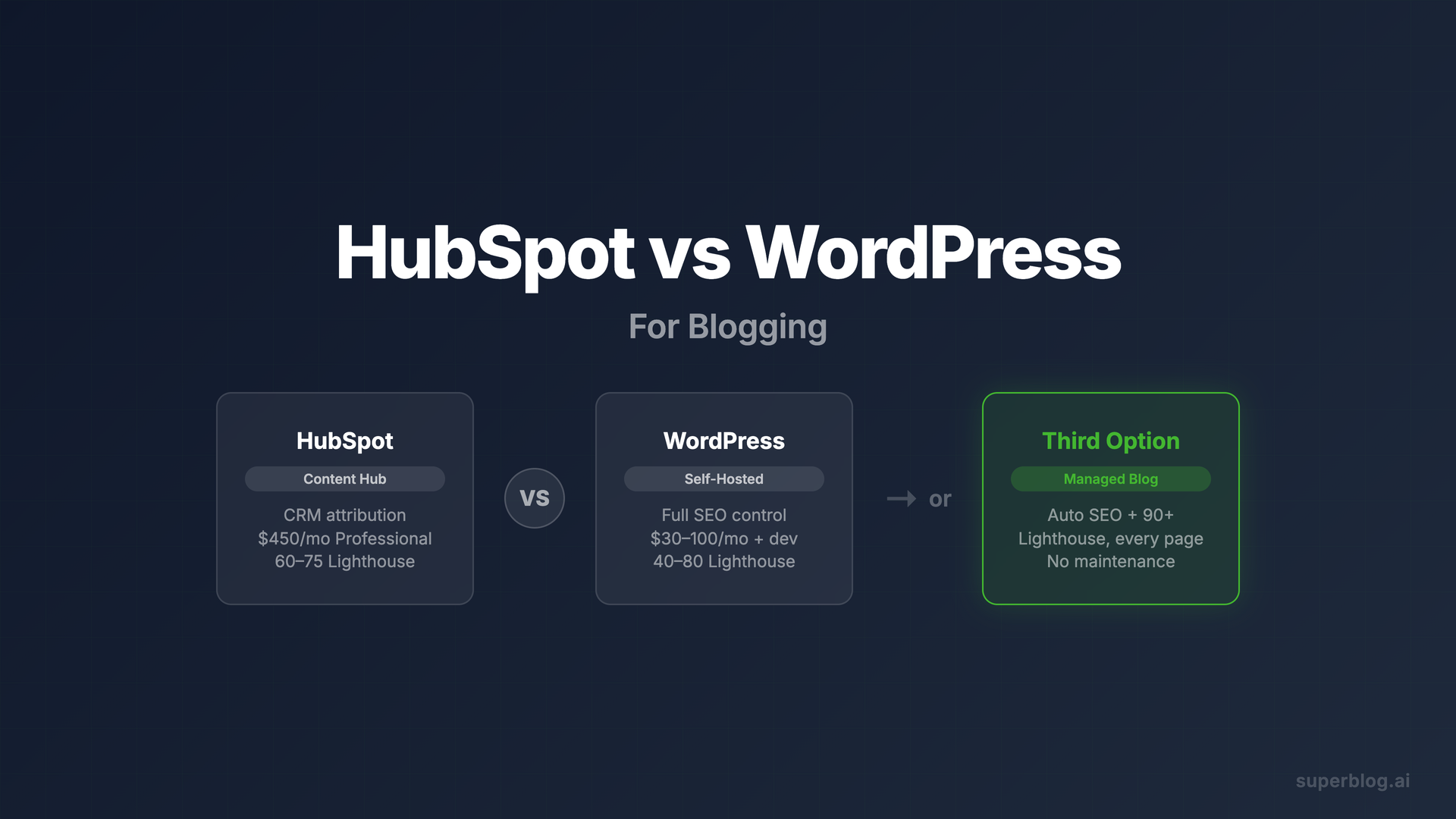
HubSpot vs WordPress for blogging is a real decision for B2B marketing teams, and it splits almost cleanly down two lines: HubSpot gives you an integrated content hub tied to your CRM, at a price that reflects it; WordPress gives you complete control over your blog infrastructure, with all the maintenance that comes with it.
Neither answer is wrong. They serve different operational realities. What this post does is lay out the actual trade-offs for blogging specifically, so your team can make the call with accurate information rather than marketing copy from either vendor.
What HubSpot Content Hub Actually Gives You for Blogging
HubSpot's blogging module has been the default choice for B2B marketing teams running inbound programs for over a decade. The reasons are specific, not vague.
The genuine strengths
Attribution that actually works. Because HubSpot owns your CRM, your blog, and your forms, the attribution loop is closed out of the box. When a lead reads three blog posts and then books a demo, HubSpot connects those touchpoints without any integration work. This is the single biggest operational advantage for marketing teams running account-based or inbound programs.
Content strategy tools built in. HubSpot's topic clusters, pillar page builder, and SEO recommendations are part of the same interface where your team writes. You do not need a separate tool to plan content architecture. The campaign-level view, where you attach blog posts to specific campaigns and measure them in aggregate, is genuinely useful for reporting to leadership.
No developer required for most tasks. Smart CTAs, A/B testing blog headlines, and personalized blog content based on CRM properties are all doable without engineering support. For a lean marketing team, that matters.
Everything in one login. Blog analytics, contact records, lead nurturing workflows, and social publishing are all in HubSpot. For teams already running HubSpot as their marketing operating system, adding Content Hub means adding capability without adding a separate platform.
The real costs
Professional tier is $450/mo billed annually, $600/mo billed monthly. This is the tier where HubSpot's blogging tools become genuinely useful for B2B teams. The Starter plan at $20/mo per seat exists, but it does not include the campaign attribution, smart content, or team collaboration that drive the HubSpot blogging value proposition. Most marketing teams buying HubSpot for its blogging stack are buying Professional.
The current tier prices and what a blog alone costs are in HubSpot CMS Hub pricing.
You are renting, not owning. HubSpot's blogging platform does not offer a clean export path. You can export post content, but your blog's URLs live on HubSpot's infrastructure. If you ever switch platforms, you face a redirect migration and risk losing rankings built over years. The data is technically yours; the architecture is not.
Performance is not a priority. HubSpot-hosted blogs typically score in the 60-75 range on Google Lighthouse performance tests. For B2B companies where organic traffic drives pipeline, page speed is a ranking factor and a conversion factor. HubSpot's infrastructure optimizes for ease of use, not raw performance.
The HubSpot bundle tax. HubSpot's pricing model is built around bundles. Content Hub Professional at $450/mo gives you blogging tools, but full Marketing Hub functionality, which many B2B teams need for email, automation, and lead scoring, requires Marketing Hub on top of that. The all-in-one promise becomes an all-in-one bill.
What WordPress Gives You for Blogging
WordPress powers roughly 43% of all websites and a significant share of B2B company blogs. Its dominance reflects genuine advantages, especially for teams that want full control.
The genuine strengths
Total control over your blog's architecture. WordPress lets you configure every technical SEO element: canonical URLs, hreflang tags, custom schema markup, structured data, robots.txt, and more. With plugins like Yoast or Rank Math, teams with SEO chops can get precise about technical configuration in ways HubSpot does not allow.
The plugin ecosystem. Over 60,000 plugins exist in the WordPress directory. If you need a specific integration, form type, analytics setup, or content workflow, there is likely a plugin for it. This flexibility is real, and for teams with a developer, it is a genuine competitive advantage.
No vendor lock-in on content. Your WordPress content lives in a database you control. Export it anytime. Migrate to any other platform with a standard XML export. The content portability is genuine.
Subdirectory hosting is native. Running your blog at yourcompany.com/blog, which passes domain authority from your main site to your blog content, is straightforward on WordPress. This matters for domain authority consolidation.
The real costs
The maintenance tax is not optional. WordPress requires active maintenance: plugin updates, theme updates, WordPress core updates, security monitoring, and backups. Over 90% of WordPress vulnerabilities are found in plugins and themes, not the core software. A business blog that goes unmaintained for three months is a security risk. This work either falls on a developer, an agency, or a managed WordPress host, all of which cost money.
Performance requires deliberate effort. Default WordPress installations score 40-60 on Lighthouse. Getting to 80+ requires a performance plugin (WP Rocket, Nitropack), a CDN, image optimization, and ongoing Core Web Vitals monitoring. That is a legitimate technical project, not a one-time setup. See our WordPress maintenance cost breakdown for what this actually runs per year.
The real cost is higher than the software price. WordPress software is free. Running it for a business blog is not. Managed hosting on a performance-grade provider like WP Engine or Kinsta runs $30-100/mo. Add premium plugin licenses, a developer for ongoing maintenance, and occasional incident response, and the real cost of a well-run WordPress business blog lands between $200-500/mo when you account for all the time and tools involved.
SEO automation requires configuration. Yoast and Rank Math give you SEO control, but they do not automate it. JSON-LD schema markup requires setup. IndexNow requires a plugin or manual integration. Sitemaps are generated but not submitted automatically on publish. Teams that want "publish and have it indexed" need to build that workflow manually or through plugins.
For a full breakdown of what WordPress actually costs a business blog, including the hidden plugin and maintenance bills, see our WordPress alternatives guide.
Decision Table: HubSpot vs WordPress for Blogging
Who Should Pick HubSpot for Blogging
HubSpot Content Hub Professional makes sense for a specific type of B2B marketing team.
Pick HubSpot if your team is already running Marketing Hub or Sales Hub and the blog is one part of a larger inbound system, not a standalone content investment. If your marketing director's quarterly report requires proving blog-to-pipeline attribution, and you do not want to wire that together from Google Analytics and Salesforce, HubSpot's closed-loop attribution is worth the price.
Also pick HubSpot if your team is small and non-technical, and the alternative is paying a developer to maintain WordPress. At $450/mo, HubSpot Content Hub Professional is not cheap, but it does eliminate a category of operational overhead that real WordPress maintenance involves.
The honest caveat: if your primary goal is organic search traffic at scale, HubSpot's performance limitations and restricted technical SEO access are real headwinds. Teams that want to compete on search need a platform built for it.
Who Should Pick WordPress for Blogging
WordPress is the right call when your team has a developer and wants maximum flexibility.
Pick WordPress if you need specific integrations that do not exist in HubSpot's ecosystem, if you need full technical SEO control, or if you are building a content operation that needs to own its infrastructure. WordPress also makes sense for teams that are not running HubSpot as their CRM, where the platform's attribution advantage disappears.
The honest caveat: committing to WordPress means committing to maintaining it. A blog that launches on WordPress and then gets handed to a content team with no technical support tends to accumulate plugin debt, performance problems, and eventually a security incident. If maintenance is not planned for, WordPress is not actually the flexible choice.
The Third Option: A Blog That Removes the Trade-Off
Most B2B marketing teams evaluating HubSpot vs WordPress are trying to solve for the same thing: a blog that ranks, converts, and does not require constant attention.
HubSpot solves the attribution and maintenance problem but adds cost and performance constraints. WordPress solves the flexibility and SEO control problem but adds maintenance overhead and real operational costs.
There is a third path that is worth knowing about before you commit to either: a managed blog platform purpose-built for organic growth.
Superblog is built exactly for this. It is not a CMS layer on top of a website builder. It is the complete blog stack: CMS, frontend, hosting, SEO engine, and performance infrastructure. What that means in practice:
Performance is automatic. Every Superblog site scores 90+ on Google Lighthouse, on every page, without configuration. JAMStack architecture and a 200+ location CDN are the infrastructure. You do not optimize this; it is already done.
SEO is automated, not configured. JSON-LD schemas for Article, FAQ, and Organization are generated on every post. When you publish, IndexNow fires automatically and notifies search engines in real time. An XML sitemap updates on every deploy. LLMs.txt is generated automatically. None of this requires a plugin, an integration, or a developer.
It works with your existing site, including HubSpot-built ones. Superblog runs at yoursite.com/blog via subdirectory hosting, regardless of what your main site runs on. If your marketing site is built on HubSpot, Webflow, Framer, or Next.js, Superblog drops in as your blog without touching the rest of your stack. You get subdirectory hosting, which means your blog content builds domain authority for your main site, not a separate domain.
No CRM bundle required. You do not need to buy a CRM platform to get a fast, SEO-automated blog. Superblog pricing starts at $29/mo and goes to $99/mo for AI features and team collaboration. That is not a lock-in to a broader platform; it is a flat rate for a managed blog.
No maintenance. No plugin updates. No security patches. No hosting bills. No performance optimization projects. You publish content. Everything else is handled.
For teams considering HubSpot Content Hub primarily for its blogging functionality and not because of deep CRM integration, Superblog covers the blog use case at a fraction of the price and with better SEO outcomes.
Migration Paths
Moving from WordPress to HubSpot
HubSpot has a WordPress import tool that pulls posts into Content Hub. The migration handles content and images. URL structure changes: your WordPress slugs will typically move to HubSpot's URL format, which requires 301 redirects to preserve rankings. Plan for redirect configuration work before you migrate a live site with established organic traffic.
Moving from WordPress to Superblog
Superblog imports directly from the WordPress REST API. No file exports needed. Posts, images, categories, tags, and metadata all pull in one step. URL slugs are preserved exactly, so your existing rankings are not disrupted. Most migrations complete in 5-10 minutes. The full process is in our WordPress migration guide.
Moving from HubSpot to WordPress or Superblog
Export your blog content from HubSpot as HTML or via the API. Redirect your existing HubSpot blog URLs to the new platform. The redirect work is the main project; content migration is manageable. The risk here is rankings built on HubSpot-hosted URLs, which is a real switching cost for teams with significant organic traffic.
FAQ
Is HubSpot good for blogging?
HubSpot is good for blogging if your team is already running HubSpot's CRM and you need attribution between blog content and pipeline. The content tools are solid, the interface is clean, and the campaign-level reporting is genuinely useful. The limitations are performance (60-75 Lighthouse scores are common) and technical SEO flexibility (you do not have access to template-level code). For teams where blog-to-revenue attribution is the primary requirement, HubSpot Content Hub Professional is a defensible choice.
Should I move my blog from WordPress to HubSpot?
Only if you are already running HubSpot as your CRM and want to close the attribution loop without a custom integration. Moving your blog to HubSpot primarily for the blogging features is rarely worth the cost or the platform lock-in. If you are evaluating the move, confirm that the attribution reporting you need requires native HubSpot blog hosting, or whether a HubSpot tracking code on a separate blog platform covers your needs.
How much does HubSpot blog cost?
HubSpot Content Hub Professional is $450/mo billed annually or $600/mo billed monthly (as of July 2026). The Starter plan starts at $20/mo per seat billed monthly ($15/mo annually), but it does not include the campaign attribution, smart content, or team collaboration features that drive most B2B teams' interest in HubSpot blogging. If you are evaluating HubSpot for a serious B2B blog program, budget for Professional.
Can I use Superblog with HubSpot?
Yes. Superblog runs at yoursite.com/blog via reverse proxy subdirectory hosting, which works regardless of what your main site or marketing platform uses. If your main site is HubSpot-hosted, Superblog handles the blog at yoursite.com/blog. You keep HubSpot for your main site and CRM; Superblog handles the blog with automatic SEO, 90+ Lighthouse scores, and no maintenance overhead. You can also use HubSpot's tracking code on your Superblog site for analytics continuity.
What is the SEO difference between HubSpot and WordPress for blogging?
WordPress gives you more technical SEO control: full plugin access, custom schema configuration, and direct template editing. HubSpot limits what you can configure at the technical level but gives you campaign-level content strategy tools. In practice, both require active configuration to get SEO right. Neither platform automates schema markup, IndexNow submission, or LLMs.txt generation out of the box. If SEO automation is the goal, a purpose-built platform like Superblog covers that automatically. See our HubSpot blog SEO guide for a deeper look at HubSpot's SEO capabilities and limitations.
Which platform is better for B2B content marketing in 2026?
For B2B content marketing, the answer depends on where the blog sits in your marketing stack. HubSpot wins on attribution and campaign management. WordPress wins on flexibility and technical SEO control. Both require ongoing attention to work well at scale. For teams where the blog is the primary acquisition channel and organic traffic is the goal, a managed platform purpose-built for that outcome, like Superblog, often outperforms both on the metrics that matter most: search rankings, page speed, and time spent on maintenance versus content. The blog platform comparison guide covers the full decision framework.
The Bottom Line
HubSpot vs WordPress for blogging is not a question with one right answer.
HubSpot Content Hub Professional is the right call for B2B marketing teams already running HubSpot as their operating system who need closed-loop attribution between content and pipeline. The $450/mo price reflects real value if that is your primary requirement.
WordPress is the right call for teams with developer resources who want complete flexibility and technical SEO control, and who are prepared to own the maintenance, performance optimization, and security work that comes with running it well.
Both paths work. Neither is maintenance-free. And for teams where the primary goal is a blog that ranks without becoming a technical project, there is a third option purpose-built for exactly that.
If you want to see what a managed blog looks like in practice, Superblog's 7-day free trial requires no credit card. Most teams have a live blog in under an hour.
Your blog, without the maintenance
Fast pages, automatic SEO, no plugins to patch. Runs on yoursite.com/blog.
Sai Krishna is the Founder and CEO of Superblog. Having built multiple products that scaled to tens of millions of users with only SEO and ASO, Sai Krishna is now building a blogging platform to help others grow organically.
superblog
Superblog is a blazing fast blogging platform for beautiful reading and writing experiences. Superblog takes care of SEO audits and site optimizations automatically.