
Framer vs Webflow 2026: Which Runs a Company Blog Better?

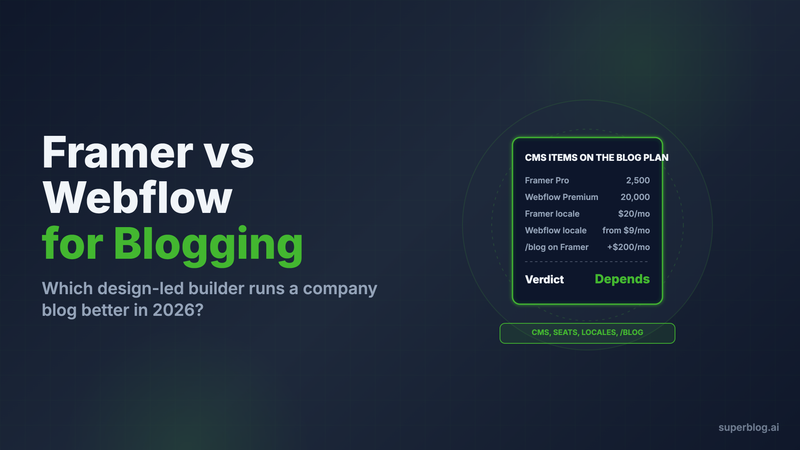
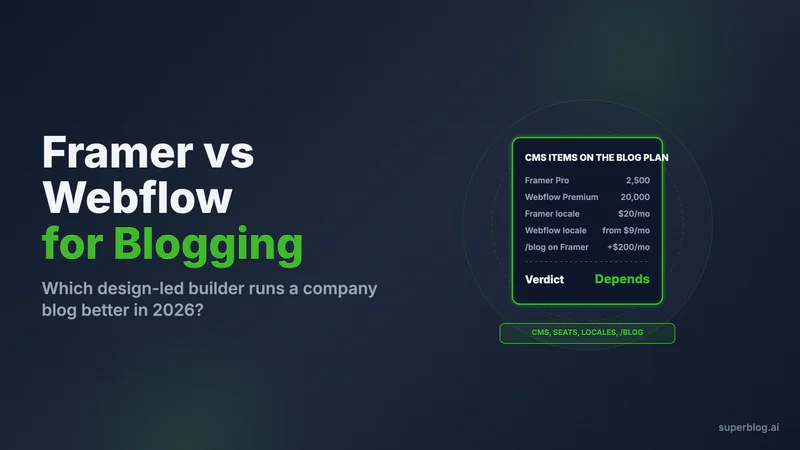
In Framer vs Webflow for a company blog, Webflow is the stronger CMS and Framer is the cheaper, faster canvas. Webflow's Premium plan holds 20,000 CMS items, schedules them natively and exports them to CSV from the CMS panel. Framer's Pro plan holds 2,500 items before add-ons, has no native scheduling, and charges $200 a month extra before another tool can serve /blog on its domain.
Both are design-first site builders, and both run a blog well enough for a small team. The gaps open with volume, languages and routing. Every figure below comes from Framer's and Webflow's own pricing pages and help centers, checked in November 2026.
The short answer
Pick neither for the blog if it is your main acquisition channel. Keep the marketing site on the builder your designer prefers and run yoursite.com/blog on a dedicated publishing platform such as Superblog. The last section covers how that works on each builder, because the routing differs sharply between the two.
Pick Webflow if the blog is a publishing program: dozens of posts a month, several writers, a calendar, and crawl controls you want to edit yourself.
Pick Framer if the blog is a supporting page on a design-led marketing site, one or two people publish, and you value build speed over CMS depth.
Framer and Webflow compared for blogging
CMS capacity: how many posts each plan holds
Webflow wins. On Webflow's pricing page, the Basic plan has no CMS items at all, so a blog starts on Premium. Premium costs from $25 a month on yearly billing (from $39 month to month, rising with the bandwidth tier) and includes 20,000 CMS items and 40 Collections. A post, an author and a category each count as an item, so a blog with a few hundred posts barely registers.
Framer's Basic plan includes 1,000 items and 2 collections, and those numbers are fixed. Pro includes 2,500 items and 10 collections, and add-ons raise the item cap by 10,000 at a time for $20 a month billed yearly, up to 40,000. A posts collection plus an authors collection fills Basic's two slots on day one.
For a team shipping three posts a week, Framer Pro's 2,500 items last many years. Capacity becomes the deciding factor only for archives you import from another platform or for programmatic pages. The detail for Webflow sits in our Webflow blog guide, and the Framer side is in Framer blog CMS.
Writing workflow and editor seats
Framer is cheaper per writer. Webflow has the better publishing tools.
Framer sells two paid seat types. A content editor updates the CMS and on-page copy for $10 a month billed yearly. An additional editor can also design and publish for $20. Viewers and the workspace owner are free. Basic and Pro stop at 10 seats.
Webflow's limited seat, which edits content and builds pages with components, costs $15 per seat each month on yearly billing, or $19 month to month. A full seat that can design whole sites is $39. Reviewer seats for comments are free.
The bigger difference is scheduling. Webflow's Premium plan lists scheduled publishing for CMS items, plus per-item and multi-item publishing, so a post goes live at 9 a.m. without anyone opening the Designer. We found no native scheduling in Framer's help center. Framer's Marketplace fills the gap with third-party plugins such as Framer CMS Scheduler.
Webflow's publishing workflows, which isolate staged changes and publish them to production in one step, sit on its Team plan at $2,500 a month with an annual contract.
SEO controls
Webflow gives you more to edit. Framer automates the defaults and stops there.
Framer's SEO guide says every site gets sitemap.xml and robots.txt automatically. It recommends that you implement JSON-LD structured data, which means writing it yourself in a custom code block. Redirects go in Site Settings, and Framer's pricing lists them on Pro, not Basic. An llms.txt file is something you upload as a static file on Pro or Enterprise, and it does not update when you publish a post.
Webflow's paid site plans list these controls:
- Robots.txt and llms.txt settings.
- A schema markup field in Page settings, filled by hand or with one click of Webflow AI. On a Collection template, the generated schema pulls in each post's fields.
- Canonical tags, global or per page.
- 301 redirects.
- A generated XML sitemap.
- Per-item control over whether a CMS post is indexed (Premium).
Framer leaves structured data to you. Webflow generates it with AI when you click the button on a page or post template, and someone has to check it and keep it current. Both handle titles, descriptions and Open Graph images per page. Our Framer SEO review goes deeper on what Framer leaves to the team.
Localization pricing
Webflow is cheaper for two or three languages. Framer is cheaper from four up.
Each Framer locale costs $20 a month on yearly billing ($25 month to month). The rate is the same on Basic and Pro, and the cap is 20 locales.
Webflow sells Localize in two tiers, priced per locale per month billed yearly:
- Essential: $9 per locale, up to 3 locales, 10,000 translated words a month.
- Advanced: $29 per locale, up to 10 locales, 50,000 words a month, plus localized URLs and automatic visitor routing.
Translated slugs matter for search in each language, and they sit on Advanced. So the fair comparison past three locales is $29 on Webflow against $20 on Framer. Five extra languages cost $1,200 a year on Framer and $1,740 on Webflow Advanced ($29 x 5 x 12).
What a blog team pays, summed
These totals use yearly billing and the prices above. The team shapes are our assumptions.
One writer besides the site owner, one language:
- Framer: Pro $360 + one content editor $120 = $480 a year.
- Webflow: Premium $300 + one limited seat $180 = $480 a year.
Three writers besides the site owner, two extra languages:
- Framer: Pro $360 + three content editors $360 + two locales $480 = $1,200 a year.
- Webflow with Localize Essential: Premium $300 + three limited seats $540 + two locales $216 = $1,056 a year.
- Webflow with Localize Advanced: $300 + $540 + $696 = $1,536 a year.
The site plan is the small line in every case. Seats and languages make up most of the bill. Framer's full plan breakdown, with monthly rates, is in Framer pricing.
Speed
Close to even, with one Framer caveat. Both builders serve published pages from a CDN. Framer's pricing page lists 20 CDN locations on Basic and 300+ on Pro. Webflow lists a global CDN on its site plans. Neither vendor guarantees a page speed score.
Staging and previews
Webflow for most teams, Framer on Pro. Every Webflow site publishes to a free webflow.io address, a place to test changes before they reach your domain. The free Workspace includes 2 staging sites with 50 CMS items each.
Framer lists staging and branching with previews on Pro. Basic has neither, so on Basic every publish goes straight to production.
Export and lock-in
Each one exports a different half.
Framer's porting guide says the published site downloads as HTML, CSS, JavaScript and assets that you can host elsewhere. CMS content comes out through plugins as CSV or JSON. So the design comes out in one download, and the posts need a plugin.
Webflow exports a Collection to CSV straight from the CMS panel, including archived items. Two limits apply. The CSV holds only the current locale, and image fields export as links to files still hosted on Webflow. Code export needs a paid Workspace (Core is $19 a month billed yearly), and Webflow's help center says the exported code leaves out CMS content entirely.
For a blog, the posts are the asset. Webflow's built-in CSV gets them out with fewer steps.
The /blog question
If the whole site lives on one builder, its own CMS blog sits at yoursite.com/blog on either platform with no extra setup. The routing question appears when the blog runs on a different tool and still needs to sit under your main domain, which is where it builds authority for the whole site.
Webflow offers no built-in way to serve one path from a different host. The route goes in front of the domain instead. The domain's DNS records move to Cloudflare's free plan and are set to Proxied, and a Cloudflare Worker on the /blog route sends that path to the blog platform. Every other path keeps loading from Webflow.
On Webflow, that Worker setup works on any site plan with a custom domain.
On Framer, the same route needs more. Framer's Cloudflare proxy guide limits reverse proxying to Pro sites that buy the Advanced Hosting add-on, and to Enterprise. That add-on also unlocks Framer's own Multi Site rewrites, which can serve an external site at a path. Advanced Hosting is $200 a month billed yearly, so either way the /blog route adds $2,400 a year to a Framer Pro site. The route that works on any Framer plan is a subdomain, blog.yoursite.com.
Choose Framer if
- A designer builds the site and also publishes the posts.
- One or two people write, in one language or more than three.
- You want the cheapest writer seats, at $10 a month each.
- You are fine adding a plugin for scheduled posts.
Choose Webflow if

- Several writers publish on a calendar and you want native scheduling.
- The archive is large, or you plan to import one.
- You want per-post indexing control, and robots.txt and llms.txt as site settings rather than uploaded files.
- You may later move the blog to a separate tool at
/blogwithout paying for a hosting add-on.
If you are already leaning away from both, our list of Webflow alternatives compares the other options on the same factors.
Where Superblog fits: the site on a builder, the blog on a publishing platform

Framer and Webflow are built to design websites. A blog that has to rank needs a different set of jobs done on every post: schema, sitemaps, indexing pings and a calendar. Superblog does those jobs, and the marketing site stays on the builder your designer knows.
On Webflow, Superblog runs at yoursite.com/blog through the Cloudflare Worker described above (Webflow setup steps). The dashboard generates the Worker code for you. On Framer, a subdomain such as blog.yoursite.com works with every plan, and /blog needs Framer Enterprise or a Pro site carrying the Advanced Hosting add-on. Our Framer setup page walks through both routes. Subdirectory hosting is on every paid Superblog plan. A trial site cannot connect /blog. Pick a paid plan first, then add the Worker.
What the blog gets, measured against the factors above:
- SEO. Every post ships with Organization, WebPage, Article and ImageObject JSON-LD, and an FAQ block adds FAQ markup. Each deploy rebuilds the XML sitemaps and
llms.txt. IndexNow pings Bing and Yandex the moment a post is published, and AI crawlers can fetch any post as plain markdown by adding.mdto its URL. - Workflow. Three roles (Admin, Editor, Writer), more than one author per post, and from Pro up, a publishing schedule plus review comments that teammates leave on drafts.
- Speed. Pages score 90+ on Lighthouse. Uploaded images are converted to WebP without a setting to switch on, and pages load from 200+ CDN edge locations.
- Languages. Multilingual SEO with hreflang on Super and above, with no charge per language.
- Migration in. Point the Webflow importer at your API token, Collection ID and post body field, and your slugs come across intact. Tags, SEO titles and SEO descriptions stay behind. Publish dates are taken from Webflow's last-published date, and categories can land as Webflow item IDs, so review both after the import. From Framer, export the collection to CSV with a plugin, upload it, and map each column. Map the slug column to keep your URLs. One import handles 300 posts at most.
Superblog costs $49/month (Pro) for 5 team members and up to 1,000 posts, or $99/month (Super) for 10 team members, up to 10,000 posts and multilingual SEO. Superblog's 7-day free trial, no credit card required, lets you set up the blog before you pick a plan and connect the domain.
FAQ
Is Framer or Webflow better for a blog?
Webflow, for a multi-writer blog with a calendar; Framer, for a small design-led blog.
Which has the bigger CMS limit?
Webflow: 20,000 items on Premium, against 2,500 on Framer Pro before add-ons.
Can Framer schedule blog posts?
Not natively; scheduling comes from Marketplace plugins.
Which is cheaper per writer?
Framer: $10/month per content editor, against $15/month for a Webflow limited seat, billed yearly.
Can I run yoursite.com/blog on another platform with Framer or Webflow?
Yes: on Webflow with a Cloudflare Worker on any plan, on Framer only with Pro plus Advanced Hosting or Enterprise.
Your blog, without the maintenance
Fast pages, automatic SEO, no plugins to patch. Runs on yoursite.com/blog.
Sai Krishna is the Founder and CEO of Superblog. Having built multiple products that scaled to tens of millions of users with only SEO and ASO, Sai Krishna is now building a blogging platform to help others grow organically.
superblog
Superblog is a blazing fast blogging platform for beautiful reading and writing experiences. Superblog takes care of SEO audits and site optimizations automatically.