
Framer SEO: What It Handles, and Where It Stops (2026)

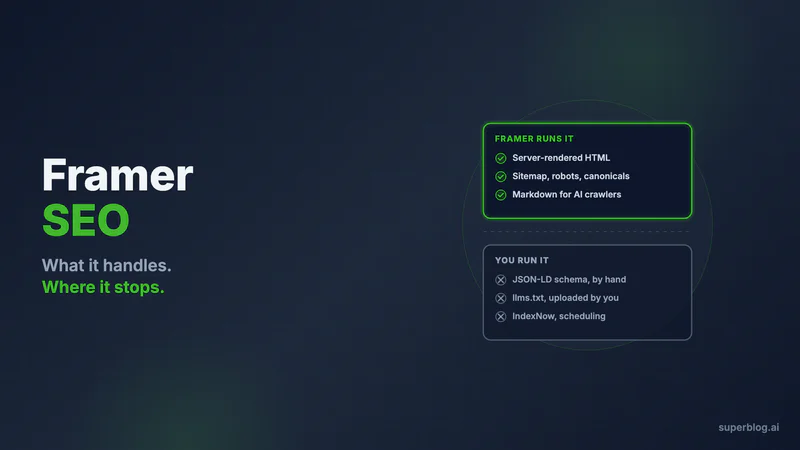
Yes, Framer is good for SEO. The answer is not close, and it has not been close for a while.
As of August 2026, Framer pre-renders every page to HTML on its servers before serving it, so crawlers that never execute JavaScript still receive your full text (framer.com/help/articles/make-site-readable-by-ai-agents, verified Aug 10, 2026). It generates sitemap.xml and robots.txt for every published site with nothing switched on. Per-page titles and descriptions accept CMS variables. Canonical URLs are settable. Redirects you enter in its redirects table are served as 301s automatically.
Disclosure before you read another paragraph: we build Superblog, a blogging platform that competes directly with running your blog inside Framer. The assessment above is not a windup for a reversal. Framer's site layer earns it, and any post telling you a Framer site cannot rank is working from 2023 notes.
The ceiling is real, but it sits somewhere more specific than most reviews put it. Framer is strong at the site layer and thin at the content-operations layer. Five marketing pages will never expose the difference. Two hundred posts will expose it in month three.
What Framer runs for you with zero configuration
Credit first, because a fair list of what Framer automates is longer than the SERP suggests.
Server-rendered HTML on every page. Framer's own documentation on AI readability states that although Framer sites are built with React, every page is pre-rendered to HTML on Framer's servers before it is served. Rendering is simply not your problem here, which is more than can be said for most builders in this category.
sitemap.xml and robots.txt, generated automatically. Framer's SEO guide says sites are SEO-optimized out of the box and include both files automatically (framer.com/help/articles/guide-to-seo-features-and-tools, updated Aug 7, 2026). No plugin, no toggle. Framer's AI-readability article adds that all AI and search crawlers are allowed by default in that generated robots.txt (framer.com/help/articles/make-site-readable-by-ai-agents, verified Aug 10, 2026).
Metadata that varies per item. Site-wide and per-page titles and descriptions live in settings, and on CMS pages you reference fields with { {Title} } syntax so each entry renders its own strings. The same panel carries the social preview image.
Canonical URLs, indexing controls, and redirects. Framer's SEO page (framer.com/seo, verified Aug 10, 2026) lists a canonical URL setting for choosing the version search engines should index, per-page controls for whether a page appears in search at all, and a redirects table, with Framer handling 301s automatically between old and new URLs.
Image and delivery optimization. Images are served as WebP through Framer's CDN and lazy-loaded, which is most of what a Lighthouse score actually rewards.
hreflang, if you use localization. Framer's language-attribute article states that with built-in localization the lang attribute follows the active locale and Framer adds an hreflang tag marking a page as a duplicate in another language, and that both tags are managed in the backend and are not editable through the UI (framer.com/help/articles/language-attribute, updated Aug 7, 2026).
SEO agents. Framer's SEO page (framer.com/seo, verified Aug 10, 2026) describes agents that scan a page and return a prioritized issue list, rewrite titles, descriptions and headings, and propose internal links and anchor text. This is a real feature, not a badge. Note the meter: Framer's pricing page as of Aug 10, 2026 says credits power agents and other AI features, and Pro includes 3,000 credits per month.
That is a serious baseline. Anyone selling you a "Framer is bad for SEO" narrative is selling.
The AI-visibility part Framer quietly leads on
The SERP for this keyword has an AEO result on page two, and here Framer is ahead of nearly everyone, including tools that market themselves on it.
Framer serves a markdown version of every optimized page at the same URL. Request a page with an Accept: text/markdown header and you get markdown back instead of HTML. Appending a ?md query parameter to any URL does the same thing in a browser. Framer also appends a Navigation section of site-wide links to the bottom of each markdown page so an agent reading one page can find the rest. All of this is documented at framer.com/help/articles/make-site-readable-by-ai-agents (verified Aug 10, 2026), and it requires no setup.
One caveat worth carrying. Framer's documentation states that markdown is only generated for optimized pages, so an unoptimized page has no markdown version, and delivery can also drop out while a site is rate-limited.
Now the part to keep straight, because a lot of AEO content gets it backwards. What makes an assistant able to quote you is that your words exist as text at a real URL that a crawler can fetch. Server-rendered HTML does that. Markdown-on-request does that more conveniently. A file at /llms.txt is a different kind of artifact: it is an index, and no vendor publishes a commitment that its assistant consumes third-party llms.txt at all. Publish one, by all means. Do not treat it as the mechanism.
On that file, Framer's position is specific: you upload it. Framer's help article says static file hosting for llms.txt is available on the Pro and Enterprise plans, and walks you through Domains, then Files, then upload (framer.com/help/articles/llms-txt-framer, updated Aug 7, 2026). Framer does not build the file from your CMS. Every post you publish makes the copy you uploaded slightly less true until you go back and replace it.
The four things Framer's SEO stack leaves to you
Not "Framer has no SEO automation." That claim is false and this post already disproved it. Four specific items, each verified against Framer's live documentation on Aug 10, 2026:
- JSON-LD is yours to write. Framer's SEO guide recommends implementing structured data with JSON-LD; it does not generate it. Framer's SEO page shows the intended route, a custom-code block holding a hand-written
application/ld+jsonscript. Article is one block. FAQPage, Organization and BreadcrumbList are three more, each a template you keep matching to your field names. The mechanics, including the CMS-field binding syntax and the escaping trap, are covered in our Framer blog CMS breakdown. llms.txtis uploaded, not generated, and it sits behind Pro or Enterprise as described above.- IndexNow has no native path. We found no IndexNow feature anywhere in Framer's documentation on Aug 10, 2026. The protocol needs a key file served from your domain root, which puts every community workaround through the static-files upload or an edge rule. New posts otherwise wait for a crawl.
- Nothing releases a post on a schedule. There is no native scheduling for CMS entries, and going live runs through the Deploy permission rather than an editorial queue. We cover the permission mechanics and the plugin workarounds in the Framer blog CMS post rather than repeating them here.
Read that list next to the previous section and the shape is clear. Framer automates the things a site needs. It leaves you the things a publishing operation needs. Side by side, verified Aug 10, 2026:
| SEO task | Framer runs it | You run it |
|---|---|---|
| Server-rendered HTML | ✅ Every page, pre-rendered before serving | |
sitemap.xml and robots.txt | ✅ Generated, no toggle | |
| Titles, descriptions, CMS variables | ✅ Per page and per collection item | |
| Canonical URLs and indexing controls | ✅ Per page | |
| 301 redirects | ✅ Served automatically | You populate the redirects table |
| Markdown for AI crawlers | ✅ Optimized pages, no setup | |
| hreflang | ✅ Automatic with localization | $20 per locale per month, 20 active max |
| JSON-LD schema | Hand-written in a custom-code block, per schema type | |
llms.txt | Uploaded by you, Pro or Enterprise only, restated after each publish | |
| IndexNow | No native path | |
| Scheduled publishing | No native scheduling for CMS entries |
What changes when five pages become two hundred
At launch, none of the four gaps costs you anything. You write four schema blocks in an afternoon, upload an llms.txt, and your site is in genuinely good technical shape.
The bill arrives with volume, and it arrives as maintenance rather than as a wall.
Schema drifts. You rename a CMS field six months in, and the binding in your custom-code block keeps rendering, just with an empty value. Nothing alerts you. You notice when rich results quietly stop appearing in Search Console.
The uploaded llms.txt decays on a schedule set by your publishing cadence. At one post a month it is a quarterly chore. At three a week it is wrong within days of every upload, permanently.
Indexing latency compounds. Without IndexNow, every post's discovery is on the crawler's timetable, and a young site's crawl budget is the one thing a growth program cannot buy.
And page speed stops being a platform property and becomes an editorial one. Framer's CDN and WebP conversion are excellent. They do not stop a writer from dropping a 4 MB hero into a post, and nothing enforces a performance budget between a draft and a live URL. Framer's pricing page also lists CDN coverage of 20 locations on Basic against 300-plus on Pro (Aug 10, 2026), so the cheapest tier is the slowest for distant readers.
None of this argues for moving your marketing site. It argues that the blog is a different workload.
A Framer SEO checklist worth running this week
Concrete, in the order that pays:
- Set per-page titles and descriptions, and bind CMS variables on collection pages. A collection page with one static title means every post ships the same title tag.
- Check your canonical setting, particularly if any part of the site is served through a rewrite. Framer's canonical field exists precisely for that case.
- Audit indexing controls. Staging leftovers, thank-you pages and duplicate landing variants should be excluded deliberately, not by accident.
- Populate the redirects table before you rename anything. Framer will handle the 301, but only for the mapping you give it.
- Fix semantic structure. Framer's SEO guide calls out a clear H1 and manually adjusted semantic tags, because a visual canvas will happily let a headline be a
div. - Write alt text on every image. Framer optimizes the file; the words are yours.
- Add your JSON-LD blocks, then re-verify them any time a CMS field is renamed.
- Preview what agents see by appending
?mdto your live URLs. If a page returns nothing useful, it is not an optimized page. - Upload an
llms.txtif you are on Pro or above, and calendar a recurring reminder to replace it.
That list will take a Framer site most of the way. It will not create the thing rankings actually require, which is a continuous supply of pages answering the questions your buyers type before they know you exist.
Where a publishing platform takes over, and what it costs
The arrangement that fits this seam: Framer keeps the site, and one path is served by a tool whose only job is publishing. Readers and crawlers see a single domain. The routing config for that setup, per stack, is in our guide to setting up yoursite.com/blog, and the architectural decision behind it is in the Framer blog CMS post.
At /blog, Superblog runs the four items above without supervision. Article, FAQPage and Organization JSON-LD are derived per post from the post's own structure, so there is no template to keep in sync. IndexNow submissions go out at publish time, which puts Bing and Yandex on notice within minutes instead of whenever a crawler next stops by. The llms.txt file is generated for you and rewritten on every deploy, so it cannot lag the archive. Pages are pre-built and static with images converted to WebP on upload, which is how the 90+ Lighthouse guarantee holds without anyone policing writers. Sitemaps rebuild every deploy. The editor suggests internal links mined from your existing posts, capped at ten per post.
Operationally: OWNER, ADMIN, EDITOR, WRITER and BILLING roles, review before publish, and posts that land on a schedule without anyone holding a deploy permission for the whole website.
Now apply the same tests to us, because they cut both ways. Framer's hreflang is genuinely better than ours in one respect: it is automatic the moment localization is on, with no plan gate on the mechanism itself, and you pick from a list of 238 supported languages and regional variants. Superblog's multilingual SEO and hreflang sit on the Super plan at $99 per month and cover 41 languages. Where the comparison turns is the bill. Framer's pricing page as of Aug 10, 2026 sells localization as an add-on at $20 per locale per month, capped at 20 active locales on Basic and Pro, so 238 is the menu rather than the ceiling you can actually run. Five live languages is $100 per month on top of your plan, which is already more than Super costs with 41 included. One or two locales on Framer is the cheaper answer and you should take it. Past that the arithmetic reverses. Our plans are also sized for under 100,000 pageviews a month, and Pro caps at 1,000 posts.
Pricing, dated: Superblog Pro is $49 per month with 5 team members, Super is $99 with 10. The trial is 7 days with no card, and there is a 30-day money-back guarantee. Framer's pricing page as of Aug 10, 2026 lists Basic at $10 and Pro at $30 per month, with additional editors at $20 and viewers free. These are two line items, not a swap: your Framer bill continues.
Moving existing posts is a file import, not a button. Framer ships a first-party plugin that dumps a collection to CSV, and Superblog's Framer import takes that file and walks you through pairing each column with a field. Title, content, slug and date are required in the mapping step; tags, meta title, meta description, scheduled date and thumbnail are optional. Slug continuity rests on you mapping your original slug into that required column, because nothing is derived for you. Each import run tops out at 300 posts. Step-by-step setup for this stack lives on our blog for Framer page, and for a wider view of the category, blog platform comparison and choosing a CMS that ranks cover the alternatives.
Point a free trial at a path on your own domain. Your Framer project is not touched.
Framer SEO FAQ
Is Framer good for SEO?
Yes. As of August 2026 Framer pre-renders every page to HTML server-side, auto-generates sitemap.xml and robots.txt, supports per-page and per-CMS-item metadata, canonical URLs, indexing controls and 301 redirects, and serves WebP images from a CDN. The gaps are not in the site layer. They are in publishing automation: schema, IndexNow, a generated llms.txt, and scheduling.
Does Framer support structured data?
Only manually. Framer's SEO guide recommends JSON-LD and gives you a custom-code panel to paste it into, with CMS field references so a collection page can vary the markup per item. Framer does not derive Article, FAQPage, Organization or BreadcrumbList markup from your content, so each schema type is a template you author and maintain.
Does Framer generate an llms.txt file?
No. Framer hosts one you upload. Per Framer's help documentation, static file hosting for llms.txt is available on the Pro and Enterprise plans, uploaded under Domains, then Files, and served at your domain root after publishing. It does not update when you publish a post.
Is Framer good for AEO or AI search?
Better than most builders. Framer serves a markdown version of every optimized page through Accept: text/markdown content negotiation or a ?md query parameter, with no configuration, and appends a navigation link section to each markdown page. What makes an assistant able to quote you is your text being fetchable at a real URL, which Framer's server-side rendering already satisfies. Framer also ships an AEO scanner for auditing this.
Why is my Framer site not ranking despite good technical SEO?
Almost always because there is nothing to rank. A marketing site is eight to twenty URLs aimed at your brand and one or two head terms with years of entrenched competition. Organic acquisition comes from covering the questions buyers search before they know your product exists, which is a continuous publishing operation rather than a settings audit.
Does Framer support hreflang for multiple languages?
Yes, through localization. Framer's documentation states that the lang attribute follows the active locale and an hreflang tag is added marking a page as a duplicate in another language, with both managed automatically and not editable in the UI. Localization is a paid add-on on both Basic and Pro: Framer's pricing page as of Aug 10, 2026 lists it at $20 per locale per month, up to 20 active locales. Budget it per language, not per site.
Can I move my Framer posts to another platform without losing rankings?
Only if you carry the slugs across yourself. Use Framer's first-party plugin to export the collection as a CSV file, then upload it to Superblog's Framer import and map the columns, of which title, content, slug and date are mandatory. Point your original slug at the slug column and the URLs survive. Leave it unmapped and they do not. A single run handles up to 300 posts.
Your blog, without the maintenance
Fast pages, automatic SEO, no plugins to patch. Runs on yoursite.com/blog.
Sai Krishna is the Founder and CEO of Superblog. Having built multiple products that scaled to tens of millions of users with only SEO and ASO, Sai Krishna is now building a blogging platform to help others grow organically.
superblog
Superblog is a blazing fast blogging platform for beautiful reading and writing experiences. Superblog takes care of SEO audits and site optimizations automatically.