
Blogger Review 2026: Is Google's Free Platform Still Worth It?

Blogger is still free, still runs on your Google account, and still pays through AdSense. It is a good home for a personal or hobby blog in 2026. For a company blog that needs to rank on your own domain and capture leads, it falls short: no /blog path, no structured data controls, and a product Google has not announced a feature for since 2020.
Verdict in one line: keep Blogger for a free personal blog, and move a business blog to a platform built for search and leads.
Every Blogger fact in this review was checked against Google's own help center, blogger.com and the official Blogger blog on November 12, 2026.
Who still publishes on Blogger
Google's own 2020 announcement says "Since 1999, millions of people have expressed themselves on Blogger," and its about page pitches the product for "sharing your expertise, breaking news, or whatever's on your mind."
Google also kept some of its own blogs on Blogger for years. That is changing. On October 15, 2026, the Android Developers Blog announced it was "closing this chapter on Blogger" and moving to developer.android.com/blog, citing "improved formatting, tighter integration with our technical content". Google's Android team decided its own blog works better off Blogger.
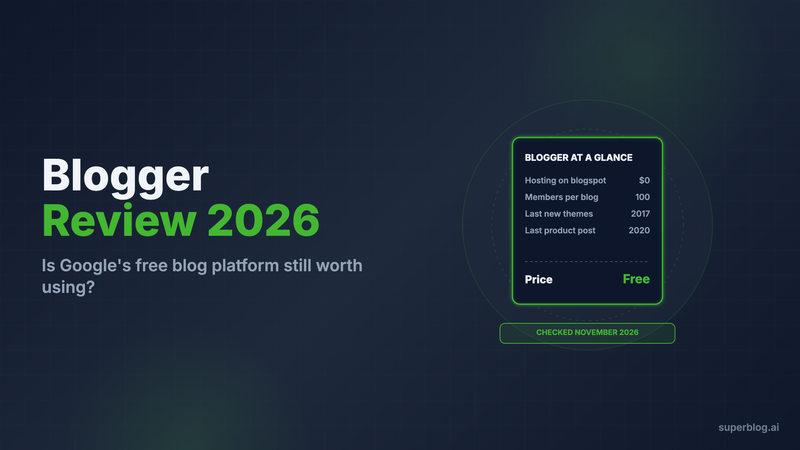
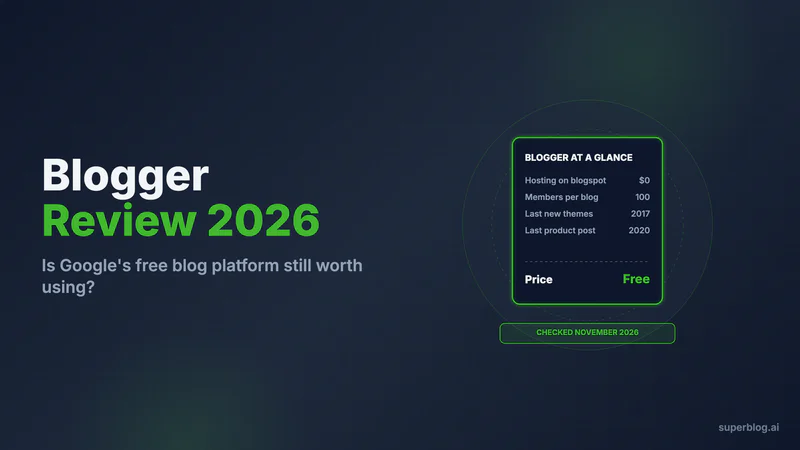
Blogger pricing at a glance
There is nothing to upgrade to. The only real cost is a domain if you want one, plus your time. Our Blogger pricing guide works through what a Blogger site costs once you add a domain and paid extras.
What Blogger still does well

- It costs nothing. Hosting, bandwidth, HTTPS and the blogspot.com address are free, with no plan tiers.
- Your Google account is the login. No new password. Google Analytics and Search Console are fields in settings, and AdSense is managed from the same dashboard.
- AdSense is built in. Blogger's about page pitches AdSense as a way to "earn income" from your posts, and the settings page has a custom ads.txt field.
- Teams are generous for a free tool. You can add up to 100 members (authors, admins or readers) to one blog.
- The editor covers the basics. Labels, scheduled posts, jump breaks, post templates, keyboard shortcuts and post-by-email are all there. The 2020 interface added table support and better image and video uploads.
- Images do not eat your storage. Blogger's help center says uploaded images are left out of your Google account's storage total.
For a hobby writer, that list is hard to beat at $0.
The editor and dashboard in 2026
The current dashboard is the one Google rolled out in 2020. Blogger's own announcement said it "is now responsive on the web, making it easier to use on mobile devices," and the old interface was switched off by late July that year.
Writing on the go is split in two. The Android app can create, edit, schedule and publish posts. Themes, layout, comments, AdSense, settings and stats are web-only, according to Blogger's help center.
Image quality has a ceiling. Google says uploaded images "may be compressed and optimized for the web" and that "there's no way to store large images in original quality on Blogger." Google has also moved image hosting to blogger.googleusercontent.com, and its help page warns that some old images cannot move automatically. Those have to be downloaded and uploaded again by hand.
Themes and the Theme Designer
The last theme launch Google announced was in 2017, when it released Contempo, Soho, Emporio and Notable and said each one would "automatically adjust to any screen." They still work, and they still look like 2017.
Under Theme, then Customize, the Theme Designer lets you change the background, column widths, fonts and colors, and add your own CSS under Advanced. Edit HTML opens the full theme template, and Layout lets you add gadgets such as an archive or a label list. Classic themes need the Google Analytics code added by hand, and Blogger's built-in Google Analytics setting does not work with first-generation Classic templates.
The gap for a business is brand control. Matching your company site means editing Blogger's template language by hand or buying a third-party theme and trusting its author with your markup.
Custom domains: www or a subdomain, nothing else
A Blogger blog starts on yourblog.blogspot.com, which is always served over HTTPS. You can connect a domain you own through a CNAME record, and Blogger creates and renews the SSL certificate.
Blogger's settings reference states the limits plainly: blogs "may not be hosted at naked domains (for example: yourdomain.com), but must include a top-level domain (www.yourdomain.com) or subdomain (blog.yourdomain.com)." There is a redirect from the naked domain to www, and that is the full list.
So yourcompany.com/blog is not an option. The blog lives on blog.yourcompany.com or on its own www domain, and links it earns build that hostname instead of the one your product pages sit on. The trade-off is covered in subdomain vs subdirectory, and it is why most marketing teams want the path. A platform such as Superblog puts the blog at yourcompany.com/blog on every paid plan.
SEO controls Blogger gives you
Blogger's SEO settings are real, and they are all manual:
- Visible to search engines, a single on or off switch under Privacy.
- Search description, the blog's meta description, under Meta tags.
- Custom permalinks for each post.
- A custom robots.txt file, plus custom robots header tags for the home page, archive and search pages, and posts.
- Per-post No index through Custom robots tags in the post editor.
- Custom 404 and custom redirects, with a Permanent option, for URLs that point to pages of your blog.
- Alt text and title text on images, and rel=nofollow on links.
- Search Console and Google Analytics fields in settings.
What Blogger's settings reference does not list is just as telling. There is no option for structured data, no IndexNow, and no llms.txt. Anything schema-related depends on what your theme's author coded. If you plan to stay, our Blogger SEO guide walks through each setting in order.
How actively Google maintains Blogger
Blogger is running, and Google has not announced a shutdown. The question is investment.
The official Blogger blog's feed shows its most recent post on May 20, 2020, the interface refresh. The two before it were a January 2019 notice that Google+ widgets and comments were being removed (Google+ comments "cannot be migrated"), and a May 2018 "spring cleaning" that dropped OpenID and retired third-party gadgets, Next Blog and Polls, the last group "due to low usage and to allow the Blogger team to focus on developing new features."
The 2019 notice ended with "we look forward to delivering fresh functionality to Blogger in the coming year," and the only announcement since is the May 2020 interface refresh. Some work does continue without announcements. The settings page includes Blogger draft, described as "Blogger in beta version" for testing new features, and the image-hosting move above shipped through the help center. But six years without a product post, plus a Google team moving its own blog off the platform in October 2026, points to maintenance rather than development.
What Blogger users say
These quotes are copied word for word from Hacker News comments, each linked to the original.
- Mobile reading. "Damn, blogspot still exists! And it doesn't render well in my mobile, a product of simpler times." (HeavyStorm, January 31, 2026)
- Surprise it survives. "It is a miracle that Google hasn't killed it. I hope they never do…" (timpera, February 16, 2026)
- Silence from Google. "I can not believe blogspot is still alive… The last post was in 2020." (TechSquidTV, November 26, 2025)
- Neglect. "So, Blogger? Feels kind of abandoned as a product, though." (rbinv, March 28, 2019)
- The other side. "Blogspot is still a very good platform… And blogspot also allows advertisements which is great." (bishalb, August 26, 2019)
The pattern is consistent. People are glad Blogger still runs and still carries ads, and they doubt Google is investing in it.
Blogger pros and cons
Is Blogger good? When it is the right call
Blogger is a sound choice when:
- The blog is personal. A journal, a family blog or a hobby site gains nothing from paying for hosting.
- AdSense is the business model. Ads switch on from settings, and there is no hosting bill to pay out of what they earn.
- You want zero setup. Sign in with Google, pick a theme, write.
- A subdomain is fine. If the blog does not need to build authority for a separate company site, blog.yourname.com or www works.
Signs it is time to leave Blogger
Move off Blogger when:
- The blog is a sales channel. You need forms under posts and a list of the leads they collect. Blogger's only form is a contact gadget in the layout.
- You want the blog on yoursite.com/blog. Blogger cannot serve a path on your main domain.
- You want schema, IndexNow and llms.txt handled for you. Blogger leaves schema to your theme and offers no setting for the other two.
- Your brand needs to match the site. Getting there means template code, not settings.
- You need a vendor roadmap. A business tool should ship updates you can see.
One planning note: Blogger documents its custom redirects only for URLs that point to pages of your blog. If your posts live on blogspot.com, plan the move around that limit. A blog on a custom domain is easier to move: you keep control of its DNS, so the old hostname can point to a host that redirects each URL to its new address.
Where Superblog fits for a company blog

This is a managed blog platform for companies that count on their blog for organic traffic and leads. Writing tools, templates, CDN hosting and SEO automation ship together, and there is nothing to install or patch.
Here is how it lines up against Blogger on a business blog's needs:
Pro, at $49 a month or $530 a year, covers up to 1,000 posts and 5 team members, with scheduled posts and privacy-friendly analytics. Super, at $99 a month or $1,070 a year, unlocks multilingual SEO, Zapier, custom form fields, webhooks for new leads and spreadsheet import, with room for 10,000 posts and 10 team members. Connecting /blog means adding a routing rule where your main site is hosted, and the subdirectory guide covers each host.
Moving from Blogger needs no export file. In the dashboard's Data section, you paste the Blogger address, and the Blogger API supplies the posts to Superblog. Each post keeps its original publish date, and its slug comes from the last part of the original post URL. Images stay on Google's servers: Superblog does not copy images hosted on Google's googleusercontent.com domain, where Blogger stores them today, so they keep loading from Google. A typical import takes 5 to 10 minutes.
You can try the editor and templates on a 7-day free trial, no credit card required.
Should you use Blogger in 2026?
Blogger is honest value for a personal blog. It is free, it is stable, and AdSense is built in. For a business, the limits are structural: no /blog path, SEO controls that stop at robots tags and redirects, and a product Google maintains without developing in public. If the blog is meant to earn search traffic and leads for a company site, start somewhere built for that job. If you are still comparing, see our list of Blogger alternatives, the roundup of free blogging platforms, or the wider guide to choosing a blog platform.
Questions about Blogger
Does Blogger have paid plans?
Yes. Blogger has no paid plans; a custom domain is the only optional cost.
Is Blogger good for SEO?
For basics, yes: search description, custom robots.txt, robots tags, permalinks and redirects.
Can Blogger host a blog at yoursite.com/blog?
No. Blogger supports www or a subdomain, not a path or a naked domain.
Is Google shutting down Blogger?
No. Google has announced no shutdown; the last official product post was May 20, 2020.
How many authors can a Blogger blog have?
Up to 100 members, counting authors, admins and readers.
Can I move a Blogger blog to Superblog?
Yes. Superblog imports it from the blog's URL through the Blogger API.
Your blog, without the maintenance
Fast pages, automatic SEO, no plugins to patch. Runs on yoursite.com/blog.
Sai Krishna is the Founder and CEO of Superblog. Having built multiple products that scaled to tens of millions of users with only SEO and ASO, Sai Krishna is now building a blogging platform to help others grow organically.
superblog
Superblog is a blazing fast blogging platform for beautiful reading and writing experiences. Superblog takes care of SEO audits and site optimizations automatically.