
Best Webflow Alternatives 2026: 8 Options When the CMS Holds Your Blog Back

The strongest Webflow alternatives in 2026 split into two groups. If the blog is the problem, keep Webflow for the marketing site and move the blog to a dedicated platform such as Superblog, WordPress or Ghost. If the whole site is the problem, rebuild on Framer, Wix or Squarespace, and price their seats and languages before you commit.
Webflow is a strong visual builder with precise layout control and clean output. The friction shows up when the blog grows a team and a second language. This list judges each option as a home for a company blog, with every price checked on the vendor's own pricing page on November 6, 2026.
Why teams look for Webflow alternatives for the blog
Webflow reworked its plans in May 2026, so older complaints about a 2,000-item cap are out of date. Here is what the pricing page says today, and where a blog still runs into it.
- The CMS starts at Premium. The free Starter plan carries 50 CMS items on a webflow.io domain. Basic ($15 a month billed yearly) has no CMS at all. A blog needs Premium: $25 a month billed yearly, $39 billed monthly.
- Items are a site-wide budget. Premium includes 20,000 CMS items and 40 Collections for the whole site. Posts, authors, categories, case studies and job listings all draw from the same pool. A blog alone rarely hits it. A blog on a site that also runs large template-generated sections can. Our Webflow CMS limits post lists every cap, including the page-level ones no plan lifts.
- Every writer is a paid seat. A limited seat (edit content) is $15 a month per seat billed yearly. A full seat is $39. Four writers add $60 a month before anyone publishes.
- Languages are metered per locale. Localize Essential is $9 per locale per month and stops at 3 locales. Localize Advanced is $29 per locale per month for up to 10. Ten locales beyond your primary language cost $290 a month on top of the Site plan. The full math is in Webflow localization pricing.
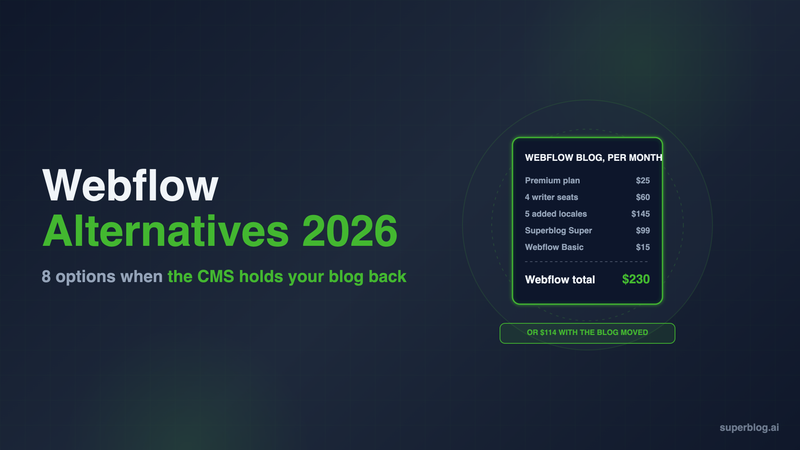
Add those up. A blog with four writers that publishes in English plus five more languages costs $25 (Premium) + $60 (four limited seats) + $145 (Advanced, five locales) = $230 a month billed yearly.
That is the gap a dedicated blog platform fills. Superblog is one: it runs the blog at yoursite.com/blog while the marketing site stays on Webflow, with seats included and no per-language fee on Super. It is covered first below, then the full site builders and other blog platforms.
Webflow alternatives at a glance
Prices are per month in USD. Third-party prices are billed yearly. Superblog is shown at its monthly price ($530 a year on Pro).
"Not covered here" means we could not confirm it on the vendor's pricing page.
1. Superblog
Type: Dedicated blog platform. Keeps your Webflow site, replaces the Webflow blog.
Superblog is a fully managed blog platform: CMS, blog frontend, hosting and SEO in one product. You do not rebuild the marketing site. The Webflow site keeps serving your homepage and product pages, and the blog runs at yoursite.com/blog through a reverse proxy. The Webflow blog setup guide walks through the Cloudflare route Webflow documents.
Pricing: $49/month (Pro) or $99/month (Super). Yearly is $530 and $1,070. There is a 7-day free trial, no credit card required. Subdirectory hosting is included on every paid plan.
Strengths for a Webflow team:
- Seats are in the plan. Pro includes 5 team members, Super 10, with Admin, Editor and Writer roles.
- Languages are not metered. Multilingual SEO is on Super and above. Adding the tenth language costs the same as the first. Translations live at
/es/and/de/subdirectories, with hreflang in the HTML head and the sitemap, plus per-language sitemaps. 41 languages are supported. - SEO is automatic. JSON-LD schemas, XML sitemaps, IndexNow and llms.txt are generated on every deploy. Pages score 90+ on Lighthouse.
- Lead forms are built in. Forms below posts, in the sidebar, or as pop-ups.
- The Webflow import is direct. You give it an API token and a Collection ID. Slugs are kept. Tags and SEO titles and descriptions are not imported, and publish dates come from Webflow's last-published timestamp, so plan to re-enter that metadata after the import. The Webflow migration guide covers the full move.
Cost of the scenario above: Move the blog off Webflow, and if nothing else on the site uses the CMS, drop the site to Basic at $15 a month, add Superblog Super at $99, and four writers publishing in English plus five more languages cost $114 a month ($15 Webflow Basic billed yearly plus $99 Superblog Super billed monthly) instead of $230.
Limits: Superblog is a blog platform, not a page builder. Your landing pages stay in Webflow. Post caps are 1,000 on Pro and 10,000 on Super, lower than Webflow Premium's 20,000 items, though Webflow counts every Collection item on the site against that number.
Choose it if: the Webflow site is fine and the blog is what costs you seats, locales and editor time. The Webflow alternative page covers the switch in detail.
2. Framer
Type: Visual site builder.
Framer is the closest like-for-like swap: fast to design in, with lower starting prices than Webflow.
Pricing: Basic $10/month and Pro $30/month, billed yearly. Enterprise is custom.
Strengths:
- Cheaper writer seats. A content editor (CMS, localization and on-page editing) is $10 a month. A full editor is $20.
- Localization covers up to 20 locales at $20 per locale per month.
- Pro adds staging, branching with previews and site redirects.
Limits: Framer's CMS is smaller than Webflow's. Basic holds 1,000 CMS items in 2 collections. Pro holds 2,500 items in 10 collections, then $20 a month per extra 10,000 items, up to 40,000. Basic and Pro cap at 10 seats. Locales are still metered, so ten added locales cost $200 a month on their own. Serving a Framer site under another site's domain needs the Advanced hosting add-on: $200 a month on Pro, with a maximum of 6 rewrites.
Choose it if: you want to rebuild the whole site in a builder that designers enjoy, and the blog stays under a few thousand posts in one or two languages.
3. WordPress
Type: Open-source CMS, self-hosted or managed on WordPress.com.
WordPress has no CMS item cap and no per-seat fee, and its theme and plugin ecosystem covers almost any requirement.
Pricing: The software is free; you pay for hosting. On WordPress.com, paid plans are Personal $4, Premium $8, Business $25 and Commerce $45 a month billed yearly. Plugin installation is available on every paid WordPress.com plan.
Strengths: No item or seat meters, a huge plugin library, and full control over markup when self-hosted.
Limits: You take on maintenance: core, theme and plugin updates, security and caching. Multilingual needs a plugin. Speed depends on the theme, plugins and tags you add, so it needs ongoing attention.
Choose it if: you have a developer or agency who already runs WordPress, and you value control over a managed setup.
4. Wix
Type: Site builder with a built-in blog app.
Wix bundles hosting, forms and marketing tools, and its blog is a first-party app with writer roles.
Pricing: Light $17, Core $29, Business $39 and Business Elite $159 a month. Displayed prices are for yearly subscriptions.
Strengths: One dashboard for site, blog, forms and email marketing. Site collaborators scale with the plan: 2 on Light, 5 on Core, 10 on Business, 100 on Business Elite.
Limits: Moving to Wix means moving the whole site, and design control is looser than Webflow's. Collaborator counts are tied to the plan, so a larger writing team pushes you up a tier.
Choose it if: a small team wants one all-in-one tool and is ready to leave Webflow entirely.
5. Squarespace
Type: Site builder.
Squarespace trades design freedom for polished templates, with the blog built in.
Pricing: Basic $19, Core $29, Plus $49 and Advanced $99 a month billed annually ($25, $39, $65 and $139 billed monthly). US prices from the Squarespace pricing page.
Strengths: Contributors are unlimited from the Core plan up, which removes the seat meter Webflow charges for. Bandwidth and storage are not capped.
Limits: Basic allows only 2 contributors. Layout control is narrower than Webflow's, so a design-led team may feel boxed in. Like Wix, it replaces the whole site, not just the blog.
Choose it if: you want a clean site with a blog, a large writing team, and no developer.
6. Ghost
Type: Blog and newsletter platform.
Ghost is open source, with a focused editor, native newsletters and a managed option called Ghost(Pro).
Pricing: Starter $15/month, Publisher $29/month and Business $199/month, billed yearly.
Strengths: A strong writing experience, newsletters built into the core product, and paid subscriptions from Publisher up.
Limits: Staff users are capped at 1, 3 and 15 by plan. Running Ghost at yoursite.com/blog is a $50/month add-on available only on the $199 Business plan, and you run the reverse proxy yourself. Plans are also priced by member count, which matters if the blog grows a large subscriber list.
Choose it if: the blog is really a newsletter or a paid publication.
7. HubSpot Content Hub
Type: CMS tied to HubSpot's CRM and marketing tools.
If your sales and marketing already run on HubSpot, Content Hub puts the blog next to your contacts, forms and attribution.
Pricing: Free for up to 2 users. Starter lists at $20 a month per seat. Professional starts at $450 a month with 3 core seats, and extra core seats start at $45 a month. Enterprise starts at $1,500 a month with 5 core seats.
Strengths: The blog sits in the same system as your contacts, forms and email, so attribution needs no integration.
Limits: Costs climb steeply once you need Professional features, and you are tied to the HubSpot ecosystem. It is a full website CMS, so it replaces Webflow rather than sitting beside it.
Choose it if: you are standardized on HubSpot and want blog attribution inside the CRM.
8. Sanity
Type: Headless CMS.
Sanity stores structured content and serves it over an API. You build the frontend yourself, often in Next.js.
Pricing: Free with up to 20 seats and 10,000 documents. Growth is $15 per seat per month, with up to 50 seats and 25,000 documents. An increased quota add-on raises documents to 50,000 for $299 a month.
Strengths: Unlimited content types and locales on every plan, flexible content modeling, and live previews with visual editing.
Limits: There is no blog frontend. A developer builds and maintains the blog templates, sitemaps, schemas and hosting, so the real cost is engineering time, not the subscription.
Choose it if: you have a frontend team and want content in one structured store across several products.
How to choose a Webflow alternative
- Decide whether the site or the blog is the problem. If the marketing site works and the blog is what costs you seats, locales and editor time, keep Webflow and move the blog. The blog for Webflow page shows how that setup works. If the whole site needs a rebuild, compare Framer, Wix and Squarespace.
- Price the team, not the plan. Multiply your writer count by the seat price, and your added-language count by the locale price. That number decides more than the base plan does.
- Keep the blog on your main domain. A blog at yoursite.com/blog builds authority for the whole site. A subdomain splits it. Subdomain vs subdirectory has the evidence.
Webflow alternatives FAQ
What is the cheapest Webflow alternative for a business blog?
WordPress.com Personal, at $4 a month billed yearly.
Can I keep my Webflow site and move only the blog?
Yes. Run the blog at yoursite.com/blog through a reverse proxy and keep every other page on Webflow.
Is Framer cheaper than Webflow for a blog?
Cheaper on price and seats, smaller on CMS: 2,500 items on Pro versus 20,000 on Webflow Premium.
Does Webflow still cap CMS items?
Yes: 50 on Starter, 20,000 on Premium, and 20,000 plus paid extras on Team.
Which Webflow alternative does not charge per language?
Superblog (Super plan and above) and Sanity (all plans).
Bottom line
Webflow is still a strong tool for building a marketing site. It is a costly place to run a growing blog, because seats and languages are metered on top of the plan. If you want to leave Webflow entirely, Framer is the closest match for design teams and Squarespace suits teams that need unlimited contributors. If the blog is the only problem, keep the site and move the blog. Superblog runs it at yoursite.com/blog from $49 a month, with seats included and no per-language fees on Super. Start with the 7-day free trial, no credit card required.
Your blog, without the maintenance
Fast pages, automatic SEO, no plugins to patch. Runs on yoursite.com/blog.
Sai Krishna is the Founder and CEO of Superblog. Having built multiple products that scaled to tens of millions of users with only SEO and ASO, Sai Krishna is now building a blogging platform to help others grow organically.
superblog
Superblog is a blazing fast blogging platform for beautiful reading and writing experiences. Superblog takes care of SEO audits and site optimizations automatically.