
Best Sanity Alternatives 2026: 11 Options and What 10 Writers Cost

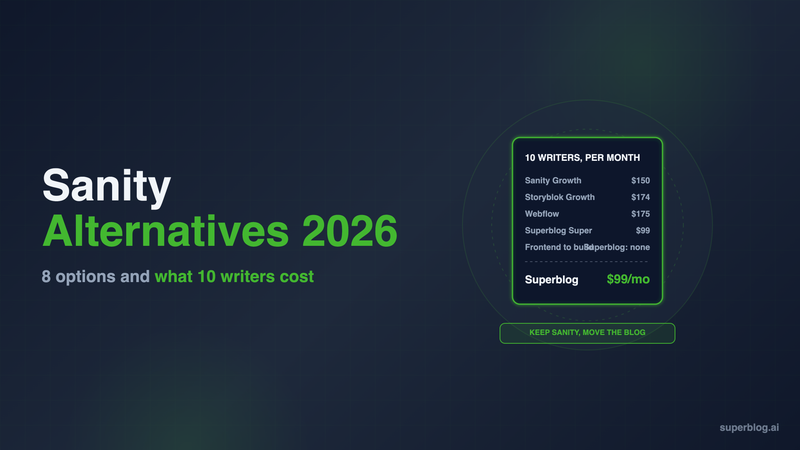
The strongest Sanity alternatives in 2026 depend on what Sanity is costing you. If only the blog is slow to change, keep Sanity for product content and run the blog on Superblog, a managed platform built for it. If the problem is Sanity itself, Storyblok, Payload and Strapi are the closest headless swaps, and Webflow replaces the stack entirely.
Sanity is a strong content platform. Schemas live in code, GROQ queries return exactly the fields you ask for, and the Studio can be shaped around any content model. Those strengths are also why a Sanity blog needs a developer for almost every change. The options below are judged on one job: running a company blog.
What a blog on Sanity actually depends on

Sanity stores content. Everything a reader or a search engine sees is code your team writes and maintains. For a blog, that list is long.
- The Studio is a React app. Sanity's docs describe Studio as an open-source React single-page application. You configure it, deploy it to a sanity.studio URL or your own host, and upgrade it. A new field for writers is a schema change in code, then a deploy.
- Every query is GROQ. The post page, the category archive, the author page and the related-posts block each need a GROQ query and a component to render it.
- Rich text arrives as Portable Text. Sanity returns post bodies as Portable Text, not HTML. Your frontend serializes it, and every custom block (callouts, code samples, embeds) needs its own renderer.
- Previews are an integration. Visual editing needs client configuration, draft mode endpoints, overlays and the Presentation Tool, per Sanity's own setup guide.
- SEO is yours to build. Sanity's SEO course for Next.js walks developers through SEO schema fields, redirects, Open Graph images, a
sitemap.tsroute and JSON-LD. That is the right lesson for a headless stack. It also means a marketer cannot fix a missing meta tag alone.
Then there is the seat meter. On Free, Sanity allows up to 20 seats, but only the Administrator and Viewer roles, so every writer is an admin. Scheduled drafts, comments and tasks start on Growth. Growth costs $15 a seat each month, up to 50 seats, and self-serve plans are billed monthly only. Viewer seats are free on every plan.
The math as the team grows:
Growth includes 25,000 documents. The increased quota add-on raises that to 50,000 for $299 a month. Past 50 seats, the next step is Enterprise at custom pricing.
None of this makes Sanity a poor choice. It makes Sanity an engineering product, and a blog run by a marketing team often wants the opposite.
That is the gap Superblog fills. It runs the blog at yoursite.com/blog with the CMS, templates, hosting and SEO already built, while Sanity keeps serving your product pages.
Sanity alternatives compared
Prices are per month, in USD unless marked €, as published on each vendor's page. Superblog is shown at its monthly price.
1. Superblog

Type: Managed blog platform. Keep Sanity for product content, move the blog.
Superblog ships the editor, the blog frontend, the hosting and the SEO layer as one managed product. You do not rip out Sanity. Your app keeps rendering product, docs and landing pages from Sanity, and the blog moves to Superblog at yoursite.com/blog. On Next.js, two rewrites in next.config.js send /blog to Superblog, and the Next.js blog setup guide walks through them. It also works on Vercel, Netlify, Cloudflare and other stacks.
Pricing: $49/month (Pro) with up to 5 team members and 1,000 posts. $99/month (Super) with up to 10 team members, 10,000 posts, the REST API, MCP, Zapier and multilingual SEO. Yearly billing is $530 and $1,070. There is a 7-day free trial, no credit card required.
Strengths:
- The SEO layer is built. JSON-LD for Organization, WebPage, Article or BlogPosting, ImageObject, and FAQ on posts with an FAQ block, is generated along with XML sitemaps, canonical URLs, Open Graph tags, an IndexNow ping at publish and an
llms.txtindex at/blog/llms.txt. Every post also has a plain-markdown copy at its URL plus.md. - Writers work without a ticket. The editor has slash commands, markdown support, SERP preview, FAQ blocks and internal link suggestions. Scheduling and collaborative review come with Pro.
- Pages score 90+ on Lighthouse with no frontend tuning.
- Seats are included in the plan. Ten writers on Super cost $99 a month, not $150.
Limits: your React components do not render inside posts. Design control comes from Superblog's templates plus colors, fonts, menus and custom CSS. There is no Sanity importer. To move existing posts, a developer exports them with a GROQ query, serializes the Portable Text bodies to HTML or Markdown, and loads the JSON with Superblog's JSON importer. It takes up to 300 posts per run and keeps each slug you map in. On Super, the REST API can create the posts instead.
Choose it if: organic search is the blog's job and engineering time belongs on the product, not on post templates and sitemaps. Setup details are on the Next.js use case page.
2. Storyblok

Type: Hosted headless CMS where writers edit on a live page preview.
Storyblok suits teams whose marketers find Sanity's form-based Studio too abstract. Writers edit a live preview of the page in the visual editor.
Pricing: Starter costs nothing for 1 seat. Growth runs $99/month ($90.75/month on annual billing) for 5 seats, and each extra seat is $15/month up to 10. Growth Plus runs $349/month for 15 seats.
Strengths: writers see the page as they edit it, and the block model suits landing pages as well as posts.
Limits: developers register every block type and map it to a React component before writers can use it. The blog frontend, metadata, sitemap and schema are still yours to build, so the developer dependency moves rather than disappears.
Choose it if: your marketers build landing pages too and a developer will maintain the block library.
3. Payload

Type: Open-source CMS that runs as part of your Next.js codebase.
Payload lives in the Next.js /app folder, which puts the admin panel, the content API and the site in a single repo with a single deploy. Config is TypeScript, and data lives in MongoDB, Postgres or SQLite.
Pricing: free under the MIT license. Your costs are the database, file storage and hosting.
Strengths: no per-seat meter and no external vendor holding your content. Teams that find GROQ and the Studio a second system to learn often like that Payload is just more code in the repo.
Limits: you run the database. The post template, SEO tags, sitemap and previews are still your code. It removes the seat bill, not the engineering.
Choose it if: you want the admin panel, schema and site in one repo and will run the database behind them.
4. Strapi

Type: Open-source headless CMS you host yourself or run on Strapi Cloud.
It exposes REST and GraphQL APIs with an admin panel you control. It runs as its own server, separate from your frontend.
Pricing: self-hosting the MIT-licensed Community Edition costs nothing. Self-hosted Growth costs $45/month for 3 users and $15/month for each user after that. On Strapi Cloud, plans run $35/month (Starter), $90 (Pro) and $450 (Business) per project.
Strengths: familiar REST or GraphQL instead of GROQ, and a form-based admin that writers pick up quickly once content types exist.
Limits: self-hosting means a second server to patch, back up and scale. Per-user pricing on Growth lands at the same $15 Sanity charges. The blog frontend is still yours.
Choose it if: you want open source with a standard API and have someone to run the server.
5. Prismic

Type: Hosted headless CMS that builds pages from reusable sections.
Prismic calls those sections slices, and every slice needs a matching React component written by a developer.
Pricing: Free covers 1 user. Paid plans are billed annually per repository: Starter $10/month for 3 users, Small $25/month for 7, Medium $150/month for 25.
Strengths: more users per dollar than Sanity or Storyblok, and a section model writers understand.
Limits: you still build the post template, the slice library and the SEO layer. A slice-based page builder is more than most text-heavy blogs need.
Choose it if: blog posts and marketing pages share layouts and you want one tool for both.
6. Contentful
Type: Enterprise headless CMS.
Contentful is the incumbent in large organizations that run many brands, locales and channels from one content platform. Teams leaving Sanity for Contentful usually want enterprise governance, not less engineering.
Pricing: current plans are on contentful.com/pricing.
Strengths: mature workflows, roles and governance at scale.
Limits: same headless shape as Sanity. The frontend, previews and SEO are your code. Buying it for a single company blog means paying for governance you will not use.
Choose it if: your organization is consolidating every channel onto Contentful and the blog is one of them.
7. Hygraph

Type: GraphQL-first content platform, hosted.
Hygraph answers every query from one GraphQL endpoint, so a team already on GraphQL never learns GROQ.
Pricing: Hobby is free with 3 seats and 1,000 entries. Growth starts at $199/month billed yearly ($299 monthly) with 10 seats, 10,000 entries and 3 locales.
Strengths: ten seats sit inside one flat price.
Limits: the step from free to $199 is steep for a small team. Your developers still write the post template, previews and SEO tags.
Choose it if: your stack runs on GraphQL and the content team is close to ten people.
8. DatoCMS
Type: Hosted CMS with a form editor for writers and GraphQL for developers.
Pricing: Free covers 2 editors and 300 records, with no overages allowed. Professional is €149/month billed annually (€199 monthly) and includes 10 collaborators per project. Each extra collaborator is €9/month, and each extra locale €19/month.
Strengths: a ten-person team fits the base Professional price, and its image components lazy-load by default.
Limits: prices are in euros, and records, traffic, API calls and locales are metered add-ons. You still write the frontend.
Choose it if: you want a hosted editor with GraphQL and can budget in euros.
9. Directus

Type: Data platform that puts APIs and an editing app on top of a SQL database.
Directus sits on a SQL database you choose, generates REST and GraphQL endpoints from it, and gives editors a Studio. Each collection is a table.
Pricing: Core is free to self-host, or $89/month billed yearly ($99 monthly) on Directus Cloud, with a hard limit of 3 seats. Team is $499/month on an annual commitment with 10 SSO seats, and each extra seat is $50/month. Cloud hosting adds $89/month to Team.
Strengths: posts live in a database you own, and every tier can be self-hosted.
Limits: the 3-seat cap on Core sends a growing team straight to $499, and the frontend remains yours.
Choose it if: you already run a SQL database and want one admin for product data and posts.
10. TinaCMS
Type: Git-based CMS for Markdown and MDX.
TinaCMS keeps posts in your Git repo as Markdown, MDX and JSON files, with visual editing layered on top for React sites. The license is Apache 2.0.
Pricing: Free covers 2 users. Team costs $29/month or $290/year, includes 3 users, and adds seats at $90 per year each up to 10. Business costs $299/month or $2,990/year.
Strengths: content lives in your repo, versioned with your code. No separate content database.
Limits: each published post is a commit, which in a typical setup triggers a deploy. The editing model suits developers and technical writers more than a marketing team.
Choose it if: your posts already live as MDX in the repo and writers need something friendlier than a code editor.
11. Webflow

Type: Visual site builder that includes its own CMS.
Webflow is the option that removes the frontend work entirely, by replacing the stack rather than the CMS. Designers and marketers build and publish without a developer.
Pricing: the CMS starts on Premium at $25/month billed yearly ($39 monthly) with 20,000 CMS items for the whole site. A limited seat for writers is $15/month per seat billed yearly.
Strengths: visual control over every page, with hosting included.
Limits: it means rebuilding your site in Webflow. A Next.js product cannot move there, so most teams would run the marketing site and blog on Webflow and keep the app elsewhere. CMS items are a site-wide budget, and writer seats are metered just as on Sanity.
Choose it if: you want marketing to own the whole website, not only the blog, and you are ready to rebuild it.
What 10 writers cost on each option
Sanity's per-seat model is the line item that grows. Published prices for a 10-person writing and editing team:
The license is the small number. Each "Yes" above means engineering time: someone builds the post template, archives, metadata, sitemap, schema and previews, then keeps them working. That workload is itemized in what a headless CMS costs a business blog, and Next.js SEO lists every tag a custom frontend must output.
How to pick a Sanity alternative
- Decide what you are replacing. If Sanity works for product content and only the blog is slow to change, move the blog and keep Sanity. Replacing the whole CMS to fix the blog swaps one engineering project for another.
- Count who changes the blog today. If most blog tickets go to developers (a new field, a missing tag, a broken preview), a managed blog removes them. Another headless CMS keeps them.
- Price at the team size you will have next year. Per-seat plans look small at 3 writers and add up at 15.
- Keep the blog on your main domain. Serve it at yoursite.com/blog, not a subdomain, so it builds authority for the whole site. The case is laid out in subdomain vs subdirectory. Both a headless blog and a managed one can sit on /blog.
For the broader list beyond Sanity's competitors, see our CMS for Next.js comparison.
Sanity alternatives FAQ
Is Sanity free?
Yes, for up to 20 seats and 10,000 documents, with Administrator and Viewer roles only.
How much does Sanity Growth cost?
$15 per seat per month, billed monthly, up to 50 seats.
Can I keep Sanity and move only the blog?
Yes. Serve the blog at /blog with a rewrite and keep Sanity for everything else.
Which Sanity alternative needs no frontend code?
Superblog and Webflow.
Which Sanity alternatives are open source?
Payload (MIT), Strapi (MIT) and TinaCMS (Apache 2.0).
Does Superblog import from Sanity?
Not directly; export posts as JSON and use the JSON importer.
The verdict on leaving Sanity
Sanity is a strong choice when developers own content modeling across a product. It is an expensive place to run a marketing blog, because every template, preview and SEO tag is code and every writer is a seat. If you want another headless CMS, Storyblok suits visual editors, Payload suits teams that want everything in the repo, Strapi suits teams that want open source with a standard API, and Hygraph or DatoCMS suits teams that would rather query in GraphQL than GROQ. If the blog is all that hurts, leave Sanity in place for product content and move only the blog. Superblog serves it at yoursite.com/blog for $49/month (Pro), with team seats in the plan and the SEO layer already built. Start with the 7-day free trial, no credit card required.
Your blog, without the maintenance
Fast pages, automatic SEO, no plugins to patch. Runs on yoursite.com/blog.
Sai Krishna is the Founder and CEO of Superblog. Having built multiple products that scaled to tens of millions of users with only SEO and ASO, Sai Krishna is now building a blogging platform to help others grow organically.
superblog
Superblog is a blazing fast blogging platform for beautiful reading and writing experiences. Superblog takes care of SEO audits and site optimizations automatically.