
Best Multilingual Blog Platform 2026: 12 Options Compared on Per-Language Cost

A multilingual blog platform is judged on two things: what the tenth language costs compared with the first, and whether search engines get correct hreflang, URLs and sitemaps for every translation. On those two tests, Superblog, WordPress with WPML or Polylang, HubSpot and Wix charge nothing per language, while Webflow and Framer bill per locale and Squarespace's Weglot route prices by language count and a word cap. Ghost has no built-in multilingual mode: it recommends one install per language for different content, and a service like Weglot for translated content. Among the CMSs a developer team would run, Drupal and Sanity charge nothing per language, and Storyblok charges $20 a month for each locale past the two its plans include.
We compared 12 platforms as a home for a company blog in several languages. Every third-party price was checked on the vendor's own page in November 2026. All locale counts below are languages beyond your primary one.
What a multilingual blog platform has to get right
Per-language cost. A per-locale fee turns market expansion into a recurring bill. Check whether the price is flat, per locale, or tied to a word allowance.
Hreflang in the head and the sitemap. Every translation should point to every other version of the same post, and to itself. Google reads hreflang from either place. Having both is a safety net when one breaks.
Subdirectory URLs.
/es/and/de/under one domain keep authority in one place. A?lang=parameter or a separate install per language splits it.Per-language metadata. Translated slugs, a matching
<html lang>, a self-referencing canonical and a meta title and description in each language.Translation workflow. Manual translation should always be free. Machine translation should have a published rate, so you can price an archive before you start.
Fallback. A post that has not been translated yet should still serve in the default language instead of a "coming soon" page.
Multilingual blog platforms at a glance
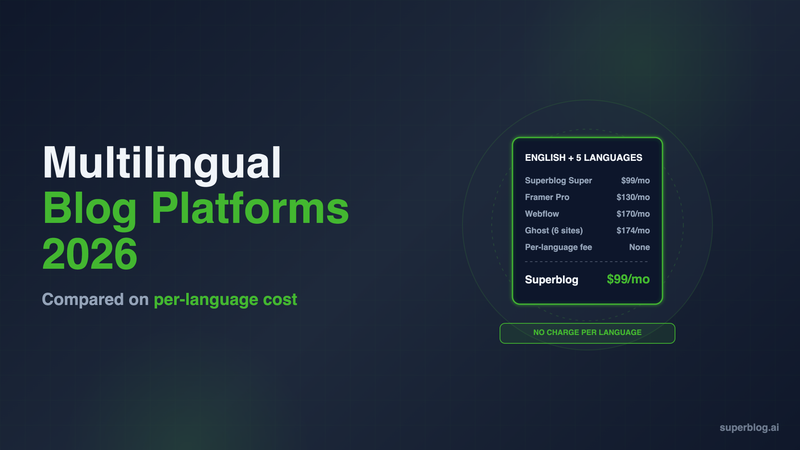
Webflow and Framer totals use yearly billing and their usual blog plan. The Ghost figure assumes six Ghost(Pro) Publisher installs at $29/month billed yearly, because Starter does not allow custom themes. WPML uses Multilingual CMS because the €39 Blog plan has no string translation.
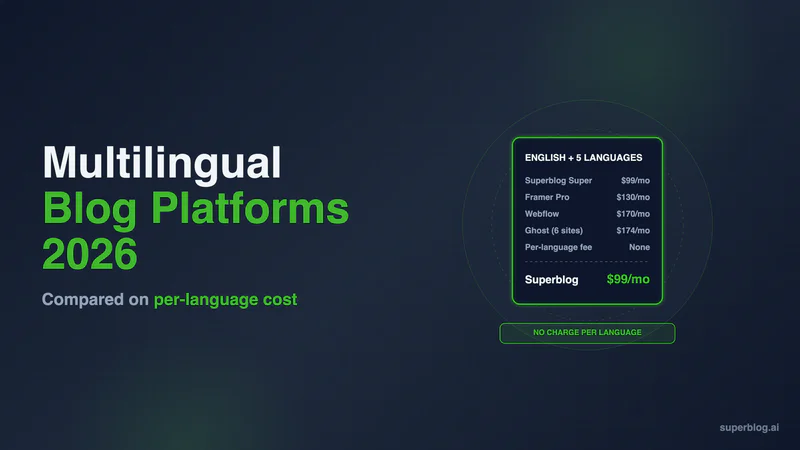
Cost for English plus 5 languages: Superblog $99, Framer $130, Webflow $170, Ghost $174 a month.
1. Superblog
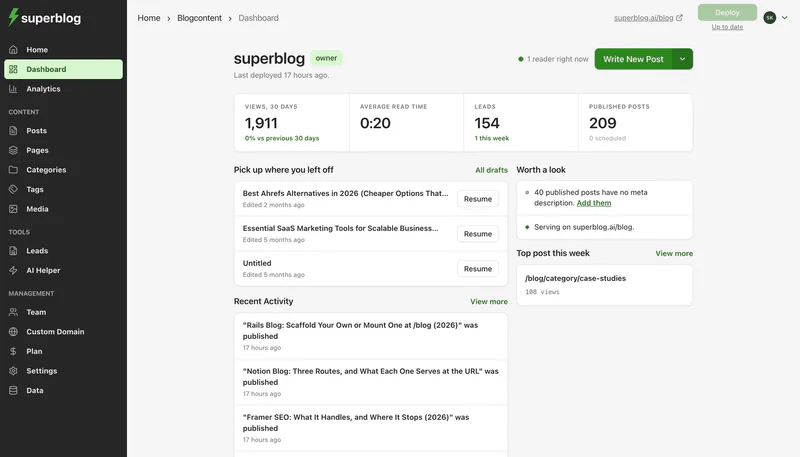
Superblog is a fully managed blog platform: CMS, hosted frontend, CDN and SEO engine in one product. It runs the blog at yoursite.com/blog next to the site you already have.
How languages work. Multilingual SEO is on Super and above. There is no per-language charge: adding a tenth language costs the same as the first. 41 languages are supported.
What the SEO engine generates for every translation:
Subdirectory URLs such as
/es/and/de/, the structure Google recommends.Hreflang tags in both the HTML
<head>and the XML sitemap, including an x-default.Separate per-language sitemap files for posts, categories, tags and authors, all listed in the sitemap index.
A matching
<html lang>, a self-referencing canonical,og:localeandog:locale:alternatetags, and theinLanguageJSON-LD property.Per-language RSS feeds and search indexes, and a language switcher in the header.
Fallback to the default language for anything not yet translated.
Translation. On Super you add translations yourself and pay nothing per word. Automatic translation runs on AWS Translate and belongs to the Business plan. It draws on 199 monthly credits, at 1 credit per 3,000 characters, so you can price an archive before you start.
Everything else is on the platform too. 90+ Lighthouse on every page, JSON-LD schema, IndexNow on publish, llms.txt with a markdown copy of every post, lead forms, and 10 team members on Super.
Fit with your site builder. On Webflow, Wix or Squarespace, a free Cloudflare Worker on the /blog route sends /blog to Superblog and every other path to the builder. On Framer, that Worker route needs Framer Pro with the Advanced Hosting add-on ($200/month billed yearly) or Enterprise, so blog.yoursite.com is the route that works on any Framer plan.
Limits. It is a blog platform, not a site builder. Multilingual is not on Pro. Each plan lists up to 100,000 pageviews a month. Going over does not cap or slow the blog, and a blog that keeps growing moves to a larger plan.
Pricing: $99/month (Super) or $1,070 billed yearly. Pro is $49/month without multilingual. There is a 7-day free trial, no credit card required.
Choose it if the blog is what needs the languages and you want hreflang, sitemaps and URLs handled with no per-locale meter.
2. WordPress with WPML or Polylang
WordPress has no multilingual mode in core. Two plugins cover most sites.
WPML. The Multilingual Blog plan is €39 a year for one production site. It does not include string translation or AI translation. Multilingual CMS is €99 a year for three production sites, with string translation, WooCommerce support and 22,500 AI translation words. WPML inserts rel="alternate" hreflang tags on every page automatically. Its WPML SEO add-on moves them into the Yoast SEO or Rank Math sitemap. Languages can sit in directories (/es/), separate domains or subdomains, or a ?lang= parameter.
Polylang. The core plugin is free on wordpress.org. Polylang Pro starts at €99 a year and adds DeepL machine translation with your own DeepL API key. Polylang adds hreflang tags automatically, and it generates x-default only for the homepage.
Limits. Neither plugin charges per language, but WordPress still needs hosting, updates and the rest of the plugin stack. Our WordPress pricing breakdown adds those lines up. Translation plugins also interact with page builders, caching and SEO plugins, and every one of those updates on its own schedule.
Pricing: WPML €39 to €99 a year, or Polylang free to €99 a year, plus hosting. Kinsta starts at $30/month paid annually.
Choose it if you already run WordPress with a developer, and you want full control over URL formats.
3. Webflow Localize

Webflow's Localize add-on is well built. You get native locale routing, and translated Collection slugs on the higher tier. You pay for it per locale.
Pricing per locale: Localize Essential is $9 per locale per month billed yearly, up to 3 locales. Localize Advanced is $29 per locale per month billed yearly, up to 10. Locales are languages beyond your primary one, and the fee sits on top of the Site plan. A blog needs the CMS, which starts at Premium for $25/month billed yearly.
The math. English plus five languages is $25 + $145 = $170 a month. English plus ten is $25 + $290 = $315 a month. Adding a fourth locale (your fifth language) moves every locale from $9 to $29.
Hreflang and URLs. Translated Collection slugs, the Spanish URL for a Spanish post, are on Advanced and Enterprise only. The full breakdown is in Webflow localization pricing.
Choose it if the whole site is Webflow and you need three locales or fewer beyond your primary language.
4. Framer

Framer prices localization flat: $20 per locale per month billed yearly ($25 monthly), the same on Basic and Pro, up to 20 locales beyond the primary language.
The math on Pro ($30/month yearly). English plus two languages is $70 a month. English plus five is $130. English plus ten is $230, and 87% of that bill is locales.
Translation. Framer's Auto Translate translates a CMS item's fields into every enabled locale when the item is created or updated. On ten locales, one edited post is ten translation jobs drawn from your AI credit balance, and Framer publishes no per-word rate. Our Framer localization pricing post covers the credit and CMS item questions.
Choose it if your marketing site is Framer, the blog is small, and you stay at two or three languages.
5. Wix Multilingual

Wix Multilingual is free to install and supports 180+ languages, with no per-language fee listed.
Strengths: Blog posts and categories translate with their own images, descriptions and URL slugs, and post SEO settings are unique per translation. Wix adds hreflang and x-default tags to multilingual pages. URLs can use subdirectories, subdomains or language parameters.
Limits for a company blog: Blog tags cannot be translated. If you add a language without translating your posts, the live blog shows a "Posts are coming soon" message instead of the default-language post. Wix plan prices vary by country, so check yours at checkout.
Choose it if the business site is on Wix and the blog translation needs are modest.
6. HubSpot Content Hub

HubSpot supports multi-language blogs on every product and plan. Each language is its own blog, linked to a primary blog in a multi-language group.
Strengths: HubSpot automatically adds an XML sitemap entry for each translated page, plus rel="alternate" hreflang links between the pages in a language group. Each variation gets a language-specific slug. There is no per-language fee.
Limits: Free tools allow up to three language variations per asset. Starter allows 50. Professional and Enterprise have no limit. Automatic translation of blog posts needs Professional or Enterprise.
Pricing: Free, then Starter at $20/seat/month list. Professional starts at $450/month.
Choose it if HubSpot already runs your CRM and you can justify Professional for the translation workflow.
7. Squarespace with Weglot

Squarespace has no native multilingual blog. Its manual method means translating every page yourself, with duplicated pages per language. On version 7.1, Squarespace recommends its built-in Weglot integration, which adds hreflang tags automatically. Squarespace's Weglot setup creates language subdomains, such as es.yoursite.com, not subdirectories.
The cost is Weglot's plan. Weglot prices by language count and words. Business is €290 a year for 3 languages and 50,000 words. Pro is €790 a year for 5 languages and 200,000 words. Advanced is €2,990 a year for 10 languages and 1,000,000 words. Prices are in euros, excluding VAT.
The word cap is the part to check. Weglot counts total words translated across all your languages, and the limit does not renew. 100 posts of 1,500 words into five languages is about 750,000 words, which is over Pro's 200,000 before you add a new post.
Pricing: Squarespace Core is $29/month billed annually in the US, plus Weglot.
Choose it if the site is Squarespace, the blog is a handful of posts, and you want translation handled outside the editor.
8. Ghost

Ghost does not have a multilingual mode. Its documentation says: "If you plan on publishing different content in each language, we recommend one Ghost install per language." For the same content in several languages, it points to a service like Weglot or Transifex.
What that costs. Ghost(Pro) Starter is $15/month billed yearly, but it runs only Ghost's built-in default theme. Custom themes start on Publisher at $29/month billed yearly. English plus five languages is six Publisher installs, or $174 a month. Each install is its own site, members list and settings.
Hreflang and URLs. Separate installs do not know about each other, so linking them with hreflang is theme code you write and maintain, and Starter does not allow custom themes. Ghost's translate helper is for theme text and does not work for multi-language content. The Ghost pricing post covers the plan tiers.
Choose it if each language is a separate newsletter with its own audience, not a translated company blog.
9. Drupal
Drupal is an open source CMS for large, structured websites. It is free under the GPL, and Drupal.org says "There are no licensing fees, ever."
How languages work. Multilingual support is part of core, through four modules: Language, Interface Translation, Content Translation and Configuration Translation. Drupal detects the language from a path prefix such as /es/ or from a domain. When a post has translations, core Content Translation adds rel="alternate" hreflang links to the page head. There is no per-language charge.
Limits. Drupal is a framework for whole websites, so a blog alone is a heavy reason to adopt it. You pay for hosting, a developer and every core and module update.
Pricing: Free software. Hosting and development are separate.
Choose it if your company site already runs on Drupal and a developer team maintains it.
10. Storyblok

Storyblok pairs headless content delivery with a visual page editor. It supports three translation setups: field-level for posts that share one structure, folder-level when each market's content differs, and space-level for separate regional teams.
Strengths: AI translation, still in beta, is on every plan and covers 48 languages. The Translatable Slugs app stores a separate slug per language, from Growth up.
Limits: Storyblok stores the content and your frontend renders it, so language URLs, hreflang tags and sitemaps are code your developers write. Locales are metered.
Pricing: Starter is free with 1 seat and 2 locales. Growth is $99/month ($90.75 billed annually) with 5 seats and 2 locales, and each extra locale is $20 a month. Growth Plus is $349/month ($319.91 billed annually) with 10 locales and 15 seats. Storyblok does not state on its pricing page whether the default language counts toward the included locales, so confirm before you price five languages.
Choose it if developers are building the whole site headless and editors want to see the page while they translate.
11. Sanity

Sanity is a headless content platform with a customizable editing app called Studio. Every plan, including Free, allows unlimited locales.
How languages work. Sanity documents two patterns. Field-level translation, through the internationalized-array plugin, keeps every language in one document, so all languages publish together. Document-level translation, through the document-internationalization plugin, gives each language its own document, so each one can publish on its own schedule.
Limits: Sanity has no blog frontend. Your team builds the pages, language URLs, hreflang and sitemaps. Those plugins need a developer to configure.
Pricing: Free for up to 20 seats. Growth costs $15 a seat each month and allows up to 50 seats.
Choose it if developers own a custom frontend and you need many languages without a locale fee.
12. Contentful
Contentful is an enterprise headless CMS. Large organizations use it when one content model feeds many sites, apps and languages.
How languages work. Translations live in Contentful as locales on each entry, and your frontend requests the locale it needs through the API.
Limits for a blog: Contentful has no blog frontend. Language URLs, hreflang tags and sitemaps are code your developers write and maintain. Locale allowances differ by plan, so confirm the count for your language list with Contentful before you model content.
Pricing: Check Contentful's pricing page for current plans.
Choose it if your company already runs Contentful across its products and the blog needs to share that content model.
How to choose a multilingual blog platform
Count your languages, not your plan. Up to three added languages, Webflow Essential and Framer cost little. Past three, a per-locale fee is the largest line on the bill.
Check hreflang in two places. View the source of a translated post for
rel="alternate" hreflang, then open the sitemap. Superblog, HubSpot and WPML with WPML SEO cover both.Price the archive, not one post. Multiply posts by words by languages. Then compare it with the platform's word cap or credit rate.
Keep languages on one domain. Subdirectories beat a separate install per language for SEO.
Separate the site from the blog. If the marketing site works on Webflow, Framer or Squarespace and the blog needs the languages, move only the blog.
Budget for the frontend on a headless CMS. Sanity, Storyblok and Contentful store translations, but hreflang, language URLs and sitemaps are code your team writes and maintains. Pick one only if a frontend team already exists.
For a broader comparison that is not language-specific, see our blogging platform for business guide.
FAQ
Which blog platforms do not charge per language?
Superblog, WordPress with WPML or Polylang, Wix, HubSpot, Drupal and Sanity.
Does Webflow charge per language?
Yes: $9 or $29 per locale per month billed yearly.
Does Framer charge per language?
Yes: $20 per locale per month billed yearly.
Does Ghost support multiple languages?
No. Ghost recommends one install per language, or Weglot for translated content.
Is a subdirectory or subdomain better for a multilingual blog?
A subdirectory, such as /es/.
Which Superblog plan includes multilingual SEO?
Super and above, from $99/month.
Your blog, without the maintenance
Fast pages, automatic SEO, no plugins to patch. Runs on yoursite.com/blog.
Sai Krishna is the Founder and CEO of Superblog. Having built multiple products that scaled to tens of millions of users with only SEO and ASO, Sai Krishna is now building a blogging platform to help others grow organically.
superblog
Superblog is a blazing fast blogging platform for beautiful reading and writing experiences. Superblog takes care of SEO audits and site optimizations automatically.