
Best Framer Alternatives 2026: 10 Options When Your Blog Outgrows the CMS

The right Framer alternative in 2026 depends on what is outgrowing Framer. If the marketing site works and the blog is the problem, keep Framer and move the blog to a dedicated platform such as Superblog, WordPress or Ghost. If the whole site needs to move, Webflow is the closest design-first match, and Wix or Squarespace suit teams that want an all-in-one builder.
Framer is a fast, design-led builder, and its CMS is fine for a small blog. This list judges each option as a home for a company blog. Every price was checked on the vendor's own site in November 2026.
Why Framer teams look for an alternative for the blog

Framer bills the site plan first, then meters the blog on top of it. These are the four limits a growing blog runs into:
- CMS items are capped by plan. Basic holds 1,000 CMS items in 2 collections, with no add-ons. Pro holds 2,500 items in 10 collections, then $20 a month per extra 10,000 items, up to 40,000. A posts collection and an authors collection use both Basic slots.
- Every writer except the workspace owner is a paid seat. A content editor (CMS, localization and on-page editing) is $10 a month billed yearly. A full editor is $20. Basic and Pro cap at 10 seats.
- Every language is a paid locale. Translation locales are $20 a month each, up to 20, on top of your primary language. Five added languages are $100 a month in locales alone. Our Framer localization pricing breakdown works through 2, 5 and 10 languages.
- Serving Framer under another site's domain needs Advanced Hosting. Framer's help center says: "Reverse proxying is available on Pro plans with the Advanced Hosting add-on and on Enterprise plans." The add-on is $200 a month on Pro, billed yearly.
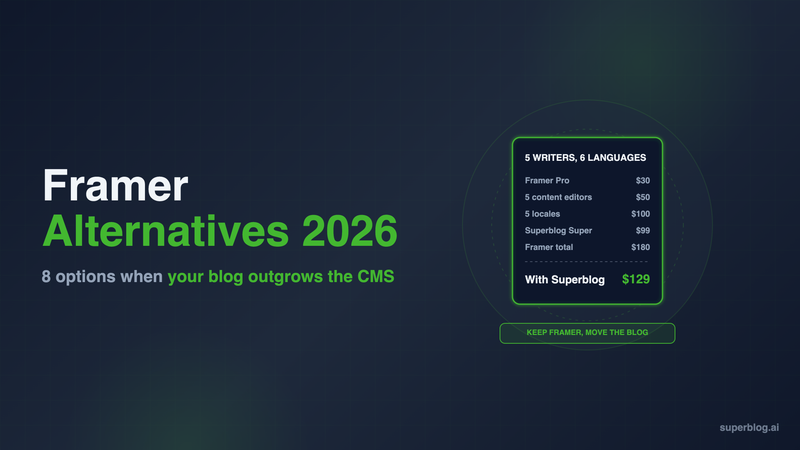
Here is what a growing blog costs on Framer Pro, billed yearly. Five writers as content editors, English plus five more languages:
- Pro: $30
- Five content editors: $50 ($10 x 5)
- Five locales: $100 ($20 x 5)
Total: $30 + $50 + $100 = $180 a month, or $2,160 a year.
The full line-by-line breakdown is in our Framer pricing guide.
That is the gap a dedicated blog platform fills. Superblog is one: it runs the blog for a Framer site with team members included and no per-language fee on Super. It is covered first below, followed by full site builders and other blog platforms.
Framer alternatives at a glance
Prices are per month in USD. Third-party prices are billed yearly. Superblog is shown at its monthly price ($530 a year on Pro, $1,070 on Super).
"Not covered here" means we could not confirm it on the vendor's pricing page.
1. Superblog

Type: Dedicated blog platform. Keeps your Framer site, replaces the Framer CMS blog.
Superblog is a fully managed blog platform: CMS, blog frontend, hosting and SEO in one product. You do not rebuild the marketing site. Framer keeps serving your homepage and landing pages, and Superblog serves the blog.
How it connects to a Framer site. You have two routes:
- blog.yoursite.com. Point a subdomain at Superblog. This works with any Framer plan and needs no Framer add-on.
- yoursite.com/blog. A free Cloudflare Worker sits in front of your domain. It sends /blog to Superblog and every other path to Framer, and the Superblog dashboard generates the Worker code. Framer has no setting for this itself. Because the Worker is a reverse proxy, Framer requires Pro plus Advanced Hosting ($200 a month billed yearly) or Enterprise for this route.
For most Framer teams, blog.yoursite.com is the practical choice. Subdomain vs subdirectory covers the SEO case for each route. The blog for Framer page has the setup steps.
Pricing: $49/month (Pro) or $99/month (Super). Yearly is $530 and $1,070. There is a 7-day free trial, no credit card required. Subdirectory hosting is included on every paid plan.
Strengths for a Framer team:
- Seats are in the plan. Pro includes up to 5 team members, Super up to 10, with role-based permissions.
- Languages are not metered. Multilingual SEO is on Super and above. The tenth language costs the same as the first. Translations live in subdirectories such as
/es/and/de/, with hreflang tags generated for you. - Room for posts without add-ons. Super holds up to 10,000 posts, against Framer Pro's 2,500 CMS items before add-ons. Pro holds up to 1,000.
- SEO runs on every deploy. JSON-LD schemas, XML sitemaps, IndexNow and llms.txt are generated automatically. Pages score 90+ on Lighthouse.
- Lead forms are built in. Forms below posts, in the sidebar, or as pop-ups.
- Framer posts come across. Export your Framer CMS collection as CSV, upload it, and map the columns. Each import takes up to 300 posts, and slugs carry over when you map the slug column.
Cost of the scenario above: Keep the Framer site on Pro at $30 a month billed yearly for the marketing pages, in one language. Move the blog to Superblog Super on blog.yoursite.com. Five writers and six languages cost $360 + $1,070 = $1,430 a year, both billed yearly, against $2,160 on Framer alone. On Superblog's monthly billing it is $30 + $99 = $129 a month. Add a sixth or seventh writer and the gap grows, because Super includes up to 10 team members.
Limits: Superblog is a blog platform, not a page builder. Your landing pages stay in Framer. If your marketing pages also need translating, those Framer locales stay on your Framer bill. For a single writer in one language, Framer CMS is cheaper.
Choose it if: the Framer site is fine and the blog is what costs you seats, locales and CMS headroom.
2. Webflow

Type: Visual site builder.
Webflow is the closest like-for-like move for a design team, with a larger CMS than Framer.
Pricing: Premium is $25 a month billed yearly, or $39 billed monthly. The Basic plan ($15) has no CMS, so a blog starts at Premium.
Strengths:
- A bigger CMS. Premium includes 20,000 CMS items and 40 Collections, against Framer Pro's 2,500 items and 10 collections.
- Cheaper localization at small scale. Localize Essential is $9 per locale per month for up to 3 locales.
Limits: Seats cost more than Framer's. A limited seat (edit content) is $15 a month billed yearly and a full seat is $39. Beyond 3 languages you need Localize Advanced at $29 per locale per month, up to 10. Moving to Webflow means rebuilding every page you made in Framer.
Choose it if: you are rebuilding the whole site anyway and the CMS item cap is your main problem.
3. WordPress
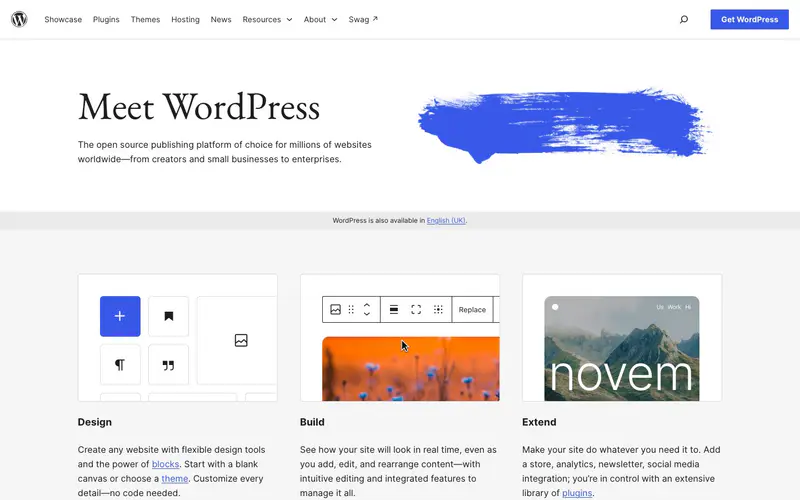
Type: Open-source CMS, self-hosted or managed on WordPress.com.
WordPress has no CMS item cap and no per-seat fee, and its plugin ecosystem covers almost any requirement.
Pricing: The software is free, and you pay for hosting. On WordPress.com, paid plans are Personal $4, Premium $8, Business $25 and Commerce $45 a month billed yearly. Plugin installation is available on every paid WordPress.com plan.
Strengths: No item or seat meters, a huge plugin library, and full control over markup when self-hosted.
Limits: You take on maintenance: core, theme and plugin updates, security and caching. Multilingual needs a plugin. Speed depends on the theme and plugins you add. Keeping your Framer site and running WordPress beside it means maintaining two systems.
Choose it if: you have a developer or agency who already runs WordPress, and you want control more than a managed setup.
4. Ghost

Type: Blog and newsletter platform.
Ghost is open source, with a focused editor, native newsletters and a managed option called Ghost(Pro).
Pricing: Starter $15/month, Publisher $29/month and Business $199/month, billed yearly.
Strengths: A strong writing experience, newsletters built into the core product, and paid subscriptions from Publisher up.
Limits: Staff users are capped at 1, 3 and 15 by plan. Running Ghost(Pro) at yoursite.com/blog is a $50 a month add-on available only on the $199 Business plan, and you run the reverse proxy yourself. Plans are also priced by member count, which matters if the blog grows a large subscriber list.
Choose it if: the blog is really a newsletter or a paid publication.
5. Wix

Type: Site builder with a built-in blog app.
Wix bundles hosting, forms and marketing tools, and its blog is a first-party app with writer roles.
Pricing: Light $17, Core $29, Business $39 and Business Elite $159 a month. Displayed prices are for yearly subscriptions.
Strengths: One dashboard for site, blog, forms and email marketing. Site collaborators scale with the plan: 2 on Light, 5 on Core, 10 on Business, 100 on Business Elite.
Limits: Moving to Wix means moving the whole site, and design control is looser than Framer's. A larger writing team pushes you up a tier.
Choose it if: a small team wants one all-in-one tool and is ready to leave Framer entirely.
6. Squarespace

Type: Site builder.
Squarespace offers polished templates with the blog built in.
Pricing: Basic $19, Core $29, Plus $49 and Advanced $99 a month billed annually. US prices from the Squarespace pricing page.
Strengths: Contributors are unlimited from the Core plan up, which removes the seat meter Framer charges for.
Limits: Basic allows only 2 contributors. Layout control is narrower than Framer's, so a design-led team may feel boxed in. Like Wix, it replaces the whole site, not only the blog.
Choose it if: you want a clean site with a blog, a large writing team, and no developer.
7. Sanity

Type: Headless CMS.
Sanity stores structured content and serves it over an API. You build the frontend yourself, often in Next.js.
Pricing: Free with up to 20 seats and 10,000 documents. Growth is $15 per seat per month, with up to 50 seats and 25,000 documents.
Strengths: Unlimited locales and flexible content modeling.
Limits: There is no blog frontend. A developer builds and maintains the templates, sitemaps, schemas and hosting.
Choose it if: you have a frontend team and want content in one structured store across several products.
8. HubSpot Content Hub

Type: CMS tied to HubSpot's CRM and marketing tools.
If sales and marketing already run on HubSpot, Content Hub puts the blog in the same CRM as your contacts and forms, so attribution needs no integration.
Pricing: Free for up to 2 users. Starter lists at $20 a month per seat. Professional starts at $450 a month with 3 core seats.
Limits: Costs climb steeply once you need Professional features, and seats are still metered. It is a full website CMS, so it tends to replace Framer rather than sit beside it.
Choose it if: you are standardized on HubSpot and want blog attribution inside the CRM.
9. Duda

Type: Site builder for agencies.
Duda sells to agencies and SaaS platforms that build websites for clients. Blogging and multilingual sites come with the builder, so a Framer site rebuilt on Duda keeps its blog in one place.
Pricing: Basic is $19 a month, Team $29 and Agency $52, billed yearly and charged up front. Paying monthly, they cost $25, $39 and $69. The trial runs 14 days and asks for no card.
Strengths: Seats are bundled rather than sold one by one: 3 on Team and 6 on Agency. Client permissions let a writer post to the blog while the agency keeps the layout locked.
Limits: Basic covers one user, so a writing team starts on Team. The product is shaped for agencies running many client sites, with white-label plans and per-site add-ons, more than for a startup's own design team. Moving off Framer means rebuilding every page.
Choose it if: an agency owns your website and you want writers to publish without editing the design.
10. Hostinger Website Builder
Type: Low-cost site builder with hosting.
Hostinger bundles a drag-and-drop builder, hosting and a free domain on yearly plans. Posts live in a blog section placed on any page, run from the Blog management panel, with categories for posts.
Pricing: Premium renews at $10.99 a month and Unlimited at $16.99 a month on a 48-month term. The first term is discounted if you prepay: in Hostinger's November 2026 Black Friday sale, Premium was $95.52 for 48 months ($1.99 a month).
Strengths: Host, builder and domain come from one vendor on one bill, and the first term is heavily discounted if you prepay.
Limits: The discount applies only to a four-year prepayment. Design control is far looser than Framer's. The built-in export goes only to WordPress, and styles, layout, forms and SEO settings stay behind.
Choose it if: price outranks design and the site is small enough that a template will do.
How to choose a Framer alternative
- Decide whether the site or the blog is the problem. If your Framer pages convert and the blog is what costs you seats, locales and CMS items, keep Framer and move the blog. If the whole site needs a rebuild, compare Webflow, Wix and Squarespace. Duda fits a site an agency maintains, and Hostinger fits a tight budget.
- Price the team, not the plan. Multiply your writer count by the seat price and your added-language count by the locale price. On Framer Pro, five content editors and five locales cost $150 a month, five times the $30 plan.
- Check what Framer CMS does for SEO. Framer handles metadata and sitemaps. Our Framer SEO review covers where it stops for a blog that has to rank, and the Framer blog CMS guide covers how it works day to day.
- Pick the route before you migrate. blog.yoursite.com works on any Framer plan. yoursite.com/blog in front of a Framer site needs Framer Pro plus Advanced Hosting or Enterprise.
If you are comparing dedicated blog platforms beyond Framer's world, see our guide to the best blogging platform for business.
Framer alternatives FAQ
Can I keep my Framer site and move only the blog?
Yes. Run the blog on blog.yoursite.com with any Framer plan.
Can Superblog run at yoursite.com/blog on a Framer site?
Yes, through a Cloudflare Worker, with Framer Pro plus Advanced Hosting ($200/month) or Enterprise.
How many CMS items does Framer allow?
1,000 on Basic and 2,500 on Pro, up to 40,000 with add-ons.
Which Framer alternative has the biggest CMS?
WordPress, with no item cap. Webflow Premium includes 20,000 items.
Which Framer alternative does not charge per language?
Superblog (Super plan and above) and Sanity (all plans).
Can I import my Framer blog posts?
Yes. Export the collection as CSV and upload it to Superblog, up to 300 posts per import.
Bottom line
Framer is a strong tool for building a marketing site, and its CMS works for a small blog with one writer. It gets expensive as the blog grows, because writers and languages are metered on top of the plan. If the blog is the only problem, keep the site and move the blog. Superblog runs it on blog.yoursite.com from $49/month (Pro), with team members included and no per-language fee on $99/month (Super). Start with the 7-day free trial, no credit card required.
Your blog, without the maintenance
Fast pages, automatic SEO, no plugins to patch. Runs on yoursite.com/blog.
Sai Krishna is the Founder and CEO of Superblog. Having built multiple products that scaled to tens of millions of users with only SEO and ASO, Sai Krishna is now building a blogging platform to help others grow organically.
superblog
Superblog is a blazing fast blogging platform for beautiful reading and writing experiences. Superblog takes care of SEO audits and site optimizations automatically.