
Best CMS for Startups 2026: Which of 8 Costs Least to Run at Seed?

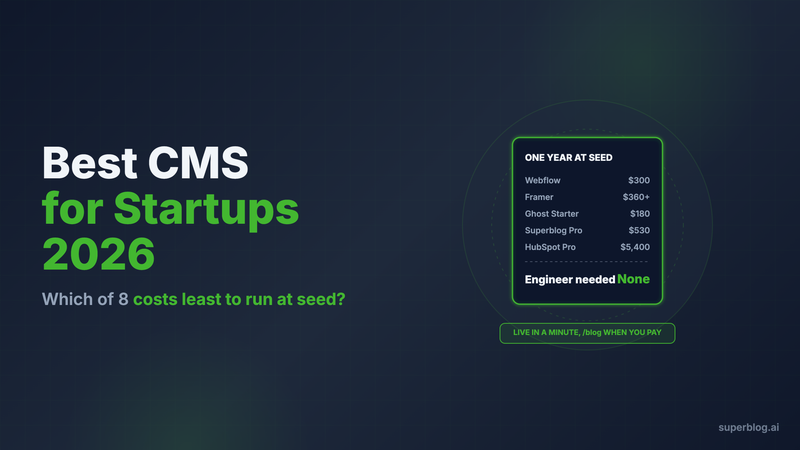
The best CMS for a startup is the one a single founder or marketer can set up this week, run at yoursite.com/blog next to the product, and keep through Series A without a rebuild. For most seed-stage teams with no engineer to spare, that is Superblog at $49/month (Pro). Webflow and Framer fit when the marketing site already runs on them, and Sanity fits when a frontend engineer wants to own the blog.
What a startup CMS has to get right
A startup picks a CMS now, with no time, and lives with it through the next two rounds. These criteria matter at that stage.
- Time to first post. One person should go from signup to a published post in an afternoon. Every week of setup is a week of posts not ranking.
- /blog on the product domain. The blog should live at yoursite.com/blog, not on a separate domain, so every post builds authority for the site that sells. Our subdomain vs subdirectory guide explains why. The catch is that your site often runs on something else already: a Next.js app, or a Webflow or Framer marketing site.
- No engineer on call. At seed, the engineer works on the product. The CMS has to run without plugin updates, proxy maintenance or template code.
- Cost at seed. A low monthly price is only cheap if the blog can sit at /blog on it. Several options below look like $0 to $30 a month and jump to $200+ the moment you need /blog.
- Switching cost later. If you outgrow the tool at Series A, the move should keep your URLs and rankings.
- Room for a second writer. The first content hire, a freelancer or an agency will need a seat, roles and scheduling.
If you have not decided what to publish yet, start with our startup content marketing guide and come back for the CMS.
Startup CMS options at a glance
1. Superblog
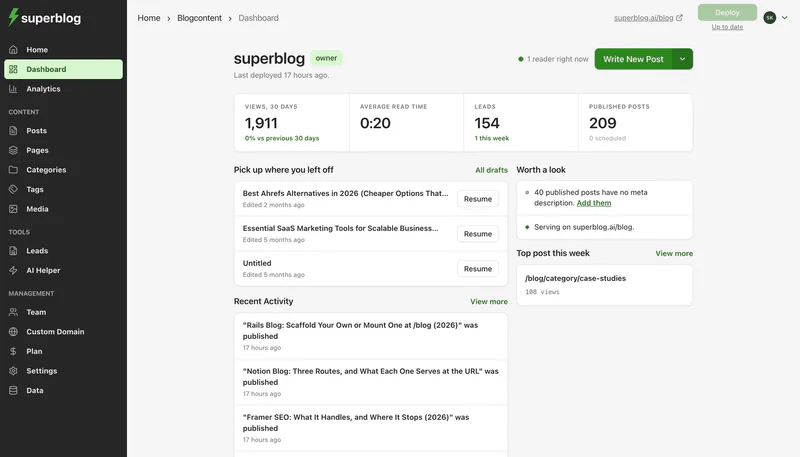
Superblog is a fully managed blog platform: CMS, hosted frontend, CDN and SEO engine in one product. It does not replace your app or your marketing site. It serves the blog next to them.
Time to first post. You create a blog in about a minute and it goes live on a free superblog.click subdomain. Writing starts right away in an editor with slash commands and markdown support.
/blog setup. On a paid plan you connect yoursite.com/blog in the dashboard and pick what the site runs on. Next.js and Vercel get a rewrite rule. Webflow has no proxy setting of its own, so your domain moves to Cloudflare's free plan and a free Cloudflare Worker sends /blog to Superblog and every other path to Webflow, in about 10 minutes. On Framer, the same Worker route needs Framer Pro with the Advanced Hosting add-on ($200/month billed yearly) or Enterprise, because Framer's help center limits reverse proxying to those plans. blog.yoursite.com works on any Framer plan.
Cost at seed. Pro is $49/month or $530 a year, with up to 1,000 posts and 5 team members. Subdirectory hosting, auto SEO, SSL and CDN are on every paid plan, so /blog does not cost extra. Super is $99/month ($1,070 a year) and adds API access, Zapier, lead webhooks and multilingual SEO when you need them.
What you skip. SEO runs on publish: JSON-LD schema (Article, FAQ, Organization), XML sitemaps, IndexNow, canonical URLs, Open Graph tags and llms.txt, plus a plain-markdown copy of every post for AI crawlers. Pages score 90+ on Lighthouse and are served from 200+ CDN locations. Lead forms below posts, in the sidebar or as pop-ups capture emails without a third-party tool.
Switching cost. Coming in is direct from WordPress, Ghost, Webflow, Wix, Drupal, Blogger and Docusaurus. WordPress imports keep slugs, publish dates and Yoast meta. Webflow imports keep slugs but not tags or SEO metadata. Notion pages and Google Docs come in as exported Markdown, HTML or Word files through the post editor; there is no integration to authorize. See the Google Docs and Notion import steps.
Limits: It is a blog platform, not a website builder. Design is template-based with color, font and custom CSS controls. Each plan lists up to 100,000 pageviews a month. Going over does not cap or slow the blog, and a blog that keeps growing moves to a larger plan. There is a 7-day free trial, no credit card required.
Choose it if one person runs content, the blog has to sit at /blog, and nobody on the team should be maintaining it.
2. Webflow

Webflow's CMS runs a blog well when the whole marketing site is Webflow.
Time to first post. Fast if the site exists: add a collection, design the template page once, publish. Slower from a blank canvas.
Cost at seed. Premium is $25/month billed yearly ($300 a year), or $39 billed monthly. Basic ($15/month yearly) is for sites that do not need a CMS, so it cannot run a blog. Editors who are not on a free reviewer seat need a paid workspace seat.
/blog. Native when the marketing site is Webflow. If your product runs on another stack and you want one domain, Webflow offers reverse proxy setup as a service in its Enterprise packages; otherwise your team maintains the proxy.
Switching cost. Premium holds 20,000 CMS items, plenty for a startup blog. The blog is tied to the site design, so rebuilding the site means rebuilding the blog.
Choose it if your marketing site is already on Webflow and the same person designs the site and runs the blog.
3. Framer

Framer builds fast, polished landing pages, and many seed-stage startups launch on it.
Time to first post. Fast inside an existing Framer site: add a CMS collection, style one page, publish.
Cost at seed. Pro is $30/month at the yearly rate ($360 a year), or $45 monthly. Content editors are $10 per editor. A founder plus one writer on Pro is $480 a year.
/blog. Native when the marketing site is Framer. If Framer has to serve the blog under another site's domain, Framer supports reverse proxying only on Pro with the Advanced Hosting add-on ($200/month billed yearly) or on Enterprise.
Switching cost. Pro caps the CMS at 2,500 items unless you buy add-ons. Leaving Framer means exporting the collection as CSV and mapping it into the new tool.
Choose it if the whole marketing site is Framer, the blog stays small, and a designer owns both.
4. Notion-to-blog tools (Feather, Super)

These tools publish Notion pages as a blog, so the editor is Notion itself.
Time to first post. Short: connect a Notion database or page, pick a template, publish.
Cost at seed.
- Feather starts at $39/month for up to 10,000 pageviews, billed monthly. Yearly billing gives 2 months free. There is a 7-day free trial.
- Super Personal is $16/month per site with your own domain, and Pro is $28.
/blog. Feather supports a blog at example.com/blog or on a subdomain. Super offers sub-path hosting such as /blog only as a custom service, starting at $50 plus fees.
Switching cost. Your posts live in Notion, which is a document tool, not a publishing system. When the blog outgrows it, you export pages as Markdown or HTML and import them into the next platform.
Choose it if the founder writes in Notion and the blog is a side channel for now.
5. Ghost

Ghost is a fast publishing platform built around newsletters and memberships, with good SEO defaults: IndexNow is on by default and llms.txt is on for new sites.
Time to first post. Fast on Ghost(Pro). The editor is one of the cleanest available.
Cost at seed. Starter is $15/month billed yearly ($180 a year) with 1 staff user and Ghost's built-in default theme. Custom themes start on Publisher, $29/month billed yearly with 3 staff users.
/blog. Ghost(Pro) runs on a root domain or subdomain. A subdirectory like yoursite.com/blog needs the $199/month Business plan, a $50/month add-on and a reverse proxy you run yourself. That is about $3,000 a year before engineering time.
Switching cost. Low. Superblog and others import from Ghost directly.
Choose it if the startup's content is really a newsletter and a subdomain is acceptable.
6. HubSpot Content Hub

HubSpot's blog tool lives inside its CRM, which many startups already use for sales.
Time to first post. Fast if you already use HubSpot, with themes and an SEO sidebar built in.
Cost at seed. Free (up to 100 posts, HubSpot branding). Starter is $20/seat/month, or from $7/seat/month with HubSpot's new-customer discount. Professional starts at $450/month (HubSpot also lists $500/month) with 3 core seats. HubSpot for Startups advertises 90% off the first year for Seed and Series A founders who qualify. Plan for the full price in year two.
/blog. The blog runs on HubSpot's hosting. To serve it at /blog on a site hosted elsewhere, HubSpot's developer docs say you need a reverse proxy through a CDN, and HubSpot support does not set it up.
Switching cost. High. The blog, forms and contact records are tied together, which is the benefit now and the lock-in later.
Choose it if HubSpot already runs your funnel and you want post-to-pipeline attribution in the CRM.
7. WordPress
WordPress can do anything. At a startup the cost is running it.
Time to first post. Slower than a managed tool: hosting, a theme, then the SEO, caching, security and form plugins a business blog needs.
Cost at seed. The software is free. Managed hosting such as Kinsta starts at $35/month, or $30/month paid annually ($360 a year), before plugins and developer time.
/blog. If the product is a Next.js app, WordPress cannot sit at /blog on its own. You run a reverse proxy to a separate WordPress host or build a headless frontend on the WordPress API. Both are engineering projects.
Switching cost. Low. Almost every platform imports WordPress.
Choose it if you have a developer who wants to own the blog and you need functionality no blog platform offers.
8. Sanity (headless CMS)

Sanity serves content through an API, and your engineers build the blog inside your app. Our headless CMS guide for business blogs covers the tradeoff in depth.
Time to first post. The longest of the eight. Before the first post you need a content schema, templates, sitemaps, schema markup, previews and image handling, all in code.
Cost at seed. Free for up to 20 seats and 10k documents. Growth is $15 per seat per month. The real cost is engineering time taken from the product.
/blog. Native: the blog is just another route in your app.
Switching cost. Medium. Content exports cleanly, but the frontend your team built does not move with it.
Choose it if a frontend engineer wants to own the blog as a product and the roadmap has room for it.
How to choose a CMS for an early-stage startup
Start with who will run the blog, then check where it has to live.
- One founder or marketer, no engineer, /blog on the product domain: Superblog. It is live in a minute and connects to /blog on a paid plan with one rewrite rule or a free Cloudflare Worker.
- The marketing site is Webflow or Framer and the blog stays small: use the builder's CMS. Move the blog when you need team roles, lead forms or SEO automation. Superblog keeps the builder site in place with a Worker route on Webflow, or blog.yoursite.com on Framer.
- The founder lives in Notion and the blog is a side channel: Feather, if it serves /blog the way you need.
- HubSpot already runs sales: HubSpot Content Hub, with the year-two price in the budget.
- The blog is a newsletter: Ghost on a subdomain.
- A frontend engineer wants to build it: Sanity, with the build weeks counted.
- You have a developer who already runs WordPress: WordPress, with maintenance budgeted.
For more on why the platform choice matters at your stage, see our blogging platform for startups page. If your company sells beyond the startup market, the blogging platform for business comparison covers Squarespace and Medium too.
FAQ
What CMS should an early-stage startup use?
Superblog for a managed blog at /blog; Sanity if an engineer wants to build it.
Is there a free CMS for startups?
Yes: HubSpot Content Hub Free (100 posts) and Sanity Free (20 seats).
How much does a startup CMS cost in year one?
From $0 (HubSpot Free) to $5,400 (HubSpot Professional at $450/month).
Can a startup run a blog without a developer?
Yes. Superblog, Webflow, Framer and Feather need no code.
Should a startup blog be on a subdomain or a subdirectory?
A subdirectory, such as yoursite.com/blog.
Does Superblog have a free trial?
Yes: a 7-day free trial, no credit card required.
Your blog, without the maintenance
Fast pages, automatic SEO, no plugins to patch. Runs on yoursite.com/blog.
Sai Krishna is the Founder and CEO of Superblog. Having built multiple products that scaled to tens of millions of users with only SEO and ASO, Sai Krishna is now building a blogging platform to help others grow organically.
superblog
Superblog is a blazing fast blogging platform for beautiful reading and writing experiences. Superblog takes care of SEO audits and site optimizations automatically.