
Best CMS for Next.js 2026: 8 Compared on Price and Dev Hours

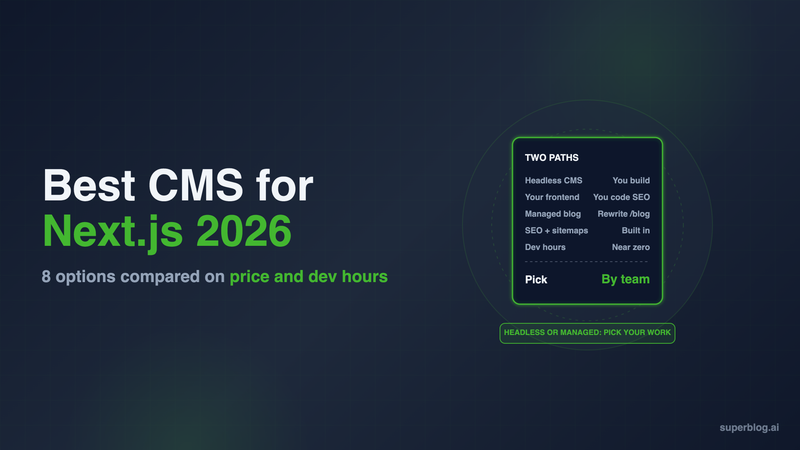
The best CMS for Next.js depends on who builds the blog. If your developers want to render every post with their own React components, pick a headless CMS: Sanity, Payload or Storyblok lead that group. If the blog's job is search traffic and you want zero blog code in your app, use a managed blog like Superblog served at /blog through a Next.js rewrite.
This guide compares 8 options on the five things that decide the cost of a Next.js blog: build time, the SEO you have to code, the editor experience, pricing, and developer hours. Every third-party price below was checked on the vendor's own pricing page on November 6, 2026.
Two ways to run a blog on Next.js
Every option on this list takes one of two paths.
- Headless CMS. Writers work in the CMS. Your Next.js app fetches content through an API and renders it. You own the post template, the routes, the metadata and the deploy.
- Managed blog behind a rewrite. The blog is a complete site hosted elsewhere. Your
next.config.jsproxies/blogto it, so readers and Google seeyoursite.com/blog. Your app holds a few lines of config and no blog code.
The first path gives you full control of the markup. The second path removes the blog from your codebase. Most teams pick based on one question: do you want your engineers to own the blog, or not?
How we judged each CMS
- Build time. Does publishing a post rebuild or revalidate your Next.js app? Statically generated posts add to every build. On-demand revalidation avoids that, but you have to write the webhook route that calls
revalidatePathorrevalidateTag. - SEO you have to implement. With a headless CMS, the SEO layer is your code:
generateMetadata,app/sitemap.ts,app/robots.ts, JSON-LD script tags, Open Graph images, canonical URLs, an RSS route and any IndexNow pings. See our Next.js SEO guide for the full list. - Editor experience. Can a marketer write, preview and schedule a post without asking a developer?
- Pricing. The published monthly price for a team of about 5 people.
- Developer hours. The work before the first post goes live, plus the work every month after.
At a glance
1. Superblog
Path: managed blog served at /blog through a Next.js rewrite.
Superblog is a complete blogging platform: CMS, blog frontend, hosting and SEO engine in one product. You do not build a post template. You add a rewrite to next.config.js and the blog appears at yoursite.com/blog, on your domain, where it builds authority for your main site.
This is the rewrite the Superblog dashboard generates for Next.js, with yourblog standing in for your blog's name:
const nextConfig = {
  async rewrites() {
      return {
          beforeFiles: [
              {
                  "source": "/blog",
                  "destination": "https://yourblog.superblog.click/"
              },
              {
                  "source": "/blog/:slug*",
                  "destination": "https://yourblog.superblog.click/:slug*"
              },
          ]
      }
  }
}

module.exports = nextConfig
Rewrites in beforeFiles run before Next.js checks your own routes, so a catch-all page in your app does not swallow /blog. The add a blog to Next.js guide walks through the TypeScript version and a vercel.json alternative.
Build time: none in your app. Publishing a post deploys the blog on Superblog's side. Your Next.js app does not rebuild or revalidate.
SEO you implement: none. Every post ships with JSON-LD schemas (Article or BlogPosting, WebPage, Organization, ImageObject and FAQ), XML sitemaps, IndexNow pings on publish, canonical URLs, Open Graph tags and an llms.txt file at /blog/llms.txt. Each post is also served as plain markdown at its own URL plus .md. Pages score 90+ on Lighthouse.
Editor experience: a WYSIWYG editor with slash commands and markdown support, SERP preview, FAQ blocks, internal link suggestions and built-in lead forms. Scheduling, analytics and collaborative review come with Pro.
Pricing: $49/month (Pro) with up to 5 team members and 1,000 posts. $99/month (Super) adds the REST API, MCP, Zapier and multilingual SEO. Subdirectory hosting is on every paid plan. There is a 7-day free trial, no credit card required.
Limits: the blog renders with Superblog's templates, not your React components. You customize it with templates, colors, fonts, menus and custom CSS. It runs your blog, not the pages inside your Next.js app.
Choose it if the blog exists to win search traffic and you do not want engineers maintaining it. The Next.js use case page and the Vercel setup page cover the setup for each host.
2. Sanity
Path: hosted headless CMS with a code-defined schema.
Sanity is the default pick for Next.js teams that want structured content and full control. You define the schema in code, query it with GROQ, and the Studio editor can run as a route inside your Next.js app.
- Build time: you wire revalidation to Sanity webhooks, or rebuild on publish.
- SEO you implement: all of it. Sanity stores fields; your app turns them into metadata, sitemaps and schema.
- Editor experience: strong once a developer configures the Studio. Comments, tasks and scheduled drafts are on Growth.
- Pricing: Free for up to 20 seats and 10,000 documents. Growth is $15 per seat per month, billed monthly on self-serve plans. A 5-person team pays $75/month.
Choose it if you have a developer who will own the blog frontend and you want content modeled precisely.
3. Payload
Path: open-source CMS that installs into your Next.js app.
Payload installs directly in your Next.js /app folder, so the CMS and the site share one codebase and one deploy. It is MIT licensed and runs on MongoDB, Postgres or SQLite.
- Build time: content lives in your own database, so you can render posts on request or revalidate on save.
- SEO you implement: all of it, in the same repo as the rest of your app.
- Editor experience: a clean admin panel that your developers configure in TypeScript.
- Pricing: the software is free. You pay for the database, file storage and hosting.
Choose it if you want no external CMS vendor and your team is comfortable running a database next to the app.
4. Storyblok
Path: hosted headless CMS with a visual editor.
Storyblok's visual editor connects to your running Next.js project, so marketers edit a live preview of the page. The cost is setup: each block type has to be registered and mapped to a React component in your code.
- Build time: revalidation through webhooks, same as other hosted options.
- SEO you implement: all of it, plus SEO fields you add to your content types.
- Editor experience: the most visual on this list for page building.
- Pricing: Starter is free with 1 seat. Growth is $99/month ($90.75/month billed annually) with 5 seats included. Growth Plus is $349/month with 15 seats.
Choose it if marketers build landing pages as well as posts and you have a developer to build the component library.
5. Contentful
Path: enterprise headless CMS.
Contentful is the common choice in large organizations with many content teams, locales and channels. For a single company blog, it is more platform than the job needs.
- Build time: webhooks plus revalidation routes you write.
- SEO you implement: all of it.
- Editor experience: structured forms and mature editorial workflows.
- Pricing: current plans are listed at contentful.com/pricing.
Choose it if the blog is one channel in a wider content operation that already runs on Contentful.
6. Strapi
Path: open-source headless CMS, self-hosted or on Strapi Cloud.
Strapi gives you a REST and GraphQL API with an admin panel you control. Unlike Payload, it runs as a separate server from your Next.js app.
- Build time: webhook-driven revalidation.
- SEO you implement: all of it.
- Editor experience: a form-based admin panel. Fine for writers once content types are set up.
- Pricing: the Community Edition is free and MIT licensed when you self-host. Self-hosted Growth is $45/month with 3 users. Strapi Cloud starts at $35/month (Starter), then $90 (Pro) and $450 (Business) per project.
Choose it if you want open source and are ready to host, patch and back up a second server.
7. Prismic
Path: hosted headless CMS built around page sections.
Prismic has writers build pages from reusable sections called slices. Developers write a React component for each slice in src/slices/.
- Build time: revalidation through webhooks.
- SEO you implement: all of it.
- Editor experience: good for assembling pages from approved sections.
- Pricing: Free with 1 user. Starter $10/month (3 users), Small $25/month (7 users), Medium $150/month (25 users), per repository, shown as paid annually.
Choose it if your blog posts share layouts with marketing pages and you want one tool for both.
8. TinaCMS
Path: Git-based CMS for Markdown and MDX.
TinaCMS stores content as Markdown, MDX and JSON files in your Git repository and adds visual editing for React sites. It is Apache 2.0 licensed.
- Build time: every published post is a commit, so in a typical setup each post triggers a deploy of your app.
- SEO you implement: all of it, inside your MDX pipeline.
- Editor experience: a visual layer over files, which suits developers and technical writers more than marketing teams.
- Pricing: Free with 2 users. Team is $29/month or $290/year with 3 users included and up to 10. Business is $299/month or $2,990/year.
Choose it if your blog already lives in MDX in the repo and you want a friendlier way for non-developers to edit it.
What 5 writers cost per month
For a team of 5 people writing posts, using the published prices above:
The license is rarely the big number. Every headless row also carries the developer hours to build the post template, category and tag pages, metadata, sitemap, schema, RSS and preview, and the hours to keep them working as Next.js changes. Our headless CMS guide for business blogs breaks down that work.
How to choose a CMS for Next.js
- Ask who owns the blog. If no engineer will own it long term, take the managed path. A headless blog with no owner falls behind on SEO fixes first.
- Check whether the blog needs your React components. Interactive demos or product embeds inside posts point to Sanity, Payload or Storyblok.
- Count the SEO work. List every item from the criteria above. If your team will not build and maintain all of it, a headless CMS will ship a weaker blog than a managed one.
- Price the team, not the plan. Per-seat pricing changes the ranking once you add writers.
- Keep the blog on
/blog. Whichever path you pick, serve it on your main domain, not a subdomain. A headless blog and a managed blog can both do this.
FAQ
What is the best CMS for a Next.js blog?
Superblog for a blog with no code to maintain; Sanity or Payload if developers render it themselves.
Does Next.js have a built-in CMS?
No.
Can I host a Superblog blog at /blog on a Next.js site?
Yes, with two beforeFiles rewrites in next.config.js.
Is Payload free?
Yes, it is MIT licensed; you pay for hosting and the database.
How much does Sanity cost for a blog team?
$15 per seat per month on Growth, with a free plan up to 20 seats.
Which Next.js CMS options handle SEO automatically?
Superblog; the headless options leave metadata, sitemaps and schema to your code.
Your blog, without the maintenance
Fast pages, automatic SEO, no plugins to patch. Runs on yoursite.com/blog.
Sai Krishna is the Founder and CEO of Superblog. Having built multiple products that scaled to tens of millions of users with only SEO and ASO, Sai Krishna is now building a blogging platform to help others grow organically.
superblog
Superblog is a blazing fast blogging platform for beautiful reading and writing experiences. Superblog takes care of SEO audits and site optimizations automatically.