
Best Blog Hosting in 2026: 13 Options Ranked by What You Actually Need



The best blog hosting depends entirely on what you need it to do, so here is the short answer before the long one. If you run a business blog that has to rank and convert, a managed blog platform (hosting included and invisible) beats renting a server. If you are committed to WordPress, a managed WordPress host removes most of the maintenance. If you are running a hobby or side project on a tight budget, a shared host gets you online for a few dollars a month. If you are a developer shipping a static site, Vercel or Netlify are built for you.
Most "best blog hosting" lists rank providers in a flat line, one to fifteen, as if a solo food blogger and a Series B SaaS company want the same thing. They do not. So this guide is organized by need. Thirteen options, grouped into five categories, with entry and renewal prices read from each vendor's own pages in July and November 2026. Where a host triples (or sextuples) its price at renewal, we say so, because that gotcha is the most expensive detail on a shared-hosting invoice.
First, decide what "hosting" even means for you
Blog hosting used to mean one thing: renting server space and installing WordPress on it. That model still runs millions of blogs, and for some people it is the right call. But it is no longer the only model, and for business blogs it is often the slowest path to traffic.
Modern blog hosting splits into three shapes:
- Fully managed platforms. You get CMS, frontend, hosting, SEO, and performance in one product. You write. The platform does the rest. Hosting is included and you never touch a server.
- Managed WordPress hosts. You still run WordPress, but the host handles server maintenance, updates, security, and caching. You manage the CMS, plugins, and theme.
- Self-managed hosting. Shared hosts and cloud platforms give you space to install and run whatever you want. Cheapest on paper, most work in practice.
The category you pick matters far more than the specific provider inside it. This guide walks each category in order of how little work it leaves you. For the managed-versus-self-hosted tradeoff, see the hosted vs self-hosted blog guide.
Category 1: Managed blog platforms (hosting you never see)
This category is built for people whose blog is a growth channel, not a technical project. A managed blog platform includes hosting the way a car includes an engine: essential, handled, and never something you think about.
Superblog
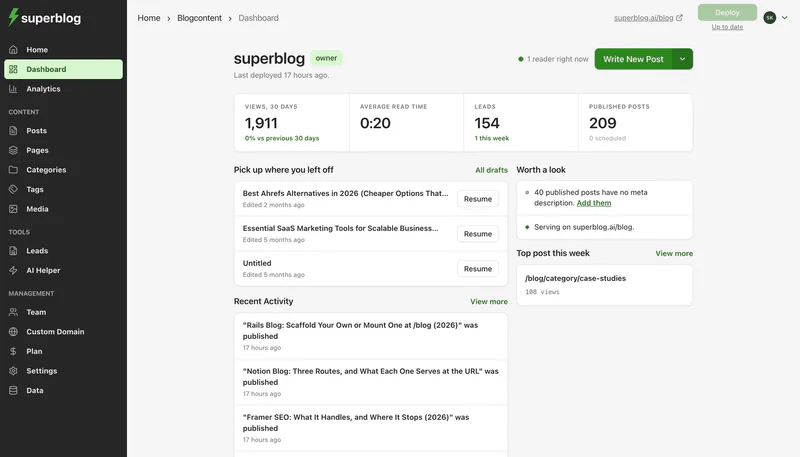
Superblog is a complete blogging platform for businesses serious about organic growth. It is blog hosting without the hosting: no server to provision, no CDN to configure, no cache plugin to tune. Every page is pre-built as static HTML and served from a global CDN with 200+ edge locations, which is why Superblog delivers 90+ Lighthouse scores automatically on every page.
What you get in one product:
- Performance by default. JAMStack architecture, automatic WebP image conversion, free SSL, and a 99.99% uptime guarantee. First Contentful Paint under one second.
- SEO that runs while you sleep. Auto JSON-LD schemas (Article, FAQ, Organization), XML sitemaps, IndexNow submission the moment you publish, canonical tags, and Open Graph. No plugins to install or configure.
- LLMs.txt built in. A machine-readable index of your content published automatically at your domain. Most hosts do not offer this at all.
- Subdirectory hosting. Run the blog at yoursite.com/blog to keep all domain authority on your main site, on any tech stack: Next.js, React, Webflow, Shopify, or WordPress.
- Built-in lead generation. Forms below posts, in the sidebar, or as pop-ups. No third-party tools bolted on.
Management burden: effectively zero. No updates, no security patches, no plugin conflicts.
Pricing: Pro is $49/month (up to 1,000 posts, 5 team members), Super is $99/month (adds multilingual SEO, API access, Zapier, and up to 10 team members). Both come with a 7-day free trial, no credit card required.
Right for: businesses that want the blog to rank and convert without anyone on the team babysitting infrastructure. If that is you, the full argument is in the managed blog platforms guide and the business blog hosting guide.
Category 2: Managed WordPress hosts (WordPress, minus the server work)
If you are committed to WordPress (for its plugin ecosystem, an existing site, or a team that already knows it), do not put it on a bargain shared host and hope for the best. Managed WordPress hosts handle the server, caching, and security so WordPress runs fast and stays up. You still own plugin updates, theme maintenance, and performance tuning, but the infrastructure is off your plate.
WordPress.com
WordPress.com is Automattic's hosted WordPress, the shortest path to WordPress without running a server.
- Entry price: a free plan that shows WordPress.com ads to visitors. Personal is $4/month billed yearly ($9 month to month), Premium $8/month and Business $25/month, both billed yearly.
- Renewal: the yearly rate is the list rate, not a first-term promo.
- Management burden: low to moderate. Paid plans can install plugins, and each one is yours to keep updated.
- Performance: fine for most blogs. Your theme and plugin choices set the ceiling.
Right for: WordPress without choosing a host. Our comparison of WordPress.com and WordPress.org covers the tradeoffs.
Kinsta
Kinsta runs managed WordPress on Google Cloud's premium tier with a built-in CDN and staging environments. It is aimed at people who want WordPress to feel fast without hand-tuning servers.
- Entry price: the Single plan is $35/month, or $30/month billed annually ($350/year). That covers 1 WordPress install, 10GB storage, and 20GB server bandwidth plus 125GB CDN bandwidth.
- Renewal: no promotional-rate trap. The price you sign up at is the price you keep, which is refreshingly honest for this market.
- Management burden: moderate. Kinsta handles the stack; you handle WordPress itself.
- Performance: strong for WordPress, with server-level caching and a built-in CDN included. Your ceiling still depends on your theme and plugin choices.
Right for: teams that want WordPress specifically and will pay for infrastructure that does not fight them.
WP Engine

WP Engine is one of the longest-running managed WordPress hosts, popular with agencies and larger content teams.
- Entry price: the Essential Startup plan is $25/month billed annually ($300/year), covering 1 site and 25,000 monthly visits.
- Renewal: first-year promotional pricing applies to new customers, so budget for the standard rate afterward. Confirm the renewal figure at checkout before committing.
- Management burden: moderate, same shape as Kinsta. Managed stack, self-managed WordPress.
- Performance: solid, with edge caching and a global CDN. Again, plugin sprawl is the usual thing that drags a WordPress blog's Lighthouse score down.
Right for: agencies and content teams standardized on WordPress that want managed infrastructure and staging.
Cloudways
Cloudways sits between shared hosting and premium managed WordPress. You pick a cloud (DigitalOcean, Vultr, Linode, AWS or Google Cloud) and Cloudways runs the server.
- Entry price: the DigitalOcean Premium Micro server is $14/month (1GB RAM, 1 vCPU, 25GB NVMe storage, 1TB bandwidth), billed by the hour.
- Renewal: no long prepaid term. Seasonal codes discount the first months, then the standard hourly rate applies.
- Management burden: moderate to high. You size the server and run WordPress yourself.
- Performance: strong for the money, since the site runs on its own cloud server instead of a slice of a shared host.
Right for: technical owners who want cloud performance without Kinsta pricing.
A caveat for this entire category: managed WordPress removes server work, but it does not remove WordPress. You still assemble SEO, caching, and image optimization from plugins, and every plugin is a maintenance and security line item. If plugin-driven slowness worries you, the WordPress speed guide breaks down where the time goes.
Category 3: Budget shared hosts (cheap upfront, watch the renewal)
Shared hosting is where most blogs started, and for a hobby project or a first site it still makes sense. You get a server slice, a one-click WordPress installer, and a tiny price. The catch is the renewal: intro pricing is a first-term promotion, and the second term is often two to six times higher. Read both numbers together, never just the big one on the banner.
Hostinger
Hostinger is the current volume leader for budget WordPress hosting, and its intro pricing is aggressive.
- Entry price: the Premium plan is $2.99/month, but only on a 48-month upfront term.
- Renewal price: $10.99/month. That is the number that matters for year five and beyond, and it is roughly 3.7x the intro rate.
- Management burden: high. You install WordPress, pick plugins, configure caching, and handle updates yourself.
- Performance: acceptable for low-traffic blogs, but shared resources mean speed degrades under load.
Right for: hobby blogs and first projects where the four-year prepay and the DIY setup are acceptable trades for a low entry price.
Bluehost
Bluehost is WordPress.org's long-recommended host and a common first stop for beginners.
- Entry price: the Starter plan is $3.99/month on a 36-month term.
- Renewal price: $9.99/month, about 2.5x the intro rate once the first term ends.
- Management burden: high, same as Hostinger. This is self-managed WordPress on shared infrastructure.
- Performance: fine for a starter blog, with the same shared-resource ceiling.
Right for: absolute beginners who want the officially blessed WordPress on-ramp and do not mind the renewal jump.
SiteGround

SiteGround is a premium shared host with its own speed and security plugins for WordPress.
- Entry price: StartUp is $2.99/month, prepaid for the first 12 months. Seasonal sales cut the intro rate further.
- Renewal price: $17.99/month, six times the intro rate and the steepest jump in this guide.
- Management burden: moderate. Managed autoupdates, backups, a CDN and a free site migration are included; plugins are still yours.
- Performance: good for shared hosting, with server-level caching. StartUp covers one website.
Right for: small blogs that want better tooling than a bargain host and budget for the renewal.
DreamHost

DreamHost is a long-running budget WordPress host.
- Entry price: WordPress Launch is $1.99/month on a 4-year term (sale price, November 2026), covering up to 25 websites and 40,000 monthly visits.
- Renewal price: $7.99/month after the first 4 years, four times the intro rate but the lowest renewal among the shared hosts.
- Management burden: high. Daily backups are included; WordPress upkeep is yours.
- Performance: fine for low-traffic sites, with the usual shared-resource ceiling.
Right for: budget blogs that can prepay four years for the lowest long-term price.
GoDaddy

GoDaddy sells Managed Hosting for WordPress next to its domains.
- Entry price: the Basic plan is $6.99/month for the first 1-year term, covering one website and 10GB of NVMe storage.
- Renewal price: the list price is $14.99/month, about 2.1x the intro rate.
- Management burden: moderate. GoDaddy updates WordPress core, themes and plugins automatically and handles security patches; choosing plugins and doing SEO stay with you.
- Performance: fine for a starter blog. Basic leaves out the CDN that the Deluxe plan adds.
Right for: owners whose domain is already at GoDaddy. The GoDaddy blog hosting review goes deeper.
The honest summary: the sticker price is real, and so is the renewal. A blog that looks like $36/year at $2.99/month actually costs $132/year once it renews at $10.99. Still low, but not the number on the ad, and the DIY maintenance load is the real price.
Category 4: Developer platforms (static sites, your own effort)
If you have a developer (or you are one), you can build a blog as a static site with a headless CMS or a Markdown generator and deploy it to Vercel or Netlify. Done well, this produces a genuinely fast blog. Done honestly, it is the most hands-on option here. You are the CMS, the frontend, and the SEO engine.
Vercel
Vercel is the deployment platform behind Next.js and a favorite for static and hybrid sites.
- Entry price: the Hobby tier is free forever for personal projects. The Pro plan is $20/user/month, plus usage-based charges beyond the included credit.
- Management burden: high, but of a different kind. No server patching, but you build and maintain the site, the content workflow, and every SEO detail (schemas, sitemaps, meta tags) yourself in code.
- Performance: excellent when built well. Static output on a global edge network is fast by construction.
Right for: developers who want full control and are happy to own the entire content and SEO stack in code.
Netlify
Netlify pioneered the modern static deploy workflow and remains a strong pick for JAMStack sites.
- Entry price: a free tier for personal and low-traffic sites, with the Pro plan at $20/month for unlimited members.
- Management burden: high, same shape as Vercel. The platform hosts and deploys; everything editorial and SEO-related is yours to build.
- Performance: excellent for static content on the edge.
Right for: developer teams comfortable wiring up their own CMS, build pipeline, and SEO.
The tradeoff to state plainly: developer platforms give you speed and control, but they hand you the work that managed platforms automate. If nobody on your team wants to write schema markup and maintain a build pipeline, this category costs more in engineering hours than it saves in hosting fees.
Category 5: Newsletter-blog hybrid
Some blogs are really newsletters with an archive, or a membership with posts attached. For that shape, a platform built around email and subscriptions fits better than a pure blog host.
Ghost(Pro)

Ghost is an open-source publishing platform, and Ghost(Pro) is the official managed hosting for it. It pairs a clean writing experience with built-in newsletters and memberships.
- Entry price: the Starter plan is $15/month billed yearly ($18 monthly), covering up to 1,000 members.
- Management burden: low. Ghost(Pro) manages the stack, and Ghost ships with less to configure than WordPress.
- Performance: fast by default, with a lean architecture.
- The blog-SEO caveat: Ghost runs on its own domain or a subdomain. Putting it at yoursite.com/blog takes the Business plan ($199/month billed yearly) plus a $50/month add-on, with a reverse proxy that you host. The Ghost alternative comparison covers that trade-off in depth. On SEO, Ghost handles meta tags and sitemaps. Since v6.45 it sends IndexNow pings without setup, and new sites get llms.txt switched on.
Right for: creators and publishers building a newsletter or membership business where email is the primary channel and the blog is the archive.
The comparison table
Prices read from vendor pages in July and November 2026. Renewal column flags where the second-term price jumps.
How to choose the best blog hosting for your situation
Match the category to your situation, then pick the provider inside it.
Your blog has to rank and convert for the business. Go managed platform. The time saved not maintaining an SEO stack is worth more than the fee, and performance and schema automation are done for you. Superblog sits here.
You are married to WordPress. Go WordPress.com if you want no host to pick, Kinsta or WP Engine for premium managed hosting, or Cloudways for cloud servers at a lower price. You keep the plugin ecosystem and hand off the server. Plugins remain your job.
It is a hobby and money is tight. Go budget shared (DreamHost, Hostinger or Bluehost, or SiteGround if you want more tooling and accept a $17.99 renewal). Read the renewal price, prepay the longest term you are comfortable with, and expect to do the maintenance.
You have a developer who wants control. Go developer platform (Vercel or Netlify). Budget the engineering hours, because you build the CMS and SEO yourself.
It is really a newsletter. Go Ghost(Pro). Email and memberships are first-class; blog-specific SEO is not.
One more honest note. For a business blog, the largest cost of hosting is almost never the monthly fee. It is the hours spent on setup, plugin maintenance, performance tuning, and technical SEO that a shared host or DIY stack pushes onto you. A $10/month host that eats five hours a month costs more than a $49/month platform that eats zero. Price the time, not just the invoice.
Frequently asked questions
What is the best hosting for a blog?
For a business blog that must rank, a managed blog platform like Superblog; for WordPress, Kinsta, WP Engine or WordPress.com; for a hobby, a budget shared host.
Do I need hosting for a blog?
Yes, but on a managed platform like Superblog it is included and you never manage a server.
Why is shared hosting so cheap at first?
The intro rate is a first-term promotion: SiteGround renews at $17.99/month after $2.99, Hostinger at $10.99 after $2.99.
Is managed hosting worth it over shared hosting?
Yes for a business blog, because it removes setup, plugin upkeep and performance tuning; for a hobby blog, shared hosting is enough.
Does blog hosting affect SEO and rankings?
Yes: page speed and technical SEO (schemas, sitemaps, fast indexing) both depend on it.
Can I host my blog on a subdirectory like mysite.com/blog?
Yes. Superblog includes it on every paid plan; Ghost(Pro) charges $249/month billed yearly for it (Business plus add-on) and you host the proxy.
How much should I budget for blog hosting?
$2 to $18 a month on shared hosting (check the renewal), $4 to $35 for WordPress.com, managed WordPress or cloud, and $49 to $99 for Superblog.
Ready to skip server management entirely? Try Superblog free for 7 days. No credit card required, and your blog goes live in under a minute.
Your blog, without the maintenance
Fast pages, automatic SEO, no plugins to patch. Runs on yoursite.com/blog.
Sai Krishna is the Founder and CEO of Superblog. Having built multiple products that scaled to tens of millions of users with only SEO and ASO, Sai Krishna is now building a blogging platform to help others grow organically.
superblog
Superblog is a blazing fast blogging platform for beautiful reading and writing experiences. Superblog takes care of SEO audits and site optimizations automatically.