
How to Automate Your Blog With Claude, Codex, and MCP

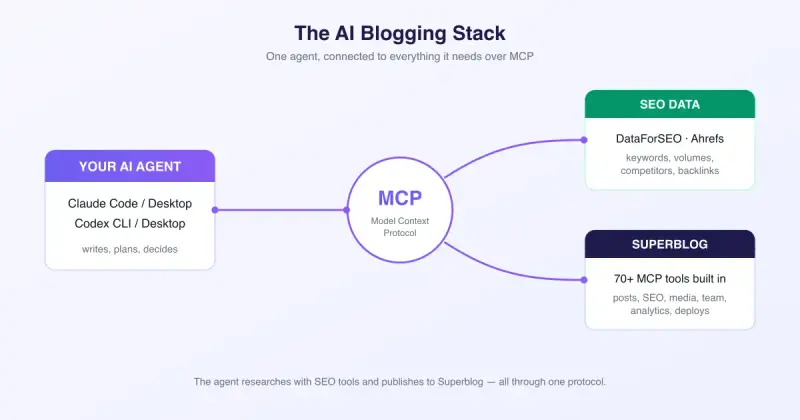
AI assistants like Claude and Codex can already write genuinely good blog posts. Connect them to SEO data tools like DataForSEO or Ahrefs and they stop guessing: the content they produce is backed by real keyword volumes, competitor gaps, and SERP data. But there's a missing piece most people hit immediately. The AI can research and write, and then it pastes markdown into a chat window for you to copy into a CMS by hand. The bottleneck isn't the writing anymore. It's the publishing. That's where your blogging platform matters. You need one that's built for AI agents, with MCP support out of the box, not a plugin bolted on as an afterthought. That's exactly where Superblog stands out: it ships an MCP server with 70+ tools, so your AI agent can handle the entire cycle from a single conversation: research, draft, optimize, publish, deploy, and measure.
In this guide, we'll set up the full stack and walk through real prompts you can use today.
What is MCP, in 30 seconds
MCP (Model Context Protocol) is an open standard that lets AI assistants securely connect to external tools and data. Think of it as a USB port for AI: any MCP-compatible assistant (Claude Code, Claude Desktop, Codex, and many others) can plug into any MCP server and immediately see what actions it can perform, each described by a typed schema the AI understands. That could be listing posts, fetching keyword volumes, or triggering deployments.
The key benefit: you don't write any integration code. You add a URL, authenticate, and your assistant discovers everything it can do on its own.
The stack
Three pieces, all speaking the same protocol:
- An AI agent such as Claude Code, Claude Desktop, Codex CLI, or Codex Desktop. This is the brain that plans, writes, and decides.
- SEO data. DataForSEO's MCP server or the Ahrefs API give the agent real numbers: search volumes, keyword difficulty, competitor rankings, backlink data.
- Superblog, the publishing platform. Its built-in MCP server exposes everything the dashboard can do as tools the agent calls directly.
Step 1: Connect your AI agent to Superblog
Superblog's MCP server lives at a single URL:
https://write.superblog.ai/api/mcp
Claude Code: one command in your terminal:
claude mcp add --transport http superblog https://write.superblog.ai/api/mcp
Claude Desktop: go to Settings > Connectors > Add custom connector, paste the URL, and click Connect.
Codex CLI: two commands:
codex mcp add superblog --url https://write.superblog.ai/api/mcp
codex mcp login superblog
Codex Desktop: go to Settings > MCP servers, paste the URL, and click Authenticate.
In every case you sign in through your browser with OAuth, so there are no API keys to copy around. Then start a chat and ask:
show my superblogs
The agent lists your sites, you tell it which one to manage, and you're connected. (Full setup details for each client are in the MCP integration docs.)
Step 2: Connect your SEO data
DataForSEO offers an MCP server that exposes keyword research, SERP analysis, and competitor data as tools. Add it to Claude Code the same way:
claude mcp add dataforseo -- npx -y dataforseo-mcp-server
(You'll need DataForSEO API credentials in the environment.)
Ahrefs has an API your agent can call, and community MCP servers wrap it. Even without a dedicated MCP server, agents like Claude Code can call REST APIs directly when you provide a key.
The exact tool doesn't matter much. What matters is that your agent can pull real search data instead of inventing keyword ideas.
Step 3: Run the loop
Here's the workflow that changes how you blog:
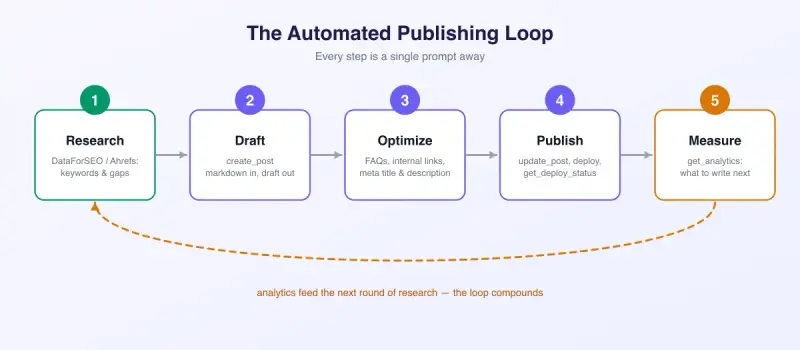
Research
Ask your agent something like:
Using DataForSEO, find 10 long-tail keywords about "email deliverability"
with decent volume and low difficulty that my blog doesn't cover yet.
Check my existing posts on Superblog first so we don't duplicate.
The agent calls list_slugs on Superblog to see what you've already published, queries DataForSEO for keyword data, and comes back with a gap analysis grounded in both.
Draft
Write a 1,500-word post targeting "spf dkim dmarc explained".
Practical tone, real examples, proper heading structure.
Save it to Superblog as a draft.
The agent writes the post and calls create_post. Markdown goes in, a draft comes out. It sets the slug, meta title, and meta description in the same call. Nothing to copy-paste.
Optimize
This is where Superblog's MCP tools go beyond basic publishing:
- FAQs for rich results.
create_faqsattaches question and answer pairs to the post, which render as FAQ structured data on your live blog. Prompt: "Generate 5 FAQs for this post from real questions people ask about DMARC." - Internal links.
get_internal_link_suggestionsanalyzes the draft against your existing content and suggests contextual links. Prompt: "Find internal linking opportunities for this draft and add the three best ones." - Meta optimization. Ask it to "rewrite the meta description to fit 155 characters and include the target keyword" and it makes a single
update_postcall. - Images. The agent can upload images with
upload_image, or browse what's already in your media library withlist_mediaand reuse it.
Publish
Publish the post and deploy the site. Tell me when it's live.
The agent flips the status with update_post, calls deploy, and then polls get_deploy_status until your changes are actually live on your domain. You get an "it's live" message instead of a "deployment started, good luck" message.
Measure
How did the blog do this week? Which posts are gaining, which are decaying?
get_analytics returns traffic for any date range. The agent spots the post that dropped 30% and suggests a refresh, which feeds the next research cycle. The loop compounds.
What your agent can actually do on Superblog
Most platforms that claim AI support give you "create post" and call it a day. Superblog's MCP server exposes 70+ tools across everything the dashboard does:
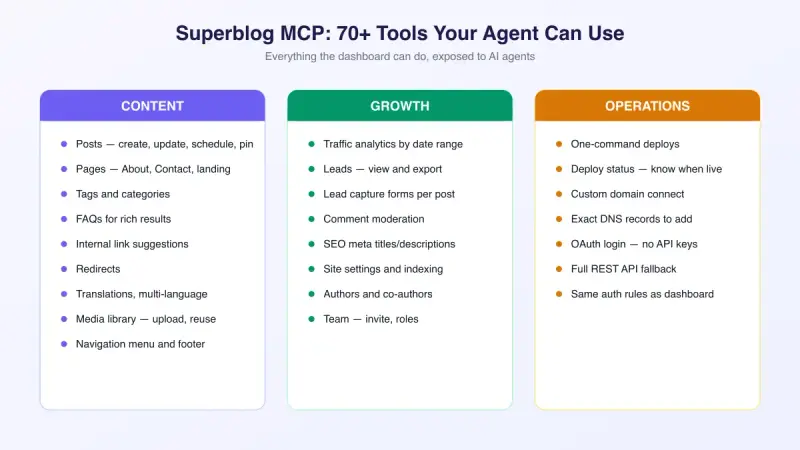
A few examples of what that unlocks in practice:
- "Moderate this week's comments. Approve the real ones, hide the spam." →
list_comments+moderate_commenton each. - "Translate our top 5 posts to Spanish." →
add_translated_language, thencreate_translationper post. - "Add a 'Guides' item to the navigation menu pointing to /guides." →
create_menu_item. - "Change the blog's meta description and turn off indexing for tag pages." →
update_site_settings. - "Who captured leads from the DMARC post this month?" →
list_leads. - "Connect blog.example.com as our custom domain." →
connect_custom_domain, and the agent hands you the exact DNS records to add, including the CNAME target and SSL validation records. - "Invite our new writer as an EDITOR and reassign the old drafts to her." →
invite_team_member+reassign_post.
Because these are first-class MCP tools with typed schemas, agents discover them automatically. You don't teach the AI your CMS. It reads the tool list and knows.
A complete example session
Here's a realistic end-to-end prompt and what happens behind the scenes:
Research what people ask about "content repurposing" using DataForSEO,
write a data-backed post targeting the best keyword, add FAQs and
internal links, set up the lead form, publish it, and confirm when live.
Behind the scenes, the agent chains roughly ten tool calls:
list_slugsto check existing coverage- DataForSEO keyword and SERP tools to pick the target
create_postto save the draft with meta tagscreate_faqsto attach 5 FAQs for rich resultsget_internal_link_suggestions, thenupdate_postto weave in internal linksupdate_leads_configto enable the lead capture form on the postupdate_postto flip it to PUBLISHEDdeploy, thenget_deploy_statusto ship it and wait- Reports back: live URL, target keyword, and what to watch in analytics
Total human effort: one prompt and a review pass. That used to be an afternoon.
Why an agent-native platform beats a plugin
You can bolt AI onto any CMS. The difference shows in the details:
- OAuth built in. Your agent signs in like you do, with the same role-based permissions. No API key sprawl, no pasting secrets into config files.
- The full surface, not a demo. Comments, translations, menus, analytics, deploys, DNS. If the dashboard can do it, the agent can do it.
- Same validation, same guardrails. Every MCP tool runs through the identical authorization and validation as the dashboard. An EDITOR's agent can't do OWNER things.
- Fast by default. Superblog sites are static builds behind a global CDN with SEO handled automatically, so what your agent publishes actually ranks. You get perfect Core Web Vitals scores out of the box.
Get started
- Create a Superblog account (MCP requires the SUPER plan)
- Add the MCP server to your AI client using the 2-minute setup guide
- Ask it to
show my superblogs
Then try the loop on your next post. Once your agent can publish, deploy, and tell you when it's live while you never touch the dashboard, you won't want to go back.
Your blog, without the maintenance
Fast pages, automatic SEO, no plugins to patch. Runs on yoursite.com/blog.
Sai Krishna is the Founder and CEO of Superblog. Having built multiple products that scaled to tens of millions of users with only SEO and ASO, Sai Krishna is now building a blogging platform to help others grow organically.
superblog
Superblog is a blazing fast blogging platform for beautiful reading and writing experiences. Superblog takes care of SEO audits and site optimizations automatically.