
Rails Blog: Scaffold Your Own or Mount One at /blog (2026)

Search "rails blog" and Google returns two things, neither of which is what a Rails team at a real company is looking for. Half the page is lists of Rails blogs worth reading. The other half is tutorials that build a blog as a way to teach routes, models, and controllers, which is the canonical Rails learning project and has been since 2005.
If you landed here from one of those, you are in the wrong place, and the GoRails series is genuinely good at what it does: it walks a blank app through models, migrations, routing, and Action Text uploads, one screencast per step, until posts and comments work.
This is the other question: your company runs on Rails, marketing wants a blog on the marketing site, and someone has to decide whether that is a Post model in your app or something you mount at /blog. Rails 8.1 makes the first day of that build shorter than it has ever been. It does nothing about days two through forty, which is where the actual decision lives.
Three approaches are real. Build it into your app. Mount a CMS engine. Hand /blog to a platform that already owns every layer of it. Here is what each one costs, with the gem ecosystem checked live rather than remembered.
What rails generate scaffold Post actually covers
Start honest: the Rails scaffold is not a toy, and Rails 8.1 ships more of a blog than most frameworks do.
bin/rails generate scaffold Post title:string slug:string published_at:datetime
bin/rails action_text:install   # also copies the Active Storage migrations
bin/rails db:migrate
That gives you a table, seven RESTful actions, and a form. Add Action Text and you get a rich text editor in the browser, backed by Trix, with attachments handled by Active Storage:
class Post < ApplicationRecord
  has_rich_text :body
  has_one_attached :cover_image

  # published_at <= now, which also excludes NULL for unpublished drafts
  scope :published, -> { where(published_at: ..Time.current) }

  def to_param = slug
end
One thing to fix before that model works: to_param changes what goes into the URL, and nothing else. The scaffolded controller still runs Post.find(params.expect(:id)), which raises RecordNotFound the moment the id is a slug, so every show page 404s until you change set_post to @post = Post.find_by!(slug: params[:id]).
Roughly ninety minutes in, you have persistence, an editor, image uploads, and a URL structure. That is a real head start, and it is why so many teams start down this road.
The trouble is that what you have built is a database-backed page renderer. What marketing asked for was a publishing system.
The parts no generator writes for you
Below is the work between the scaffold and something a content team can operate without filing tickets. The day estimates assume a competent Rails developer who has done each piece before, and none of them include review, QA, or the meetings.
| Piece | Why the scaffold does not cover it | Rough cost |
|---|---|---|
| Slugs and redirects | to_param is one line, but slug history, uniqueness, and 301s when a title changes are not | 1 day with friendly_id |
| Draft, scheduled, published states | Rails 8.1 has Solid Queue and config/recurring.yml, so the cron half is free. The state machine, the preview token, and the "publish at 9am Tuesday" UI are not | 2 to 3 days |
| Image pipeline | Active Storage stores files. WebP conversion, responsive variants, lazy loading, and CDN headers are configuration and glue you write | 2 days, plus libvips in every environment |
| An editor a marketer will use | Trix handles bold and links. Slash commands, embeds, tables, callouts, drag-to-reorder, and autosave are a product, and most teams end up swapping in TipTap or Lexical and wiring it to Action Text themselves | 1 to 3 weeks, honestly |
| Roles and permissions | bin/rails generate authentication in Rails 8 gives you sign-in and password reset. It ships no sign-up flow and no authorization at all, so editor vs author vs admin is yours, usually via Pundit | 2 to 4 days |
| JSON-LD structured data | Rails has no schema helper. Article, BreadcrumbList, and FAQPage are hand-built ERB or a serializer, then validated, then maintained as Google changes requirements | 2 days, recurring |
| Meta tags and Open Graph | meta-tags covers the mechanics. Per-post overrides, truncation rules, fallbacks, and a SERP preview so writers can see what they are shipping are not covered | 2 days |
| XML sitemap | sitemap_generator is well maintained and does the job. You still own the regeneration trigger, the ping, and keeping it correct once the blog is behind a path | 1 day |
| RSS or Atom | Action View's atom_feed helper is still in Rails, which makes this the cheapest item on the list | half a day |
| Search engine notification | No IndexNow client ships with Rails. It is a POST and a key file, so it is small, but nobody writes it and it never gets built | half a day, usually skipped |
| Caching that survives traffic | Solid Cache is a Rails 8 default. Deciding what to cache, expiring it on publish, and stopping a Hacker News spike from saturating your Puma threads is design work | 2 days, then ongoing |
llms.txt for AI crawlers | Not a Rails concept. Another file you generate and keep current, on top of the schema work above | half a day, almost always skipped |
Add it up and a credible internal blog is four to eight engineering weeks before the first post ships, then a standing tax on every sprint after. That is not a rigged number. It is the same estimate you would produce yourself if the ticket landed in your backlog and you were being careful.
The part that surprises teams is not the initial build. It is that blog posts now live in your production database, behind your deploy pipeline, in your incident scope. A marketer fixing a typo triggers a request through Puma. A schema change for the blog rides the same migration path as your billing tables.
Whether that matters depends on your team, and for plenty of teams it does not. If it does, note that platforms built for this arrangement host the blog at yoursite.com/blog without touching your app. The proxy config for that is further down, after the gem survey.
Rails blog gems: what is actually alive in 2026
The next instinct is to mount an engine and skip the build. Reasonable, and there are still maintained options. There are also a lot of gems that rank well in search results and have not shipped a release since Obama was president.
Everything below was checked against RubyGems and GitHub on August 7, 2026. Rails 8.1.3.1 is the current release.
| Gem | Latest release | Rails constraint | What you are signing up for |
|---|---|---|---|
alchemy_cms | 8.3.6, Jul 28 2026 | >= 7.2, < 8.2 on actionpack, activerecord, railties | Genuinely active, with commits landing most weeks. It is a component-based content framework rather than a blog, so you model posts, categories, and the index yourself |
spina | 2.21.0, May 22 2026 | rails >= 7.0, < 9.0 | Maintained, native Turbo and Stimulus, opinionated admin. Page-first rather than post-first, so the blog is a resource you configure |
refinerycms | 4.1.0, May 11 2026 | >= 6.1.0, < 9 via refinerycms-core | Core came back to life in 2026 after no release since October 2018. But refinerycms-blog last shipped 4.0.0 in August 2020, so the blog extension is exactly the stale part |
camaleon_cms | 2.9.2, May 1 2026 | via runtime deps | Maintained, and closest to a WordPress-shaped admin. It hard-requires sprockets-rails, jquery-rails, and tinymce-rails < 5. Rails 8 defaults to Propshaft, so you are reinstalling Sprockets to run it |
storytime | 2.1.7, Jul 1 2026 | rails >= 7.0 | Actively maintained, with security fixes and feature work landing through 2026. The catch is the asset stack: coffee-rails, jquery-rails, jquery-ui-rails, sass-rails, and Sprockets pinned below 4, so on a Propshaft-default Rails 8 app you are reinstalling the old pipeline to mount it |
comfortable_mexican_sofa | 2.0.19, Dec 31 2019 | rails >= 5.2.0 | Still the most downloaded Rails CMS engine and still recommended in listicles. Last gem release was six and a half years ago and the repo has not been pushed since May 2024 |
blogo, blogelator, blogit | 2018 or earlier | n/a | Dead. They keep appearing in search results because the posts recommending them rank |
Two things worth pulling out of that table.
First, most of the maintained tier is CMS frameworks rather than blog engines. Alchemy and Spina are excellent at what they do, which is letting you model structured content inside a Rails app. Neither hands you a blog with SEO automation, scheduling, and an editor your content lead will not complain about. You are back to building, with a framework underneath instead of a scaffold.
Second, the one maintained option that really is a mountable blog engine comes with a legacy asset stack attached. Storytime's README still describes it as a Rails 4+ CMS and blogging engine you drop in with mount Storytime::Engine => "/", and its 2026 was substantive: a path traversal CVE fix, a stored XSS fix, an open redirect fix, database-backed API tokens, and canonical URL support for posts. What has not moved is the front end. CoffeeScript, jQuery, jQuery UI, and Sprockets pinned under 4 are runtime dependencies, so mounting it on a Propshaft-default Rails 8 app means reinstalling a pipeline your app was generated without. That is a cost to weigh, not a dead gem, and it is a different kind of cost from the ones above it in the table.
What nobody has shipped is a modern mountable blog engine, built the way a Rails 8 app is built. That is not a knock on Ruby. It reflects that the teams who need one have mostly stopped putting the blog inside the app.
If you want the whole app rather than an engine, Publify is a self-hosted Rails publishing platform with commits as recent as July 2026. It is a second application to deploy, monitor, patch, and upgrade, which is the trade you are making.
When building it in Rails is the right call
There are cases where the internal build wins outright, and pretending otherwise would insult your judgment.
Your posts need your data. If an article renders live pricing, a customer's portfolio, a leaderboard, or anything else that has to come out of your production database at request time, an external blog cannot do it. Keep it in Rails.
Engineers are the only authors. A team where every post is written by someone who already has a laptop set up with the repo does not need an editor, roles, or a preview flow. Markdown files in the repo plus a Redcarpet or Commonmarker render is a weekend, not a quarter. The markdown blog guide covers where that pattern holds and where it stops.
Publishing volume is genuinely low. Six posts a year does not justify a platform, a subscription, or a proxy rule.
Content is a product feature. If posts have comments tied to user accounts, gated sections keyed to subscription tier, or personalized recommendations, the blog is part of your application. Build it there.
The signal that flips the decision is usually the same one: someone in marketing wants to publish three times a week, and every one of those posts currently needs an engineer. That is when the blog stops being a feature and starts being infrastructure you did not plan to own.
Routing /blog past Rails entirely
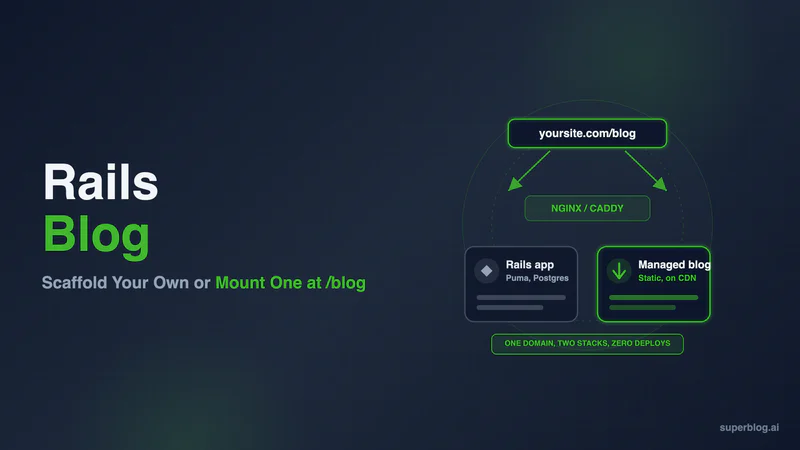
The third path keeps yoursite.com/blog on your domain and moves everything behind it off your stack. A routing rule on whatever sits in front of Puma forwards /blog and /blog/* to a blog origin, strips the prefix, and returns the response without changing the address bar. Rails never sees those requests.
Keeping the blog on the apex domain rather than a subdomain matters because internal links between posts and product pages stay same-domain, and the blog inherits whatever crawl history your root domain has already accumulated. Subdomain vs subdirectory works through that trade-off properly, including the cases that point the other way.
For a Rails app the rule goes wherever your TLS terminates. That is almost always Nginx, Caddy, or Cloudflare.
Nginx in front of Puma
upstream puma {
    server unix:///var/www/app/shared/tmp/sockets/puma.sock;
}

server {
    listen 443 ssl;
    server_name yoursite.com;

    # A bare /blog has no trailing slash, so it never matches location /blog/
    location = /blog {
        return 301 /blog/;
    }

    location /blog/ {
        proxy_ssl_server_name on;
        proxy_set_header Host "yourblog.superblog.click";
        proxy_set_header X-Forwarded-Host "";
        proxy_set_header X-Forwarded-For "";
        proxy_set_header Cookie "";
        proxy_pass https://yourblog.superblog.click/;
        proxy_redirect ~^https?://[^/]+(/.*)$ https://$http_host/blog$1;
    }

    location / {
        proxy_set_header Host $http_host;
        proxy_set_header X-Forwarded-For $proxy_add_x_forwarded_for;
        proxy_set_header X-Forwarded-Proto $scheme;
        proxy_pass http://puma;
    }
}
Four lines carry the weight. The trailing slash on proxy_pass https://yourblog.superblog.click/ is what replaces the matched /blog/ prefix instead of forwarding it, so you do not get a /blog/blog/post-name/ request upstream. The explicit Host header tells a multi-tenant origin which blog to serve, since it cannot resolve a tenant from yoursite.com. And proxy_ssl_server_name on sends SNI so the upstream TLS handshake presents the right certificate.
The proxy_redirect line is the one people get wrong. Since proxy_pass stripped /blog on the way out, any redirect the origin sends back is written against its own root, so the rule has to put /blog back as well as swapping the hostname. Miss that and a trailing-slash redirect from the origin, which is the most common redirect a static host emits, arrives at the browser as https://yoursite.com/post-name/, falls through to Puma, and 404s.
Nginx picks the longest matching prefix, so /blog/anything lands in the blog block and everything else falls through to Puma. Reload with nginx -t && nginx -s reload.
Caddy
Caddy is shorter because handle_path strips the prefix for you. It is documented as equivalent to handle plus uri strip_prefix:
yoursite.com {
    redir /blog /blog/ 301

    handle_path /blog/* {
        reverse_proxy https://yourblog.superblog.click {
            header_up Host {upstream_hostport}
            header_down Location "^https?://[^/]+(/.*)$" "https://yoursite.com/blog$1"
        }
    }

    handle {
        reverse_proxy localhost:3000
    }
}
The https:// scheme on the upstream is what enables TLS to the origin. Caddy 2.11.0 and later sets the upstream Host automatically for HTTPS upstreams, but writing header_up Host {upstream_hostport} explicitly keeps the config correct on older versions too. On 2.11 and up that line makes Caddy log an "Unnecessary header_up Host" warning at startup, which is informational and not a sign the config is broken. The redir line exists because /blog/* does not match a bare /blog.
header_down Location does the same job as nginx's proxy_redirect. Without it Caddy passes the origin's redirect through untouched, so the browser is sent to yourblog.superblog.click and your reader ends the click on a hostname you were trying to keep out of sight.
Three traps at this layer
Do not proxy through Rails. The rack-proxy gem works, and it is the wrong layer. Every blog request would occupy a Puma thread, add Ruby to a response that is otherwise static, put your marketing content inside your app's error budget, and break the moment you deploy. Routing at the edge costs one config file and zero runtime.
Kamal's proxy is not the right hook either. If you deploy with Kamal, kamal-proxy does support path-based routing via --path-prefix, and it strips the prefix by default. But its targets are given as hostname:port for containers Kamal itself deploys, and it documents no HTTPS upstream or Host header override. Put the rule at Cloudflare, or in whatever terminates TLS ahead of kamal-proxy.
Neither rule touches a relative Location. Both the nginx and Caddy patterns above match on a scheme and hostname, so an origin that answers with Location: /post-name/ rather than an absolute URL passes straight through and lands the reader outside /blog. Most static hosts send absolute redirects, but it is the one failure mode left after these fixes, so curl a post with the trailing slash removed and read the Location header before you call it done.
If your Rails app sits behind Cloudflare or on a platform where you cannot touch the web server, a Worker on a yoursite.com/blog* route does the same job. That config, plus Netlify and Vercel variants and a nine-step verification checklist, lives in the cross-stack subdirectory setup guide.
One thing the routing rule cannot fix: the blog behind it has to emit output that is already correct for a subdirectory. Canonical tags, internal links, asset URLs, the sitemap, and JSON-LD all need to resolve at yoursite.com/blog/.... If they point at the origin hostname instead, the proxy works fine and your rankings go to a domain you do not control.
What Superblog handles on the blog side
Superblog is the platform in the config above, and it is built for exactly this arrangement: the blog lives at a path on your domain while none of it runs on your infrastructure.
Pages are built ahead of time as flat HTML, pushed out to 200+ CDN edges, and written with your subdirectory path already in the markup. They are static by the time a reader hits them, so there is nothing left to render at request time and the proxy stays a path mapping instead of an HTML rewriter.
For a Rails team, the specifics that matter:
Nothing touches your deploy pipeline. Publishing a post is an operation on Superblog's infrastructure. No migration, no asset precompile, no Puma restart, no entry in your incident timeline. Your main branch has no opinion about the blog.
Most of that cost table is already paid. JSON-LD for Article, FAQ, and Organization is emitted per post. The XML sitemap rebuilds on every deploy. Hitting publish sends an IndexNow ping, SHA-256 authenticated and capped at one per post per 24 hours, to Bing, Yandex, and the other engines that accept the protocol. Canonical URL, meta title, meta description, and Open Graph values are editable per post against a live SERP preview, so a writer sees the snippet before it ships.
A /blog/llms.txt file is generated and kept current.Superblog generates it at your subdirectory path and rewrites it on every deploy. On the DIY path it is the item that never gets prioritized, because it is small and nobody owns it.
The editor is not Trix. Superblog runs TipTap v3. Slash commands and markdown shortcuts are both there, uploaded images convert to WebP on the way in, FAQ blocks emit FAQPage schema without anyone writing serializer code, and internal link suggestions surface anchor phrases pulled from your own published archive. Your content lead publishes without opening a terminal.
Roles ship with it. Admin, Editor, and Writer permissions, post assignment, and review before publish are configured in the dashboard rather than written in Pundit policies.
Getting existing posts out of Rails. There is no Rails importer, because there is no standard Rails blog schema to import from. What works is a JSON export from your posts table mapped to Superblog's import format, which takes 300 posts per run, so a long archive moves in batches. (If you would rather hand it a spreadsheet, CSV import is a Super plan feature.) Keep the slug column identical and your existing URLs stay identical, which is the whole point if those posts already rank.
Pro runs $49/month: a 1,000-post ceiling, five seats, scheduled publishing, cookie-free Pirsch analytics, and review before publish. Super runs $99/month and raises the team to ten while adding the AI outline helper, REST API and MCP access, Zapier, lead webhooks, and multilingual SEO across 41 languages with hreflang written into both the page head and the sitemap. Subdirectory hosting, the SEO engine, SSL, and the CDN are on every plan. Trials last 7 days with no card required.
Over 500 companies have now run a blog on the platform, Llama Life, Printstop, Fyno, and AlgoTest included.
Where the three paths actually differ
| Build in Rails | Maintained CMS gem | Managed blog at /blog | |
|---|---|---|---|
| Time to first post | 4 to 8 engineering weeks (estimated) | 1 to 2 weeks of modeling | Under an hour |
| Editor for non-developers | You build it | Admin UI, developer-shaped | Purpose-built WYSIWYG |
| Publishing touches your deploys | Yes | Yes | No |
| JSON-LD, sitemap, IndexNow | Hand-built and maintained | Hand-built and maintained | Automatic |
llms.txt | You write it | You write it | Automatic |
| Posts can read your app's data | Yes | Yes | No |
| Ongoing maintenance | Yours forever | Yours plus the gem's release cadence | None |
| Cost | Engineering weeks | Engineering weeks | $49/month |
The row that decides it for most teams is the third one. Everything else is a number you can argue about. Whether marketing can publish without an engineer is a yes or a no.
For the wider version of this decision across every stack, not just Rails, start with putting a blog on a site you already have. If your front end is a separate Next.js app talking to a Rails API, building or mounting a blog on Next.js covers the rewrite-based version of this same setup.
FAQ
What is the fastest way to add a blog to an existing Rails app?
Three ways. Generate a Post model with Action Text and Active Storage and build the publishing layer yourself. Mount a maintained CMS engine such as Alchemy or Spina and model the blog inside it. Or add a routing rule to Nginx, Caddy, or Cloudflare that forwards /blog and /blog/* to a managed blog platform, which leaves your Rails app untouched. The first two put blog content in your database and your deploy pipeline. The third does not.
Is there a good Rails blog engine gem in 2026?
One, with a caveat. Storytime is a mountable Rails blog engine that is genuinely maintained, with security fixes and feature work landing through 2026, but it still depends on CoffeeScript, jQuery, and Sprockets under 4, so putting it on a Propshaft-default Rails 8 app means reinstalling the old asset pipeline. Separately from that, the rest of the maintained tier is CMS frameworks rather than blog engines: Alchemy (8.3.6, July 2026) and Spina (2.21.0, May 2026) both support Rails 8, and with either one you model posts, categories, and the index yourself. Then there are the gems that rank for this query and should not, including ComfortableMexicanSofa, Blogo, Blogelator, and Blogit, none of which has shipped a meaningful release in years.
Does Action Text work as a blog editor?
For engineers writing occasional posts, yes. Trix handles headings, links, lists, and attachments through Active Storage. For a content team it falls short quickly: no slash commands, no tables, no embeds, no autosave, no SEO fields, no preview of the published page. Teams that start on Trix typically end up swapping in TipTap or Lexical and wiring it back to Action Text, which is a multi-week project on its own.
Will proxying /blog to an external platform hurt my SEO?
No, provided the blog emits subdirectory-correct output. Google indexes what it fetches at yoursite.com/blog/post-name/, and it has no visibility into which origin served the bytes. The failure mode is not the proxy, it is a blog whose canonical tags, sitemap, and internal links still reference the origin hostname. Curl a post and confirm the canonical points at your domain before you consider it done.
Can I run the reverse proxy inside Rails with Rack::Proxy?
You can, and you should not. Blog requests would consume Puma threads, inherit your app's latency and uptime, and go down with your next bad deploy. The routing belongs in the layer that already terminates TLS in front of Rails: Nginx, Caddy, or Cloudflare. It is a config file, not a dependency.
How do I move posts out of an existing Rails blog?
Export the posts table to JSON with title, slug, body, publish date, and tags, then import that file, 300 posts at a time. Keep the slug values byte-identical so every published URL resolves to the same path after the move, which is what protects the rankings those posts already have. Inline images referenced by URL are fetched and re-hosted during import on a paid plan.
What about a headless CMS with a Rails front end?
It solves the editor problem and leaves everything else with you. Contentful, Sanity, and Strapi store and version content well, but the Rails views, the schema markup, the sitemap, the image variants, and the caching are still yours to build and keep working. You pay a monthly fee and keep most of the engineering surface. Where that trade actually pays off is worked through in this comparison of headless platforms.
Rails will let you build a blog. That was never the question. The question is whether a publishing system is something your team wants to own alongside the product, or whether /blog should be fifteen lines of proxy config and someone else's on-call rotation.
If it is the second, open a Superblog trial, then aim the rule at it. No credit card, and the config above is the whole integration.
Your blog, without the maintenance
Fast pages, automatic SEO, no plugins to patch. Runs on yoursite.com/blog.
Sai Krishna is the Founder and CEO of Superblog. Having built multiple products that scaled to tens of millions of users with only SEO and ASO, Sai Krishna is now building a blogging platform to help others grow organically.
superblog
Superblog is a blazing fast blogging platform for beautiful reading and writing experiences. Superblog takes care of SEO audits and site optimizations automatically.