
How to Add a Blog to a Bolt.new Site (2026)

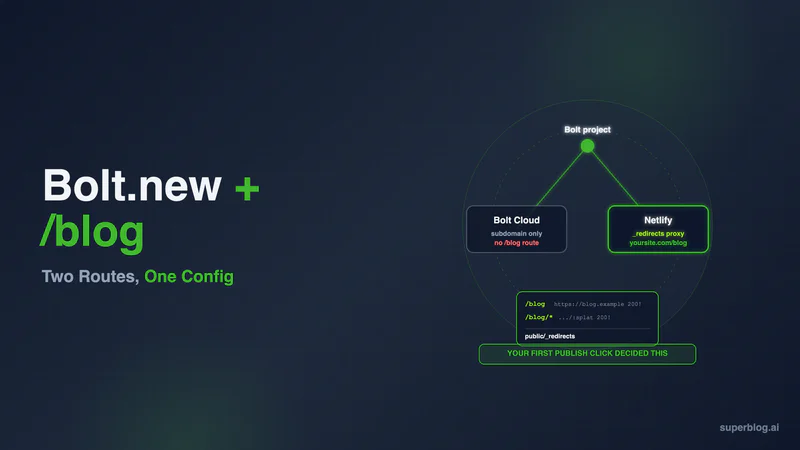
Whether a Bolt.new blog can live at yourdomain.com/blog depends on where your project is published. On Bolt hosting, the default, Bolt's documentation covers domains, aliases, DNS, SSL, analytics, and plans and describes no rewrite or proxy rule, so the blog goes on a subdomain or inside the project. If you publish through the Netlify integration instead, two _redirects lines proxy the prefix to an external blog. A GitHub copy of your code deployed on Vercel or Netlify can do the same with a rewrite. Bolt generates a blog well and does not run one, and the recurring cost lands in tokens rather than dollars.
The hesitation that stops most Bolt builders is not whether Bolt can produce the pages. It is what happens afterwards: managing posts and their formatting the way a tool built for publishing lets you, every week, for as long as the blog exists.
That is the right instinct, and it is the distinction almost every article on this topic misses. Asking Bolt for a blog is a generation problem, and Bolt generates well. Running a blog for two years is a management problem, and nothing in Bolt's product surface addresses it.
Below: what Bolt actually hands you when you prompt for a blog, why the ongoing cost lands in tokens rather than dollars, and whether you can serve posts at yourdomain.com/blog at all. That last one has a genuinely non-obvious answer. It turns on where your project is published, a setting most builders never change from the default.
What a Bolt.new blog actually is when Bolt builds it
Bolt is StackBlitz's AI builder. Per its own introduction it "runs on WebContainers, so you don't have to install anything or set up a local environment," and it targets JavaScript end to end. Its supported-technologies page says: "Bolt only supports JavaScript-based backends, so languages such as PHP or Python aren't compatible."
Bolt's blog use-case page supplies the prompt itself, "Build a blog with a post editor, categories, author profiles, and RSS feed," names the default output as "React, Vite, Tailwind CSS, and Node.js," and on changing anything afterwards says you "ask for changes in follow-up prompts, or edit the code directly."
So "post editor" there names a component Bolt writes for you, not a product Bolt operates for you. What arrives is a repository. Posts live inside it as files, JSX, or database rows, and every future edit routes through the Bolt chat or the code view. Fine for a launch announcement and two case studies. For a channel that publishes weekly and outlives its first engineer, the repository is where the trouble starts.
The bill arrives in tokens, not dollars
This is what separates Bolt from the rest of the AI-builder category, and it comes from Bolt's own documentation rather than inference.
The tokens page explains what draws down your allowance: "Bolt consumes tokens when it reads, thinks about, and builds your project." Then the line that matters if you plan to publish regularly: "Most of your token usage comes from Bolt reading, understanding, and syncing your project files, so larger projects use more tokens per message."
Follow that forward. Every post makes the project bigger, and every message after it costs more than the one before. A blog is the one component of a product designed to grow without limit, and you have attached it to a pricing model that charges by project size.
Bolt's own advice closes the argument rather than merely opening it. Its guidance on managing context states the mechanism directly: "As your project grows, Bolt has to process more source material to understand your code and respond to your prompts." Under a heading called "Reduce the size of your project," it offers two remedies. One is refactoring, which reorganizes code without removing any of it. The other is deletion: Bolt tells you to "Clean up unused files," and warns that even the Markdown files Bolt writes for its own record-keeping accumulate against you, because "it reads them into your context on every prompt."
Read that remedy against a blog. Unused files are waste and can go. Published posts are inventory, and the archive is the whole point of having started. Bolt's supported route to a cheaper project is to remove the thing a content channel exists to accumulate.
For the ceiling: Bolt's pricing page lists Free at $0 with a "300K tokens daily limit" and "1M tokens per month," Pro at $25 a month billed monthly, Teams at $30 a month per member billed monthly, and Enterprise at custom pricing. Yearly billing saves up to 28%. Those were read off the page in November 2026 and this category reprices often, so confirm before budgeting. Unused tokens roll forward on paid plans but expire: they "stay valid for two months from the start of the billing cycle in which you received them."
Tokens are the right currency for building. They are a strange currency for correcting a comma.
Credit where it is due: Bolt sells SEO boosting
Most competitor content on this topic still argues that a Bolt site is a JavaScript shell Google cannot read. That argument is dated, and repeating it would be lazy.
Bolt's pricing page lists "SEO boosting" as a feature of its Pro plan, and the Teams and Enterprise plans include everything in Pro. As of November 2026, Bolt's help center has no page that explains how the feature works, so check what it does in your project settings before you rely on it.
Take the win, then notice its scope. Nothing on the pricing page says SEO boosting creates routes, writes posts, generates Article or FAQ JSON-LD, maintains an XML sitemap as your archive grows, or pings anything on publish. A crawler-friendly page still needs content worth reading, and producing that content is a separate job.
Where a Bolt.new blog can live: your hosting choice decides
This is where the other Bolt guides stop and where the answer actually lives.
Bolt hosting, part of Bolt Cloud, is the default host. Per Bolt's hosting docs, you can "publish your project to a live URL in seconds, with a free .bolt.host domain included," and "No third-party account is required: Bolt handles everything."
The Netlify integration is the alternative. Bolt's integration page says: "All new Bolt projects are published using Bolt hosting by default, but if you want, you can choose to publish your project to Netlify instead." To use it you connect a Netlify account, pick Netlify as the hosting provider under Domains & Hosting, and publish.
A project already on Bolt hosting can switch. Disconnect its custom domain, unpublish it, choose Netlify under Domains & Hosting, and publish. Then add the domain again in your Netlify dashboard, because custom domains do not carry over. One limit decides whether the switch is open to you: Bolt's docs say Netlify "can't host a database or a traditional backend." A project that needs either stays on Bolt hosting.
That is why this section exists. Where your project is published decides what URL your blog can occupy.
There is a third route. Bolt's GitHub docs say that once your code is in GitHub, "you can publish your site using Bolt hosting, the Netlify integration, or another service you choose." Deploy that repository on Vercel or Netlify and their rewrite rules can forward /blog too.
The vercel.json and netlify.toml versions of the rule are on our Bolt.new blog options page.
Bolt's hosting documentation is thorough about what it does cover: publishing, custom domains, aliases, DNS records, SSL, analytics, and hosting plans. Nowhere in it is a redirect rule, a rewrite rule, or a path proxy.
A Cloudflare Worker in front of Bolt hosting is not a supported route either. Bolt's SSL docs say: "If you use Cloudflare for DNS and have the proxy enabled for your Bolt records, SSL provisioning fails." They tell you to keep the Cloudflare proxy off for Bolt domains. A Worker only runs on proxied records, so it is not a supported way to route /blog here.
Custom domain wiring on Bolt hosting needs no guesswork: a CNAME for www pointing at site-dns.bolt.host, and for the root domain "an ALIAS, ANAME, or Flattened CNAME" aimed at the same target. Subdomains add a TXT verification step first. Paid plans only.
Four routes Bolt builders actually take
Four routes cover almost everyone who asks. Here they are with the cost each one carries.
Prompt the posts into the project. Bolt writes routes and articles as files. Fastest to a live page, and every subsequent edit is a chat message against a project that keeps growing. This is the route that becomes the token problem above.
Use Supabase as the content store. Ask Bolt for a blog page with placeholder posts and Supabase behind it as the content store, written in markdown, and it wires that up without much fuss. It works, and the catch surfaces the first time you try to publish from a phone or hand the table to a writer who does not think in rows. A database table is storage, not a writing environment. It will never have a draft state, a scheduler, or a preview.
Have Bolt build an admin dashboard too. The obvious next prompt is to ask for the blog and an admin panel to run it, in one go. That works, and now you maintain a CMS. Image uploads, revision history, scheduled publishing, role permissions, per-post metadata: each is another prompt, another regression, another permanent line in a codebase that was supposed to be about your product.
Read posts from an outside CMS over an API. Point Bolt at a CMS you already run, WordPress being the common case, and tell it to build a blog page that fetches posts from that API. Bolt handles this well, and writers get a real editor out of it. You also keep an installation to patch and take ownership of a front end, so the schema markup, sitemap, canonical tags, and Open Graph output all become your code.
All four end with content infrastructure inside the project. The fifth route does not.
The _redirects config for a Netlify-deployed Bolt project
If your project publishes to Netlify, you can forward one path prefix to an external blog origin while the visitor's address bar stays on your domain. Netlify calls this a proxy, and the mechanism is a rewrite with a 200 status: "you can also set up rules to let parts of your site proxy to external services," with requests "proxied through to https://api.example.com straight from our CDN servers without an additional connection from the browser."
Netlify reads these rules from "a plain text file called _redirects without a file extension" placed in the publish directory. Bolt generates Vite projects by default, and Vite's docs confirm the mechanic: files in the public directory are "copied to the root of the dist directory as-is." So the file goes at public/_redirects in your Bolt project, and it lands in dist/ where Netlify looks for it.
Two rules, because a splat does not cover the bare path:
/blog      https://yourblog.superblog.click/            200!
/blog/*    https://yourblog.superblog.click/:splat      200!
Four details decide whether this works on the first try.
The trailing ! forces the rule. Without it, a real file in your build matching that path wins, and your rule appears to do nothing at all, with no error logged anywhere.
The upstream target carries no /blog. A hosted blog platform typically serves your content at the root of an origin it assigns you, so :splat carries the remainder and the prefix drops on the way out. Forward the prefix too and you land on /blog/blog/post-name, a 404 that looks like a platform failure and is a config error.
Order matters. Netlify processes "the first matching rule it finds, reading from top to bottom," so both lines belong above any single-page-app catch-all rewriting /* to /index.html. If you also keep a netlify.toml, note that "Rules in the _redirects file are always processed first, followed by rules in the Netlify configuration file." Keeping both is how you spend an evening debugging a rule that was overridden the whole time.
Proxied requests time out at Netlify's documented 26 seconds, which only matters if you aim the rule at something that renders on demand rather than prebuilt CDN pages.
Why a subdirectory instead of blog.yourdomain.com: search engines treat the subdomain as a separate property, so the authority your posts earn accumulates somewhere other than the pages you want ranking. A site launched this year has none to spare. Full argument in subdomain vs subdirectory; per-stack configs in subdirectory blog hosting.
Where Superblog sits in this
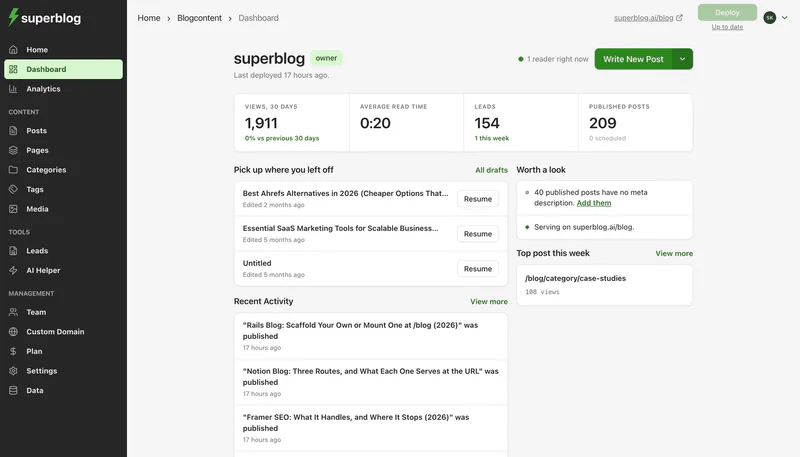
Superblog is a blogging platform: writing interface, rendered front end, hosting, CDN, and search infrastructure shipped as one product. It complements Bolt and nothing more than that. Bolt keeps building and serving your application. One path prefix points at something designed for publishing. What that changes for a Bolt project:
Your project stops growing. Posts never enter the repository, so the file volume Bolt reads and syncs on every message stays flat. Publishing costs zero tokens because it never touches the AI.
Nobody needs a Bolt account to write. Writers get TipTap v3: slash commands, markdown shortcuts, a structured FAQ block whose entries become FAQ schema, and suggested internal links drawn from your existing archive. A contract writer is productive without ever seeing your code view, and without typing an article into Supabase on a phone.
Search plumbing is standing infrastructure. JSON-LD types (Article, FAQ, Organization) per post. An XML sitemap that rebuilds itself. An IndexNow ping on publish, telling Bing and the other participating engines about a new URL rather than waiting for them to find it. An llms.txt file refreshed every deploy. What actually earns a citation is server-rendered HTML at a real URL, and that is the default state of every post.
Speed is guaranteed rather than pursued. Prebuilt pages from 200+ edge locations, automatic WebP conversion, 90+ Lighthouse performance on every page.
Moving existing posts across is documented behavior, not a hope. Markdown files from your Bolt repo go in as a ZIP: the importer reads YAML front matter for title, slug, date, tags, and meta fields, falling back to the filename stem only when a slug key is missing. Posts sitting in Supabase go in as JSON or a spreadsheet, where you map columns to fields. Map your existing slugs and each post keeps its URL. A row without a slug gets one generated at import, so map that column if the posts are already live. File imports take up to 300 posts per run, and spreadsheet import is on Super and above.
Two tiers matter for a project like this. At $49/month, Pro holds 1,000 posts and 5 seats spread over the Admin, Editor, and Writer roles, with publishing on a schedule and cookie-free analytics. At $99/month, Super raises the team to 10 and adds hreflang-backed multilingual SEO in 41 languages, REST API access, Zapier, and MCP. Every paid plan includes the pieces this setup needs: subdirectory hosting, custom domain, SSL, CDN, full SEO engine. The seven-day free trial needs no card. Use it to set up the blog and write your first posts. Connecting /blog needs a paid plan. There is also a 30-day money-back guarantee.
If your stack is adjacent: Lovable SEO covers the same question for Lovable projects, and adding a blog to a Replit app works through the deployment-type version of the routing problem.
Questions Bolt builders actually ask
Can Bolt.new build a blog?
Yes, and quickly. Prompt it and you get routes, layouts, styling, and placeholder posts in minutes. What you receive is a codebase containing a blog, not a service that runs one: no hosted editor, no draft state, no publishing calendar, no metadata that maintains itself as the archive grows.
Does Bolt.new have a CMS?
No. Bolt's documentation covers no content management product. The Bolt Cloud database is a database, and the Supabase integration is a database too. Both store rows. Neither is a place a marketer writes.
Is a Bolt.new site good for SEO?
It can be. Bolt's pricing page lists SEO boosting on its Pro plan and above. What Bolt's docs do not describe is generating JSON-LD schemas, maintaining an XML sitemap as you publish, notifying engines via IndexNow, or producing an llms.txt file. Being indexed and having something worth indexing are different achievements.
Can I put my blog at yourdomain.com/blog on Bolt?
Not on Bolt hosting. Its documentation covers domains, aliases, DNS, SSL, analytics, and plans, and documents no rewrite or proxy mechanism. Two routes work. Publish through Bolt's Netlify integration, where a _redirects proxy rule forwards the prefix to an external origin. Or deploy the GitHub copy of your code on Vercel or Netlify and add a rewrite there. A project already on Bolt hosting can switch to Netlify: disconnect the custom domain, unpublish, choose Netlify under Domains & Hosting, publish, and add the domain again in Netlify. Bolt's docs say Netlify cannot host a database or a traditional backend, so a project that needs one stays on Bolt hosting.
Will a blog inside my Bolt project cost me tokens every time I publish?
Yes, twice over. The publishing edit is itself a message, and every message afterwards is priced against a larger project, since Bolt's docs state that most token usage comes from reading and syncing your project files. One post is negligible. Two hundred is a different project.
How much traffic will Bolt hosting take before it breaks?
As of November 2026, Bolt's hosting plans page puts the free tier at "Up to 10 GB bandwidth + 333,333 requests per month," estimated as "around 10,000–15,000 monthly visits," and Pro at "Up to 30 GB bandwidth + 1 million requests per month," which "can often support 100,000+ visits per month." Two catches: the limits "apply to your Bolt account as a whole, not to individual projects," and a free site that exceeds them goes offline until the next cycle. A blog that works is exactly the traffic that eats an app's allowance.
Which blog CMS goes with Bolt.new?
Any that serves rendered HTML at a URL you can route to. Inblog markets itself for this pairing and is the one direct competitor ranking for the term, though its post stops at positioning and never explains how the connection gets made. Our read on that platform is in Inblog alternatives for business blogs. Judge whatever you pick on two things: whether a non-technical writer can publish without a developer, and whether schema, sitemaps, and canonical tags come out of the box.
Bolt turned "I have an idea" into a deployed product on a real domain, and it did that well. It did not turn it into a business with traffic, and never claimed to.
That gap gets closed one published page at a time, by someone who is not going to open a code view to fix a headline. Build the app in Bolt. Give the writing a home of its own.
Start a 7-day Superblog trial, no card required.
Your blog, without the maintenance
Fast pages, automatic SEO, no plugins to patch. Runs on yoursite.com/blog.
Sai Krishna is the Founder and CEO of Superblog. Having built multiple products that scaled to tens of millions of users with only SEO and ASO, Sai Krishna is now building a blogging platform to help others grow organically.
superblog
Superblog is a blazing fast blogging platform for beautiful reading and writing experiences. Superblog takes care of SEO audits and site optimizations automatically.